Week Overview#
Theme: "Making data findable at scale"
This week we design search infrastructure from the ground up. Search is deceptively complex — it's not just "put data in Elasticsearch." Understanding search deeply means understanding inverted indexes, relevance scoring, query optimization, and the operational challenges of keeping indexes fresh and fast.
The System: A product search platform for an e-commerce site with 50M products, 10K queries per second, and sub-200ms latency requirements.
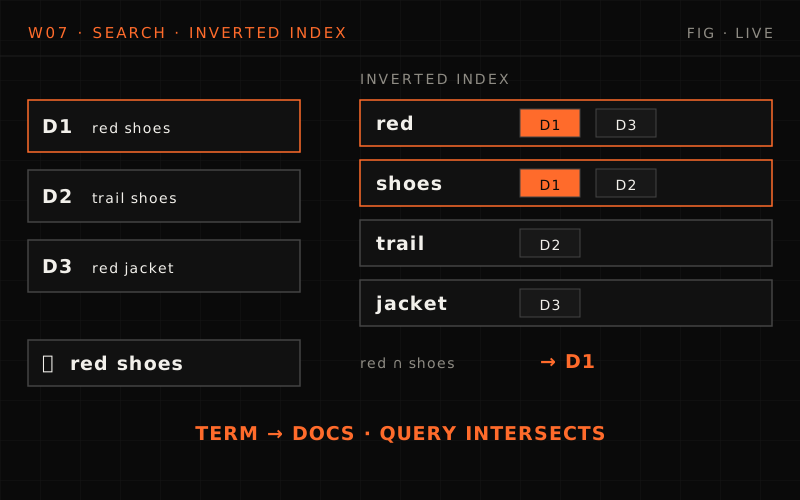
SQL LIKE on 50 million products is a 30+ second full scan with no relevance ranking, no typo tolerance and no synonyms, while a search engine answers from an inverted index in 50 ms, ranked by BM25 plus boosts. The week builds product search for 50M products at 10K queries a second, p99 under 200 ms and 5-minute freshness: fundamentals, a CDC indexing pipeline, query processing and relevance, advanced features (autocomplete, did you mean, facets, synonyms), then operations and scale. The estimate: 500 GB at ~30 GB per shard is ~17, rounded to 20 primaries, 40 copies with one replica, on 6 data nodes plus 3 master and 2 coordinating nodes (11 in all).
Why Search Systems Matter#
Every application eventually needs search:
Without proper search
User: "red running shoes nike size 10"
SELECT * FROM products
WHERE name LIKE '%red%'
  AND name LIKE '%running%'
  AND name LIKE '%shoes%'
  AND name LIKE '%nike%'
  AND size = 10;
Problems:
- Full table scan (50M rows)
- No relevance ranking
- No typo tolerance ("nikee" → 0 results)
- No synonym handling ("sneakers" vs "shoes")
- 30+ second query time
- Database falls over
With search infrastructure
User: "red running shoes nike size 10"
Search engine returns in 50ms:
- Nike Air Zoom Pegasus (red, size 10) — Score: 0.95
- Nike Free Run (red, size 10) — Score: 0.91
- Nike Revolution (crimson, size 10) — Score: 0.87
- ... 234 more results
Features:
- Instant results (inverted index)
- Relevance ranking (BM25 + boosts)
- Typo tolerance (fuzzy matching)
- Synonym expansion
- Faceted filtering
- Autocomplete suggestions
What Makes Search Hard?#
1. The Indexing Problem#
- Source of Truth: PostgreSQL (50M products)
- Search Index: Elasticsearch
Challenges
- How do you keep them in sync?
- Product updated → How fast must search reflect it?
- Bulk imports (1M new products) → Don't overwhelm the index
- Schema changes → Reindex without downtime?
- Deleted products → Must disappear from search immediately
2. The Relevance Problem#
Query: "apple"
- User A (shopping for fruit) — Wants: Fresh apples, apple juice, apple pie
- User B (shopping for electronics) — Wants: iPhone, MacBook, AirPods
Same query, completely different intent. How do you rank results?
3. The Scale Problem#
- 50M documents × 20 fields = 1B field values to index
- 10K queries/sec × 100ms = ~1,000 concurrent queries in flight (each fanning out to every shard)
- Index size: 500GB+
- Hot index data should fit in the OS page cache for speed
Questions
- How many shards?
- How many replicas?
- How do you handle hot queries?
- What happens during reindexing?
Why search is hard
Q1/2 Your team runs product search as
WHERE name LIKE '%red%' AND name LIKE '%shoes%'on 50M rows. Beyond speed, what can this approach fundamentally not give users?Answer & explanation
Answer: A
LIKEeither matches or it doesn't, so there's no relevance ranking (and no typo or synonym handling). Filters and consistency are things the database already does well; ranking is what a search engine adds.Q2/2 Two users both type "apple": one wants fruit, the other an iPhone. What does this example show?
Answer & explanation
Answer: C
Both users get the same text matches; what differs is what each one finds relevant. That's the relevance problem, not an indexing, typo or sharding problem.
Week 7 Learning Objectives#
By the end of this week, you will be able to:
- Search fundamentals
- Explain how inverted indexes work
- Understand tokenization, stemming, and analysis
- Design document schemas for search
- Choose between Elasticsearch, OpenSearch, Solr, or custom
- Indexing pipelines
- Design CDC-based indexing (Debezium pattern)
- Implement batch vs streaming indexing trade-offs
- Handle schema evolution without downtime
- Build reindexing strategies
- Query optimization
- Understand BM25 and TF-IDF scoring
- Implement query-time boosting
- Design filter vs query clauses
- Optimize for latency at scale
- Typeahead at scale
- Serve autocomplete from a precomputed top-k index (trie, prefix map or FST)
- Build suggestions from query logs: decay, a trending overlay, a nightly snapshot
- Filter out PII, rare and offensive queries, with a serve-time kill switch
- Cache suggestions at the CDN and keep personal history private
- Handle Hinglish and other scripts with transliterated keys
- Add "did you mean" (noisy channel) and multi-select facets
- Location search and scale
- Explain why a B-tree on (lat, lng) can't answer "near"
- Choose between geohash, quadtrees, S2, H3 and R-trees (PostGIS)
- Answer radius and k-nearest queries with coverings and a stopping bound
- Keep moving drivers in memory and handle hot cells
- Size the cluster and its shards, and reindex behind an alias
The System We're Building#
Product Search Platform#
Scale
- Products: 50 million
- Queries: 10,000/second (peak: 50K during sales)
- Index size: ~500GB
- Freshness: Products searchable within 5 minutes of update
Features
- Full-text search with relevance ranking
- Filtered search (category, brand, price range, ratings)
- Faceted navigation (show counts per filter)
- Autocomplete (as-you-type suggestions)
- Typo tolerance ("iphoen" → "iphone")
- Synonyms ("couch" = "sofa", "tv" = "television")
- Personalized ranking (user preferences boost)
Requirements
- Latency: p99 < 200ms
- Availability: 99.9%
- Consistency: Eventually consistent (5 min max)
- Accuracy: High relevance for top 10 results
Architecture Preview#
%% title: High-level architecture
flowchart TD
  C@{ icon: "sd:user", label: "Client" } --> API@{ icon: "sd:api", label: "Search API" }
  API --> QP["Query Parser"]:::core
  API --> SR["Search Router"]:::core
  API --> SUG["Suggest Service"]:::core
  subgraph ESC["Elasticsearch cluster (shards)"]
    direction TB
    S1@{ icon: "sd:index", label: "S1" }
    S2@{ icon: "sd:index", label: "S2" }
    S3@{ icon: "sd:index", label: "S3" }
  end
  QP --> ESC
  SR --> ESC
  SUG --> TK["Top-k suggestion index<br/>in memory, built from query logs"]:::core
  SUG -.->|"a few instant results"| ESC
  PG@{ icon: "tech:postgresql", label: "PostgreSQL (Source)" } --> K@{ icon: "tech:kafka", label: "Kafka (CDC)" }
  K --> IP@{ icon: "sd:worker", label: "Indexing Pipeline" }
  IP --> ESC
  class C client
  class API edge
  class S1,S2,S3,PG store
  class K queue
  class IP service
Daily Breakdown#
Day 1: Search Fundamentals & Architecture#
Theme: "How search engines think"
Topics
- Inverted indexes: The core data structure
- Text analysis: Tokenization, stemming, normalization
- Document modeling: Designing for search
- Elasticsearch vs alternatives: When to use what
- Initial architecture and component design
Key questions
- Why can't we just use SQL LIKE?
- What's an inverted index and why is it fast?
- How do you decide what fields to index?
- Elasticsearch vs OpenSearch vs Solr vs Algolia?
Deliverables
- Inverted index implementation (conceptual)
- Product document schema design
- Text analyzer configuration
- Cluster sizing estimation
Day 2: Indexing Pipeline#
Theme: "Keeping search fresh"
Topics
- Change Data Capture (CDC) with Debezium
- Streaming vs batch indexing trade-offs
- Bulk indexing strategies
- Schema evolution and reindexing
- Handling deletes and updates
Key questions
- How do you sync PostgreSQL → Elasticsearch?
- What happens if indexing falls behind?
- How do you reindex 50M documents without downtime?
- What if a product is deleted but still in the index?
Deliverables
- CDC pipeline implementation
- Bulk indexing service
- Zero-downtime reindex strategy
- Index aliasing pattern
Day 3: Query Processing & Relevance#
Theme: "Finding the needle and ranking the haystack"
Topics
- Query parsing and understanding
- BM25 scoring algorithm
- Boosting and custom scoring
- Filters vs queries performance
- Query optimization techniques
Key questions
- How does Elasticsearch rank results?
- When do you use filter vs query?
- How do you boost certain products (sponsored, popular)?
- How do you handle "no results" gracefully?
Deliverables
- Query parser implementation
- Relevance tuning configuration
- Function score queries
- Query performance optimization
Day 4: Typeahead at Scale#
Theme: "Answer every keystroke in milliseconds"
Topics
- The budget: ~100 ms keystroke to screen, ~15 ms for the server
- QPS amplification: one search is ~12 keystroke requests
- Precomputed top-k: tries, prefix maps, FSTs, and where edge n-grams fit
- Building suggestions from query logs: decay, trending, PII and policy filters
- Serving: CDN caching, replicate vs shard, personal history, Hinglish
- Compactly: "did you mean" and multi-select facets
Key questions
- How would you implement autocomplete?
- Why shouldn't each keystroke query the search cluster?
- How do you keep a phone number or a rumour out of the dropdown?
- How do you show "Brand: Nike (892)" and still let users tick Adidas?
Deliverables
- Client debounce, cancel and sequence check
- Top-k suggestion index and its nightly build
- Typeahead sizing: requests, memory, replicas
- Spelling correction and a facet query
Day 5: Location Search and Search at Scale#
Theme: "Where the user is changes the answer"
Topics
- Why a B-tree on (lat, lng) can't answer "near"
- Geohash, quadtrees, S2 cells and H3 hexagons
- R-trees in PostGIS, geo_point in Elasticsearch
- Radius and k-nearest queries: cover, then refine
- Moving drivers in memory; sharding and hot cells
- Compactly: cluster topology, shard sizing, reindexing with aliases
Key questions
- Why can two points 43 m apart share no geohash prefix?
- Why hexagons?
- Where do 75,000 position updates a second go?
- How many shards and data nodes does this week's index need?
Deliverables
- A geo index choice for stores, drivers and heat maps
- A live location index with a TTL
- k-nearest search with a stopping bound
- Cluster and shard sizing, plus an alias-swap reindex
Concepts from Previous Weeks Applied#
This week builds heavily on previous concepts:
| Previous Week | Concept | Application in Search |
|---|---|---|
| Week 1 | Partitioning | Elasticsearch sharding strategy |
| Week 1 | Replication | Search replica configuration |
| Week 1 | Hot Keys and Skew | Hot prefixes (Day 4) and hot map cells (Day 5) |
| Week 2 | Timeouts | Query timeout handling |
| Week 2 | Circuit Breakers | Search degradation during overload |
| Week 3 | Message Queues | CDC pipeline via Kafka |
| Week 3 | Backpressure | Indexing rate limiting |
| Week 4 | Caching | Query result caching |
| Week 4 | Cache Invalidation | Index freshness |
| Week 5 | Eventual Consistency | Search index lag |
| Week 6 | Async Processing | Background indexing |
Key Technologies#
Primary: Elasticsearch/OpenSearch#
Pros
- Purpose-built for search
- Distributed and scalable
- Rich query DSL
- Built-in aggregations
- Active community
- Well-documented
Cons
- Resource intensive (memory hungry)
- Complex cluster management
- Eventual consistency only
- Can be expensive at scale
- Learning curve for tuning
Alternatives Considered#
| Technology | Best For | Not For |
|---|---|---|
| Elasticsearch | General search, analytics | Strict consistency |
| OpenSearch | Apache-2.0 open source, AWS managed option | Newest Elastic-only features |
| Solr | Enterprise, mature | Modern cloud-native |
| Algolia | SaaS simplicity | Cost-sensitive, large scale |
| Meilisearch | Simplicity, typo tolerance | Very large datasets |
| Typesense | Simple, fast | Complex queries |
| PostgreSQL FTS | Small datasets | Scale, features |
Estimation Preview#
Scale Numbers#
Documents
- Total products: 50,000,000
- Avg document size: 10 KB
- Total index size: 500 GB
- With replicas (1): 1 TB
- Fields indexed: 20 per document
Traffic
- Search queries: 10,000/sec average
- Peak (Black Friday): 50,000/sec (5x)
- Autocomplete: 50,000/sec (about 5 requests per search once the client debounces)
- Indexing: 100 updates/sec average
- Bulk imports: 1M/day (batch)
Latency targets
- Search p50: 50ms
- Search p99: 200ms
- Autocomplete: ~100ms keystroke to screen, so ~15ms p99 in the typeahead service
- Index freshness: 5 minutes
These are the week's reference cluster, used again in Day 5's sizing. Day 4's typeahead example assumes a smaller store of its own: ~2,800 searches a second at peak, and ~33,000 keystroke requests a second before debouncing, twelve times its searches.
Infrastructure Estimate#
Shards
- 500 GB / 30 GB per shard = ~17 shards
- Round up to 20 shards for growth
- 1 replica = 40 total shard copies
Nodes
- 3 master nodes (dedicated)
- 6 data nodes (for 40 shards)
- 2 coordinating nodes (query routing)
- Total: 11 nodes
Per data node
- RAM: 64 GB (~26 GB heap + ~38 GB OS cache)
- Storage: 500 GB SSD
- CPU: 16 cores
- Network: 10 Gbps
This is a first pass from storage alone. Day 5 redoes it with 1.5x growth and the 50K peak: 32 primaries and ~21 data nodes, because at peak CPU, not storage, decides.
Interview Angle#
Search system design is common in interviews:
- "Design a search system for an e-commerce site" → Full system design (this week's focus)
- "How would you implement autocomplete?" → Day 4: a precomputed top-k typeahead service, with edge n-grams as one option
- "How do you keep search in sync with the database?" → Day 2: CDC, indexing pipeline
- "How would you handle a product going viral?" → Hot key problem, caching
- "Design a search system for 1B documents" → Sharding strategy, cluster sizing
- "Find the nearest drivers or stores" → Day 5: geo cells, coverings, moving objects in memory
What interviewers look for
- Understanding of inverted indexes
- Awareness of consistency trade-offs
- Practical experience with relevance tuning
- Knowledge of operational concerns
- Ability to estimate and size systems
Week 7 Success Criteria#
By Friday, you should be able to:
Design
- Architect a search system from scratch
- Choose appropriate technologies with justification
- Design document schemas for search
- Estimate cluster size and capacity
- Pick a geo index (geohash, S2, H3 or PostGIS) for a "nearby" query
Build
- Implement CDC-based indexing pipeline
- Configure text analyzers for your use case
- Write effective search queries
- Build a precomputed top-k typeahead from query logs
Operate
- Keep suggestions free of PII and policy-violating queries
- Handle reindexing without downtime
- Tune for query performance
- Keep moving objects in memory and handle hot cells
Interview
- Explain inverted indexes clearly
- Discuss relevance tuning trade-offs
- Handle "design a search system" questions
- Handle "design typeahead" and "find nearby" questions
- Know when NOT to use Elasticsearch
Connections to Future Weeks#
This Week (Search)
- Indexing pipelines from source databases
- Query-time processing
- Real-time index updates
Next Week (Analytics)
- Similar pipeline patterns
- But optimized for aggregations, not search
- Batch-heavy instead of real-time
- Different storage (columnar vs inverted index)
Key insight: Search and Analytics are both "derived data systems" — they take source data and transform it for specific query patterns.
Resources#
Documentation#
- Docs
Elasticsearch Guide: https://www.elastic.co/guide/
- Docs
OpenSearch Docs: https://opensearch.org/docs/
- Read
Lucene Internals: https://lucene.apache.org/
Engineering Blogs#
- Read
Airbnb Search Architecture
- Read
Etsy Search Infrastructure
- Read
LinkedIn Search at Scale
- Read
Uber Search Platform
Books#
- Book
"Relevant Search" by Doug Turnbull
- Docs
"Elasticsearch: The Definitive Guide"
- Read
"Introduction to Information Retrieval" (Stanford)
Ready to Start#
Tomorrow we begin with Day 1: Search Fundamentals & Architecture.
We'll answer the fundamental question: "Why is LIKE '%term%' so slow, and what do search engines do differently?"
You'll learn
- How inverted indexes work (with implementation)
- Text analysis pipeline (tokenization → stemming → indexing)
- Document modeling for search
- Elasticsearch cluster architecture
- Initial system design for product search
You'll build
- Conceptual inverted index
- Product document schema
- Text analyzer configuration
- Cluster sizing estimate
Tomorrow: Day 1 — Search Fundamentals: How search engines think
this lesson in shorts · 2
play them all →One idea from this lesson in about a minute each, made for your phone.


New lessons by email
New lessons, side quests and case files as they ship, at most once a week. No spam, unsubscribe anytime.
Discussion · …
Public: everyone reading this lesson sees comments. Be kind and keep it on the material.