Want it harder? Hide the model answer and work each phase in a scratchpad against its time budget, then reveal and score yourself. Or simply read on: the checkpoints below work either way.
Delivering 97 Billion Hours of Entertainment — Without a Single Buffer
Imagine this challenge: It's 8 PM on a Friday night. Across the globe, tens of millions of people are about to press "play" at roughly the same time.
Each viewer expects instant playback — no buffering wheel, no quality drops, no frozen frames. They're watching on everything from 4K smart TVs in Tokyo to mobile phones in rural Brazil. Their internet connections range from gigabit fiber to spotty mobile data.
Now do that for 97 billion hours of viewing every six months. Your traffic alone has been measured at roughly 15% of all downstream internet traffic worldwide (Sandvine, 2022 data).
This is Netflix — the platform that reinvented how we consume entertainment and built the most sophisticated video delivery system ever created.
Subscribers
- Global paid memberships: 325M+ (end of 2025; Netflix no longer reports this quarterly)
- Countries served: 190+
- Ad-supported tier: 250M+ monthly active viewers (May 2026, Netflix's household-based measure)
- Viewing hours (H1 2026): 97 Billion
Content
- Titles available: ~7,900 in the US (end of 2025, What's on Netflix count; varies by country)
- Content spend (2026 plan): ~$20 Billion
- New originals released (2025): 597 titles (What's on Netflix count)
- Subtitle and dubbing languages: 30+ (Netflix, Apr 2025)
Infrastructure
- Open Connect servers: 18,000+ worldwide (2022)
- Open Connect footprint: 6,000+ locations in 175 countries (2022), 1,000+ ISP partners (Open Connect site)
- % of global internet traffic: ~15% of downstream traffic (Sandvine, 2022 data in its 2023 report)
- Backend services (AWS): 1,000+ microservices (commonly cited, not a current Netflix figure)
Business
- Annual revenue (2025): $45.2 Billion
- Revenue guidance (2026): $51.0–51.4 Billion
- Employees: ~16,000 (end of 2025)
This is the system we'll design today. Netflix publishes a lot about its architecture (Open Connect, its tech blog, its open-source tools). Where this design goes further, such as the ABR thresholds, placement rules, breaker settings and request rates, it is a likely design, not Netflix's actual system.
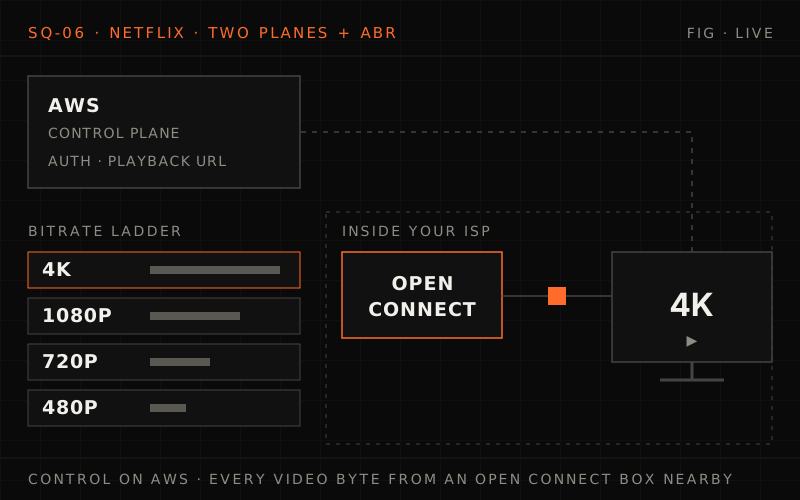
Netflix serves 325 million+ members; ~10 million peak streams at 5 Mbps is 50 Tbps, far too much to send from a few cloud regions. A control plane on AWS authorizes playback and returns a manifest, and Open Connect appliances inside ISPs stream the bytes, filled from IXP and S3 tiers. The deep dives cover the adaptive bitrate ladder, Open Connect economics and placement, and circuit breakers with fallbacks, then midnight launches, a failed appliance or region, and what changes for live events.
The Interview Begins#
You walk into the interview room. The interviewer smiles and gestures to the whiteboard.
"Thanks for coming in. Today we're going to design a video streaming platform similar to Netflix. I want to see how you think about large-scale content delivery, client-server architecture, and handling global distribution. Feel free to ask questions — this should be collaborative."
They write on the whiteboard:
Build a streaming service that can
- Stream video to 300M+ subscribers worldwide
- Support devices from phones to 4K TVs
- Deliver content with <2 second start time
- Handle peak traffic of millions of concurrent streams
- Provide personalized recommendations
Consider
- How do you encode and store video efficiently?
- How do you deliver content globally with low latency?
- How do you adapt quality to network conditions?
- How do you handle millions of concurrent users?
"Take a few minutes to think about this, then walk me through your approach. We have about 45 minutes."
Phase 1: Requirements Clarification (5 minutes)#
Before diving in, you take a breath and start asking questions.
Your Questions#
"Before I start designing, I'd like to clarify some requirements. First, what's our target scale — how many concurrent viewers should we support at peak?"
"At peak, we need to support around 10 million concurrent streams. That's a typical Friday evening."
"What quality levels do we need to support? Just HD or up to 4K/HDR?"
"We need the full range — from 240p for poor mobile connections up to 4K HDR for premium users on home theater systems."
"How important is start time versus sustained quality?"
"Both are critical. Users expect playback to start within 2 seconds, but we also can't have constant rebuffering. A smooth experience is paramount."
"Should we design for VOD only, or also live streaming like sports events?"
"Focus on VOD for now, but keep in mind we're expanding into live events."
"What about content protection? Do we need DRM?"
"Yes, premium content requires robust DRM across all devices."
"Perfect. Let me summarize the requirements."
Functional Requirements#
1. Video playback
- Stream on-demand video content
- Support resolutions from 240p to 4K HDR
- Adaptive bitrate based on network conditions
- Resume playback from where user left off
- Support subtitles and multiple audio tracks
2. Content catalog
- Browse and search content library
- Organize content by genre, trending, personalized rows
- Display metadata, trailers, ratings
- Support multiple profiles per account
3. Recommendations
- Personalized content suggestions per user
- "Continue Watching" functionality
- "Because You Watched X" recommendations
- Trending and top 10 lists
4. User management
- Account creation and authentication
- Multiple profiles per household
- Parental controls and viewing restrictions
- Download for offline viewing
Non-Functional Requirements#
1. Scale
- 300M+ subscribers globally
- 10M+ concurrent streams at peak
- 18,000+ titles in catalog
- 190+ countries
2. Latency
- Playback start: <2 seconds
- Seek response: <500ms
- API response: <100ms p99
3. Availability
- 99.99% uptime (52 minutes downtime/year)
- Graceful degradation under failures
- Multi-region redundancy
4. Quality
- Zero buffering on stable connections
- Seamless quality adaptation
- Consistent experience across devices
Phase 2: Back of the Envelope Estimation (5 minutes)#
"Let me work through the numbers to understand the infrastructure we need."
Before the numbers: how big is the Friday-night peak?
You have 300 million subscribers. Assume about 3% are watching at the 8 PM peak and the average stream runs at 5 Mbps. Work out the concurrent streams and the total bandwidth before you read on, then ask yourself what that bandwidth figure rules out.
One strong answer
- Streams: 300M × 3% = 9M, call it ~10 million concurrent streams.
- Bandwidth: 10M × 5 Mbps = 50 Tbps of egress.
- What it rules out: serving video from a handful of cloud regions. 50 Tbps leaving a few data centres would be ruinously expensive and far from most viewers, so the bytes have to come from servers close to them. That one number shapes the whole architecture that follows.
Traffic Estimation#
- Total subscribers: 300 million
- Peak concurrent rate: ~3% (design target for a Friday 8 PM)
- Peak concurrent streams: ~10 million
- Average stream bitrate: 5 Mbps (mix of qualities)
- Sanity check against real viewing:
- Average per member: ~1.7 hours/day (97B hours in H1 2026 ÷ 181 days ÷ 325M members)
- Total daily: ~535 million hours
- Average concurrent streams: 535M h ÷ 24 h = ~22 million
- So the real service peaks several times above this 10M design target; we size for 10M and scale out (Phase 5)
- Peak bandwidth: 10M × 5 Mbps = 50 Tbps
Storage Estimation#
- Titles in catalog: 18,000
- Average title length: 90 minutes (mix of movies/series)
- Per-title encoding:
- Resolutions: 8 (240p to 4K)
- Bitrates per resolution: 3-4 variants
- Total streams per title: ~30 encoded versions
- Average encoded title size:
- Low quality (240p-480p): ~500 MB
- HD (720p-1080p): ~4 GB
- 4K HDR: ~15 GB
- Total per title: ~20 GB average
- Total storage:
- 18,000 titles × 20 GB = 360 TB (all encoded versions, one copy)
- With CDN replication (100x): ~36 PB distributed globally
Infrastructure Summary#
Bandwidth
- Peak egress: 50+ Tbps
- Daily data transfer: ~200 PB at this design target (50 Tbps peak, ~20 Tbps daily average); real viewing of ~535M hours/day is ~1 EB/day
- % of internet traffic: ~15% of global downstream (Sandvine, 2022 data)
Storage
- Encoded library (one copy): ~360 TB
- With extra codecs + source masters: ~5 PB (central)
- CDN distributed: ~36-50 PB (globally)
Compute (Control Plane)
- Microservices: 1,000+ (commonly cited)
- API requests/sec: ~1 million (this design's estimate)
- Recommendation calls: ~100K/sec (this design's estimate)
CDN (Data Plane)
- Edge servers: 18,000+
- OCA locations: 6,000+
- Countries: 175
Requirements and estimation
Q1/3 Peak egress is 10M concurrent streams x 5 Mbps = 50 Tbps. If more viewers moved to 4K and the average bitrate rose to 7 Mbps, roughly what would peak egress be?
Answer & explanation
Answer: C
Egress is concurrent streams times average bitrate: 10M x 7 Mbps = 70 Tbps. Bitrate mix is a first-order lever on bandwidth, which is why per-title encoding savings matter so much.
Q2/3 The encoded library is ~360 TB, yet the estimate budgets ~36 PB of CDN storage. Why the ~100x?
Answer & explanation
Answer: A
The library itself is modest. The cost comes from replicating it across many edge locations so streams are served nearby. That's the trade: storage is cheap compared with long-haul bandwidth and startup latency.
Q3/3 Why does each title need around 30 encoded versions?
Answer & explanation
Answer: D
Supporting phones on weak mobile data through 4K TVs on fiber means offering several bitrates at each resolution. Without that ladder, the player has nothing to switch between when the network changes.
Phase 3: High-Level Design (10 minutes)#
"Netflix has a unique architecture with two distinct planes — let me explain."
Sketch it first: what would you split apart?
Browsing, sign-in, billing and recommendations are small requests that need correct answers. Video is enormous, read-only and the same for everyone who watches a title. Would you run both on the same servers in the same cloud regions? Sketch how you would divide the system and what the client talks to, in order.
One strong answer
Split it into two planes:
- Control plane (cloud): the API gateway and the microservices for auth, catalogue, recommendations, billing and playback authorization. It answers "what can this user watch, at which qualities, and from where?"
- Data plane (CDN): servers placed inside or next to ISPs that hold encoded video and stream it.
- The flow: the client asks the control plane to play a title, gets back a manifest with playback URLs pointing at nearby appliances, then pulls the video chunks from those appliances only.
Each plane can then be optimised for its own job (consistency for the first, raw throughput near viewers for the second) and can fail without taking the other down.
System Architecture#
%% title: Netflix architecture overview
flowchart TD
  subgraph CD["Client devices"]
    direction TB
    TV@{ icon: "sd:tv", label: "Smart TV" }
    PH@{ icon: "sd:phone", label: "Phone" }
    TB1@{ icon: "sd:tablet", label: "Tablet" }
    WB@{ icon: "sd:browser", label: "Web" }
    CO@{ icon: "sd:gamepad", label: "Console" }
  end
  subgraph CPL["Control plane (AWS)"]
    direction TB
    ZU["Zuul Gateway"]:::edge
    EU["Eureka Discovery"]:::service
    subgraph MS["Microservices"]
      direction TB
      AU["Auth"]:::core
      CA["Catalog"]:::core
      RE["Recommendations"]:::core
      PB["Playback Service"]:::hot
      BI["Billing Service"]:::core
      SE["Search Service"]:::core
      AU ~~~ PB
      CA ~~~ BI
      RE ~~~ SE
    end
    subgraph DS["Data stores"]
      direction TB
      CS@{ icon: "tech:cassandra", label: "Cassandra (Users)" }
      EV@{ icon: "sd:cache", label: "EVCache (Cache)" }
      MY@{ icon: "tech:mysql", label: "MySQL (Billing)" }
      S3@{ icon: "tech:s3", label: "S3 (Media)" }
    end
    ZU --> MS
    EU ~~~ MS
    MS ~~~ DS
  end
  CD ==> ZU
  subgraph DP["Data plane (Open Connect CDN) · Open Connect Appliances"]
    direction TB
    ORI@{ icon: "tech:s3", label: "Origin · AWS S3" }
    IXP["IXP Level · OCA (Metro)"]:::cache
    ISP["ISP Level · OCA (Edge)"]:::cache
    EUS@{ icon: "sd:users", label: "END USERS" }
    ORI -->|"Miss"| IXP
    IXP -->|"Miss"| ISP
    ISP ==>|"Video Streams"| EUS
    IXP --> EUS
  end
  CPL -->|"Playback URLs"| DP
  DS ~~~ DP
  class TV,PH,TB1,WB,CO,EUS client
  class CS,MY,S3,ORI store
  class EV cache
The Two-Plane Architecture#
"Netflix separates its architecture into two distinct systems optimized for different purposes."
Control Plane (AWS)#
Purpose: Handle all user interactions before playback — browsing, authentication, recommendations, playback authorization.
Key characteristics:
- Runs on AWS across multiple regions
- 1,000+ microservices (commonly cited)
- Handles metadata, not video data
- Optimized for consistency and availability
- ~1M API requests/second (this design's estimate)
Data Plane (Open Connect)#
Purpose: Deliver actual video content to users with minimum latency.
Key characteristics:
- Netflix's proprietary CDN
- 18,000+ servers in 6,000+ locations (2022)
- Servers placed inside ISP networks
- Handles 100% of video streaming
- Optimized for throughput and proximity
"This separation is crucial. The control plane needs strong consistency for things like authentication and billing. The data plane needs raw throughput for video delivery. Different problems, different solutions."
Two-plane architecture
Q1/2 A viewer is 40 minutes into a movie. Which system is sending the video bytes?
Answer & explanation
Answer: B
The control plane on AWS handles browsing, auth and playback authorization, then hands out playback URLs. From then on, all of the video comes from the Open Connect data plane, close to the user.
Q2/2 Why split the design into a control plane and a data plane instead of running one platform?
Answer & explanation
Answer: C
Metadata requests and video delivery are different problems. Splitting them lets each be optimized and scaled on its own: many microservices on AWS for metadata, and purpose-built appliances placed inside ISPs for video.
Phase 4: Deep Dives (20 minutes)#
"Great overview. Let's dive deeper. How does adaptive bitrate streaming work?"
Deep Dive 1: Adaptive Bitrate Streaming (Week 2 - Timeouts & Latency)#
"Adaptive bitrate streaming is the core technology that enables buffer-free playback across varying network conditions."
The subway problem
A viewer is watching on 20 Mbps home Wi-Fi, walks out to LTE, then drops to 500 Kbps in the subway. What has to exist on the server side, and what does the player have to do, so the video keeps playing instead of freezing?
One strong answer
- Server side: every title is encoded into a ladder of bitrates and resolutions, and every rung is cut into short chunks (a few seconds each) aligned on the same boundaries, so the player can switch rung at any chunk.
- Player side: it keeps measuring download throughput and how many seconds are buffered, picks the highest rung that fits the measured bandwidth with headroom, drops fast (straight to the bottom if the buffer is nearly empty) and climbs back up cautiously.
- The trade: a few seconds of lower quality instead of a frozen screen. Rebuffering is what makes people quit.
The Problem#
User watching on mobile
- Start: 20 Mbps (WiFi at home)
- Minute 5: 5 Mbps (left home, on LTE)
- Minute 15: 500 Kbps (entered subway)
- Minute 20: 0 Mbps (tunnel)
- Minute 25: 10 Mbps (emerged from tunnel)
Without ABR
- Fixed 8 Mbps stream → Constant buffering on LTE
- Fixed 500 Kbps stream → Terrible quality on WiFi
With ABR
- Dynamically adjust quality based on conditions
- Seamless transitions between quality levels
- Buffer management to avoid interruptions
How ABR Works#
ENCODING PIPELINE
%% title: Adaptive bitrate streaming — encoding pipeline
flowchart LR
  SV@{ icon: "sd:video", label: "Source Video" } --> EN["Encoder"]:::core
  EN --> MQ["Multiple Quality Levels"]:::service
  MQ --> CS@{ icon: "sd:object-storage", label: "Chunked Storage" }
  class SV client
  class CS store
Quality Ladder (an illustrative fixed ladder; per-title tuning comes next):
| Resolution | Bitrate | Use Case |
|---|---|---|
| 240p | 235 Kbps | Extremely poor connections |
| 360p | 560 Kbps | Mobile data saving |
| 480p | 1.0 Mbps | Standard mobile |
| 720p | 3.0 Mbps | Tablet/laptop |
| 1080p | 5.0 Mbps | HD TV |
| 1080p HDR | 7.0 Mbps | Premium HD |
| 4K | 15 Mbps | 4K TV |
| 4K HDR | 25 Mbps | Premium 4K experience |
CHUNKING — each quality level is split into 2-4 second chunks; the client can switch quality at any chunk boundary.
| Chunk 1 | Chunk 2 | Chunk 3 | Chunk 4 | Chunk 5 | Chunk 6 | … |
|---|---|---|---|---|---|---|
| 4K | 4K | 1080p | 720p | 720p | 1080p | … |
Quality can vary from chunk to chunk.
The player picks the highest rung whose bitrate × 1.2 fits the measured bandwidth and switches at 4-second chunk boundaries: 4K (15 Mbps) on 20 Mbps Wi-Fi, 720p on 5 Mbps LTE, 240p on 500 Kbps in the subway, and back up to 1080p HDR at 10 Mbps only once the buffer passes 15 s. A fixed 8 Mbps stream needs 6.4 s per 4 s chunk on LTE, so the buffer drains and playback stalls.
Per-Title Encoding Optimization#
"Netflix doesn't use a fixed bitrate ladder. They analyze each title and create custom encoding settings."
Problem: Not all content is equal
- Animation: Compresses well, needs less bitrate
- Action movies: Complex scenes need more bitrate
- Dark scenes: Compression artifacts more visible
Traditional approach
- One bitrate ladder for all content
- Result: Wasted bandwidth on simple content, poor quality on complex content
Netflix's approach
- Encode each title at many resolution and bitrate points and measure the quality of each (PSNR in Netflix's 2015 per-title work; its VMAF metric, Video Multi-method Assessment Fusion, followed in 2016)
- Generate custom bitrate ladder per title
- For example, some titles get good 1080p at 3 Mbps, others need 6 Mbps (illustrative)
Result: up to ~20% bandwidth savings at the same quality (Netflix, 2015)
ABR Client Implementation#
# streaming/abr_client.py

"""
Adaptive Bitrate Streaming Client
Demonstrates how Netflix clients select quality levels dynamically.
"""

from dataclasses import dataclass
from typing import List, Optional
from enum import Enum
import time


class QualityLevel(Enum):
    """Available quality levels."""
    Q_240P = (240, 235_000)    # (height, bitrate_bps)
    Q_360P = (360, 560_000)
    Q_480P = (480, 1_000_000)
    Q_720P = (720, 3_000_000)
    Q_1080P = (1080, 5_000_000)
    Q_4K = (2160, 15_000_000)


@dataclass
class ChunkInfo:
    """Information about a video chunk."""
    index: int
    duration_seconds: float
    quality: QualityLevel
    size_bytes: int
    url: str


@dataclass
class BufferState:
    """Current state of playback buffer."""
    buffered_seconds: float
    current_position: float
    is_playing: bool


class ABRController:
    """
    Adaptive Bitrate Controller.

    Implements a buffer-based ABR algorithm similar to Netflix's approach.
    Balances between:
    - Maximizing video quality
    - Avoiding rebuffering
    - Minimizing quality switches

    Applies concepts from:
    - Week 2: Timeout management and graceful degradation
    - Week 4: Caching and buffer management
    """

    # Buffer thresholds (seconds)
    BUFFER_MIN = 5.0      # Minimum buffer before panic
    BUFFER_LOW = 15.0     # Start being conservative
    BUFFER_TARGET = 30.0  # Ideal buffer level
    BUFFER_MAX = 60.0     # Maximum buffer

    # Quality switch dampening
    SWITCH_COOLDOWN = 10.0  # Seconds between quality changes

    def __init__(self, quality_levels: List[QualityLevel]):
        self.quality_levels = sorted(
            quality_levels,
            key=lambda q: q.value[1]  # Sort by bitrate
        )
        self.current_quality_idx = 0
        self.last_switch_time = 0.0
        self.bandwidth_estimates: List[float] = []

    def estimate_bandwidth(self, chunk_size: int, download_time: float) -> float:
        """
        Estimate available bandwidth from chunk download.

        Uses a harmonic mean of recent samples to smooth estimates.
        """
        if download_time <= 0:
            return 0

        measured_bps = (chunk_size * 8) / download_time

        # Keep last 5 measurements
        self.bandwidth_estimates.append(measured_bps)
        if len(self.bandwidth_estimates) > 5:
            self.bandwidth_estimates.pop(0)

        # Use harmonic mean (conservative estimate)
        if not self.bandwidth_estimates:
            return measured_bps

        harmonic_mean = len(self.bandwidth_estimates) / sum(
            1/bw for bw in self.bandwidth_estimates
        )
        return harmonic_mean

    def select_quality(
        self,
        buffer_state: BufferState,
        estimated_bandwidth: float,
        current_time: float
    ) -> QualityLevel:
        """
        Select optimal quality level based on buffer and bandwidth.

        Algorithm:
        1. If buffer critically low → drop to lowest quality
        2. If buffer low → be conservative, don't increase
        3. If buffer healthy → select highest sustainable quality
        4. Apply switch dampening to avoid oscillation
        """
        buffer = buffer_state.buffered_seconds

        # PANIC MODE: Buffer critically low
        if buffer < self.BUFFER_MIN:
            self.current_quality_idx = 0
            self.last_switch_time = current_time
            return self.quality_levels[0]

        # Find highest sustainable quality
        target_idx = 0
        for i, quality in enumerate(self.quality_levels):
            bitrate = quality.value[1]
            # Need 20% headroom for safety
            if bitrate * 1.2 <= estimated_bandwidth:
                target_idx = i

        # Buffer-based adjustment
        if buffer < self.BUFFER_LOW:
            # Don't increase quality when buffer is low
            target_idx = min(target_idx, self.current_quality_idx)
        elif buffer > self.BUFFER_TARGET:
            # Allow quality increase when buffer is healthy
            pass

        # Switch dampening: avoid rapid oscillation
        time_since_switch = current_time - self.last_switch_time
        if time_since_switch < self.SWITCH_COOLDOWN:
            # Only allow quality decrease, not increase
            target_idx = min(target_idx, self.current_quality_idx)

        # Apply change
        if target_idx != self.current_quality_idx:
            self.current_quality_idx = target_idx
            self.last_switch_time = current_time

        return self.quality_levels[self.current_quality_idx]

    def get_initial_quality(self) -> QualityLevel:
        """
        Select initial quality for playback start.

        Strategy: Start at medium quality for fast startup,
        then adapt based on actual bandwidth.
        """
        # Start at 480p - reasonable quality, fast start
        for i, q in enumerate(self.quality_levels):
            if q.value[0] >= 480:
                self.current_quality_idx = i
                return q
        return self.quality_levels[0]


class StreamingSession:
    """
    Manages a complete streaming session.

    Coordinates:
    - Chunk downloading
    - Buffer management
    - Quality selection
    - Playback control
    """

    def __init__(self, manifest_url: str):
        self.manifest_url = manifest_url
        self.abr = ABRController(list(QualityLevel))
        self.buffer = BufferState(
            buffered_seconds=0.0,
            current_position=0.0,
            is_playing=False
        )
        self.chunks_downloaded = 0
        self.total_rebuffers = 0
        self.quality_switches = 0

    async def start_playback(self):
        """
        Initialize playback session.

        1. Fetch manifest
        2. Select initial quality
        3. Pre-buffer minimum amount
        4. Start playback
        """
        # Start with medium quality for fast startup
        initial_quality = self.abr.get_initial_quality()

        # Pre-buffer 5 seconds before starting
        while self.buffer.buffered_seconds < 5.0:
            await self._download_next_chunk(initial_quality)

        self.buffer.is_playing = True

    async def _download_next_chunk(self, quality: QualityLevel):
        """Download next chunk at specified quality."""
        # Simulated download - in reality would fetch from CDN
        chunk_size = quality.value[1] * 4 // 8  # 4-second chunk, in bytes
        download_time = (chunk_size * 8) / 5_000_000  # Simulate 5 Mbps

        await self._simulate_download(download_time)

        self.buffer.buffered_seconds += 4.0
        self.chunks_downloaded += 1

        # Update bandwidth estimate
        self.abr.estimate_bandwidth(chunk_size, download_time)

    async def _simulate_download(self, seconds: float):
        """Simulate network download time."""
        import asyncio
        await asyncio.sleep(seconds)

    def get_session_stats(self) -> dict:
        """Return session quality metrics."""
        return {
            "chunks_downloaded": self.chunks_downloaded,
            "rebuffer_events": self.total_rebuffers,
            "quality_switches": self.quality_switches,
            "current_quality": self.abr.quality_levels[
                self.abr.current_quality_idx
            ].name
}Deep Dive 2: Open Connect CDN (Week 1 - Partitioning & Replication)#
"Tell me about Netflix's CDN strategy. Why did they build their own?"
"Open Connect is Netflix's secret weapon. It's why they can carry roughly 15% of the world's downstream internet traffic (Sandvine, 2022 data) without breaking the bank."
Why Build Your Own CDN?#
Third-party CDN costs (illustrative 2010s list prices)
- $0.02 - $0.05 per GB delivered (deals at Netflix's volume would be far cheaper)
- Netflix daily traffic (real-world estimate): ~1 exabyte
- Daily CDN cost at those prices: $20M - $50M (!)
- Annual: $7B - $18B just for delivery
Netflix's solution
- Build own CDN infrastructure
- Up-front investment: large, though Netflix hasn't published a total
- Ongoing costs: Much lower than third-party
- Bonus: Better control over quality
Open Connect Architecture#
%% title: Open Connect CDN architecture — content distribution tiers
flowchart TD
  T1@{ icon: "tech:s3", label: "TIER 1: ORIGIN (AWS S3)<br/>Complete content library<br/>All encoded versions<br/>Source of truth" }
  T2["TIER 2: INTERNET EXCHANGE POINTS (IXP)<br/>Large OCAs at peering points<br/>Store most of the catalog<br/>Serve multiple ISPs"]:::cache
  T3["TIER 3: ISP-EMBEDDED OCAs<br/>Servers inside ISP networks<br/>Store regionally popular content<br/>Shortest path to users<br/>(18,000+ servers across both tiers, 2022)"]:::hot
  EU@{ icon: "sd:users", label: "END USERS<br/>Typically served from ISP OCA<br/>90%+ cache hit rate (design target)<br/>Minimal latency" }
  T1 -.->|"Nightly fill (popular content)"| T2
  T2 -.->|"Proactive off-peak fill (predicted popularity)"| T3
  T3 ==>|"Video streams"| EU
  class T1 store
  class EU client
Open Connect Appliance (OCA) Specs#
Published Open Connect storage appliance (a lighter "Global" appliance for small ISPs holds up to 60 TB and pushes ~80 Gbps):
Storage
- 2U chassis
- Up to 120 TB of content
Network
- 6 × 10 Gbps LAG or up to 2 × 100 Gbps
- Operational throughput: ~200 Gbps
- At a 5 Mbps average that's ~40,000 concurrent streams
Compute
- Modest CPU needs (video serving is mostly I/O, with TLS offloaded where possible)
- FreeBSD (-CURRENT) as the OS
- NGINX web server, BIRD for routing
- Netflix's FreeBSD work has pushed single servers to ~400 Gb/s (2021) and ~800 Gb/s (2022) of TLS video
Efficiency
- Power: ~400W at peak
- Cost per GB delivered: <$0.001 (rough estimate)
Content Placement Algorithm#
# cdn/content_placement.py

"""
Content Placement Algorithm for Open Connect
Determines which content to cache on which OCA servers.
"""

from dataclasses import dataclass
from typing import Dict, List, Optional, Set
from datetime import datetime, timedelta
import heapq


@dataclass
class ContentItem:
    """A piece of content in the catalog."""
    content_id: str
    size_bytes: int
    popularity_score: float
    release_date: datetime
    regions: List[str]  # Regions where content is available


@dataclass
class OCAServer:
    """An Open Connect Appliance server."""
    server_id: str
    location: str
    region: str
    capacity_bytes: int
    used_bytes: int
    cached_content: Set[str]

    @property
    def available_bytes(self) -> int:
        return self.capacity_bytes - self.used_bytes


class ContentPlacementEngine:
    """
    Determines optimal content placement across OCA fleet.

    Goals:
    1. Maximize cache hit rate
    2. Minimize origin fetches
    3. Balance load across servers
    4. Account for regional popularity differences

    Applies concepts from:
    - Week 1: Partitioning and replication strategies
    - Week 4: Cache placement and invalidation
    """

    def __init__(self):
        self.servers: Dict[str, OCAServer] = {}
        self.content: Dict[str, ContentItem] = {}
        self.regional_popularity: Dict[str, Dict[str, float]] = {}

    def add_server(self, server: OCAServer):
        """Register an OCA server."""
        self.servers[server.server_id] = server

    def update_popularity(self, region: str, content_id: str, score: float):
        """Update regional popularity score for content."""
        if region not in self.regional_popularity:
            self.regional_popularity[region] = {}
        self.regional_popularity[region][content_id] = score

    def compute_placement(self, region: str) -> Dict[str, List[str]]:
        """
        Compute optimal content placement for a region.

        Algorithm:
        1. Get all servers in region
        2. Rank content by regional popularity
        3. Place highest-popularity content on all servers
        4. Fill remaining space with long-tail content

        Returns: Dict mapping server_id to list of content_ids
        """
        regional_servers = [
            s for s in self.servers.values()
            if s.region == region
        ]

        if not regional_servers:
            return {}

        # Get regional popularity scores
        popularity = self.regional_popularity.get(region, {})

        # Sort content by regional popularity
        sorted_content = sorted(
            self.content.values(),
            key=lambda c: popularity.get(c.content_id, 0),
            reverse=True
        )

        placement: Dict[str, List[str]] = {
            s.server_id: [] for s in regional_servers
        }

        # Tier 1: Popular content goes on ALL servers
        popular_threshold = 0.8  # Top 20% by popularity
        popular_content = sorted_content[:int(len(sorted_content) * 0.2)]

        for content in popular_content:
            for server in regional_servers:
                if server.available_bytes >= content.size_bytes:
                    placement[server.server_id].append(content.content_id)
                    server.used_bytes += content.size_bytes
                    server.cached_content.add(content.content_id)

        # Tier 2: Long-tail content distributed across servers
        # Spread load with a simple hash-mod (a consistent-hash ring would
        # move far fewer items when servers are added or removed)
        remaining_content = sorted_content[int(len(sorted_content) * 0.2):]

        for i, content in enumerate(remaining_content):
            # Assign to server based on hash
            server_idx = hash(content.content_id) % len(regional_servers)
            server = regional_servers[server_idx]

            if server.available_bytes >= content.size_bytes:
                placement[server.server_id].append(content.content_id)
                server.used_bytes += content.size_bytes
                server.cached_content.add(content.content_id)

        return placement

    def select_server_for_request(
        self,
        content_id: str,
        user_region: str,
        user_isp: str
    ) -> Optional[OCAServer]:
        """
        Select best OCA server to serve a content request.

        Priority:
        1. ISP-embedded OCA with content cached
        2. Regional IXP OCA with content cached
        3. Any OCA with content cached
        4. Fall back to origin (cache miss)
        """
        candidates = []

        for server in self.servers.values():
            if content_id not in server.cached_content:
                continue

            # Score servers by proximity and load
            score = 0

            # Prefer ISP-embedded servers
            if server.location == user_isp:
                score += 100
            # Prefer same-region servers
            elif server.region == user_region:
                score += 50

            # Penalize highly loaded servers
            load_pct = server.used_bytes / server.capacity_bytes
            score -= load_pct * 20

            candidates.append((score, server))

        if not candidates:
            return None  # Cache miss - fetch from origin

        # Return highest-scoring server
        candidates.sort(key=lambda x: x[0], reverse=True)
return candidates[0][1]Adaptive bitrate and Open Connect
Q1/3 The viewer enters a subway and the playback buffer falls below 5 seconds. What does the ABR controller do?
Answer & explanation
Answer: A
Below
BUFFER_MIN, avoiding a rebuffer matters more than picture quality, so the controller jumps to the lowest level right away. The cooldown only blocks quality increases, never emergency decreases.Q2/3 Estimated bandwidth is 4 Mbps and the controller requires 20% headroom (bitrate x 1.2 must fit). Using the ladder 480p = 1 Mbps, 720p = 3 Mbps, 1080p = 5 Mbps, which level is the highest it can sustain?
Answer & explanation
Answer: D
1080p needs 5 x 1.2 = 6 Mbps, which is more than the estimate, while 720p needs 3.6 Mbps and fits. A healthy buffer allows an upgrade, but it never overrides the bandwidth check.
Q3/3 Why does the placement algorithm copy the most popular 20% of content onto every regional server but spread the long tail across servers by hash?
Answer & explanation
Answer: B
Copying hot content to every server means any server can take its heavy demand. Rarely watched titles would waste space if copied everywhere, so each is stored once per region, which still keeps it off the origin.
Deep Dive 3: Microservices Architecture (Week 2 - Circuit Breakers)#
"Netflix is famous for their microservices. How do they handle failures at scale?"
"Netflix popularised many of the patterns we now consider standard — circuit breakers, bulkheads, and chaos engineering."
The Microservices Landscape#
%% title: Netflix microservices ecosystem — request flow through the backend
flowchart TD
  CR@{ icon: "sd:user", label: "Client Request" }
  ZU["Zuul Gateway · API Gateway<br/>Authentication · Rate limiting<br/>Request routing"]:::edge
  EU["Eureka Registry · Service Discovery<br/>Dynamic service registration<br/>Health monitoring · Load balancing info"]:::service
  subgraph SM["Service mesh · every call wrapped in a Hystrix circuit breaker"]
    US["User Service"]:::core
    PS["Playback Service"]:::core
    RS["Reco Service"]:::core
    SS["Search Service"]:::core
    C1@{ icon: "tech:cassandra", label: "Cassandra" }
    EV@{ icon: "sd:cache", label: "EVCache" }
    C2@{ icon: "tech:cassandra", label: "Cassandra" }
    ES@{ icon: "tech:elasticsearch", label: "Elastic Search" }
    US --> PS --> RS --> SS
    US --> C1
    PS --> EV
    RS --> C2
    SS --> ES
  end
  CR ==> ZU
  ZU ==> EU
  EU ==> US
  class CR client
  class C1,C2,ES store
  class EV cache
Each service-to-service call is wrapped in a Hystrix circuit breaker (historically; Hystrix has been in maintenance mode since 2018. Netflix said its focus had shifted to adaptive concurrency limits, with libraries like Resilience4j for new internal projects).
Circuit Breaker Pattern#
# resilience/circuit_breaker.py

"""
Circuit Breaker Implementation
Based on the circuit-breaker pattern popularised by Netflix's Hystrix.
Simplified: it opens after N consecutive failures, whereas Hystrix trips on an
error percentage (default 50%) over a rolling window with a minimum request
volume (default 20 requests in 10 s) and a 5 s sleep window.
"""

from dataclasses import dataclass, field
from typing import Callable, Optional, Any
from enum import Enum
from datetime import datetime, timedelta
import threading
import time


class CircuitState(Enum):
    """Circuit breaker states."""
    CLOSED = "closed"      # Normal operation
    OPEN = "open"          # Failing, reject requests
    HALF_OPEN = "half_open"  # Testing if service recovered


@dataclass
class CircuitBreakerConfig:
    """Configuration for circuit breaker behavior."""
    failure_threshold: int = 5         # Failures before opening
    success_threshold: int = 3         # Successes to close from half-open
    timeout_seconds: float = 30.0      # Time before trying half-open
    half_open_max_calls: int = 3       # Max calls in half-open state


@dataclass
class CircuitBreakerStats:
    """Runtime statistics for monitoring."""
    total_calls: int = 0
    successful_calls: int = 0
    failed_calls: int = 0
    rejected_calls: int = 0
    state_changes: int = 0


class CircuitBreaker:
    """
    Circuit Breaker for protecting service calls.

    States:
    - CLOSED: Normal operation, requests pass through
    - OPEN: Service failing, reject requests immediately
    - HALF_OPEN: Testing if service recovered

    Transitions:
    - CLOSED → OPEN: When failure_threshold exceeded
    - OPEN → HALF_OPEN: After timeout_seconds
    - HALF_OPEN → CLOSED: When success_threshold reached
    - HALF_OPEN → OPEN: On any failure

    Applies concepts from:
    - Week 2: Failure handling, timeouts, graceful degradation
    """

    def __init__(
        self,
        name: str,
        config: CircuitBreakerConfig = None,
        fallback: Callable = None
    ):
        self.name = name
        self.config = config or CircuitBreakerConfig()
        self.fallback = fallback

        self._state = CircuitState.CLOSED
        self._failure_count = 0
        self._success_count = 0
        self._last_failure_time: Optional[datetime] = None
        self._half_open_calls = 0

        self.stats = CircuitBreakerStats()
        self._lock = threading.Lock()

    @property
    def state(self) -> CircuitState:
        """Get current state, checking for timeout transitions."""
        with self._lock:
            if self._state == CircuitState.OPEN:
                if self._should_attempt_reset():
                    self._transition_to(CircuitState.HALF_OPEN)
            return self._state

    def _should_attempt_reset(self) -> bool:
        """Check if enough time passed to try half-open."""
        if self._last_failure_time is None:
            return False
        elapsed = (datetime.utcnow() - self._last_failure_time).total_seconds()
        return elapsed >= self.config.timeout_seconds

    def _transition_to(self, new_state: CircuitState):
        """Transition to new state with logging."""
        old_state = self._state
        self._state = new_state
        self.stats.state_changes += 1

        if new_state == CircuitState.HALF_OPEN:
            self._half_open_calls = 0
            self._success_count = 0
        elif new_state == CircuitState.CLOSED:
            self._failure_count = 0

        print(f"Circuit {self.name}: {old_state.value} → {new_state.value}")

    def call(self, func: Callable, *args, **kwargs) -> Any:
        """
        Execute function through circuit breaker.

        Returns result or fallback value.
        Raises exception if no fallback and circuit open.
        """
        self.stats.total_calls += 1
        current_state = self.state

        # OPEN: Reject immediately
        if current_state == CircuitState.OPEN:
            self.stats.rejected_calls += 1
            return self._handle_rejection()

        # HALF_OPEN: Limit trial calls
        if current_state == CircuitState.HALF_OPEN:
            with self._lock:
                if self._half_open_calls >= self.config.half_open_max_calls:
                    self.stats.rejected_calls += 1
                    return self._handle_rejection()
                self._half_open_calls += 1

        # Execute the call
        try:
            result = func(*args, **kwargs)
            self._on_success()
            return result
        except Exception as e:
            self._on_failure()
            return self._handle_failure(e)

    def _on_success(self):
        """Handle successful call."""
        with self._lock:
            self.stats.successful_calls += 1

            if self._state == CircuitState.HALF_OPEN:
                self._success_count += 1
                if self._success_count >= self.config.success_threshold:
                    self._transition_to(CircuitState.CLOSED)
            elif self._state == CircuitState.CLOSED:
                # Reset failure count on success
                self._failure_count = 0

    def _on_failure(self):
        """Handle failed call."""
        with self._lock:
            self.stats.failed_calls += 1
            self._last_failure_time = datetime.utcnow()

            if self._state == CircuitState.HALF_OPEN:
                # Any failure in half-open goes back to open
                self._transition_to(CircuitState.OPEN)
            elif self._state == CircuitState.CLOSED:
                self._failure_count += 1
                if self._failure_count >= self.config.failure_threshold:
                    self._transition_to(CircuitState.OPEN)

    def _handle_rejection(self) -> Any:
        """Handle rejected call (circuit open)."""
        if self.fallback:
            return self.fallback()
        raise CircuitOpenError(f"Circuit {self.name} is OPEN")

    def _handle_failure(self, exception: Exception) -> Any:
        """Handle failed call."""
        if self.fallback:
            return self.fallback()
        raise exception


class CircuitOpenError(Exception):
    """Raised when circuit breaker rejects a call."""
    pass


# Example usage with service calls
class RecommendationService:
    """
    Service that uses circuit breaker for dependency calls.
    """

    def __init__(self):
        self.user_service_breaker = CircuitBreaker(
            name="user-service",
            config=CircuitBreakerConfig(
                failure_threshold=5,
                timeout_seconds=30,
                success_threshold=3
            ),
            fallback=self._get_default_user
        )

        self.ml_service_breaker = CircuitBreaker(
            name="ml-recommendations",
            config=CircuitBreakerConfig(
                failure_threshold=3,
                timeout_seconds=60,
                success_threshold=2
            ),
            fallback=self._get_popular_content
        )

    def get_recommendations(self, user_id: str) -> list:
        """Get personalized recommendations for user."""
        # Get user profile (with circuit breaker)
        user = self.user_service_breaker.call(
            self._fetch_user_profile, user_id
        )

        # Get ML recommendations (with circuit breaker)
        recommendations = self.ml_service_breaker.call(
            self._fetch_ml_recommendations, user
        )

        return recommendations

    def _fetch_user_profile(self, user_id: str) -> dict:
        """Fetch user profile from user service."""
        # Actual HTTP call would go here
        pass

    def _fetch_ml_recommendations(self, user: dict) -> list:
        """Fetch recommendations from ML service."""
        # Actual HTTP call would go here
        pass

    def _get_default_user(self) -> dict:
        """Fallback: return anonymous user profile."""
        return {"id": "anonymous", "preferences": []}

    def _get_popular_content(self) -> list:
        """Fallback: return globally popular content."""
        return [
            {"id": "trending_1", "title": "Popular Movie 1"},
            {"id": "trending_2", "title": "Popular Series 1"},
]Deep Dive 4: Recommendation System (Week 5 - Distributed Computing)#
"Tell me about Netflix's recommendation system. How does it power 80% of viewing?"
"The recommendation system is Netflix's competitive moat. It processes billions of events to personalize every user's experience."
Recommendation Architecture#
%% title: Netflix recommendation system
flowchart TD
  subgraph DC["Data collection"]
    direction TB
    UE["User Events<br/>What you watched (and for how long)<br/>What you searched for<br/>What you scrolled past<br/>Time of day you watch<br/>Device you watch on<br/>What you added to 'My List'"]:::queue
    CM[("Content Metadata<br/>Genre, cast, director<br/>Runtime, release year<br/>Visual features (extracted by ML)<br/>Audio features<br/>Maturity rating")]:::store
  end
  subgraph ML["ML models"]
    CF["Collaborative Filtering"]:::service
    CB["Content-Based Filtering"]:::service
    DL["Deep Learning Models<br/>(Neural Networks)"]:::service
    EN["Ensemble Model<br/>(Combines all)"]:::core
    CF & CB & DL --> EN
  end
  subgraph PZ["Personalization · homepage rows"]
    direction TB
    R1["'Because You Watched Stranger Things'<br/>Show1 · Show2 · Show3 · Show4 · Show5 →"]:::client
    R2["'Trending Now'<br/>Show1 · Show2 · Show3 · Show4 · Show5 →"]:::client
    R3["'Top Picks for You'<br/>Show1 · Show2 · Show3 · Show4 · Show5 →"]:::client
    R1 ~~~ R2 ~~~ R3
  end
  DC ==> CF & CB & DL
  EN ==> PZ
Even the artwork shown varies per user (Netflix Tech Blog, 2017)!
Recommendation Algorithm Implementation#
# recommendations/recommender.py

"""
Netflix-style Recommendation System
Demonstrates collaborative filtering and personalization.
"""

from dataclasses import dataclass
from typing import Dict, List, Tuple, Optional
import numpy as np
from collections import defaultdict


@dataclass
class UserProfile:
    """User viewing profile."""
    user_id: str
    viewing_history: List[str]  # Content IDs watched
    ratings: Dict[str, float]   # Content ID → rating
    preferences: Dict[str, float]  # Genre → preference score


@dataclass
class ContentItem:
    """Content metadata."""
    content_id: str
    title: str
    genres: List[str]
    tags: List[str]
    avg_rating: float
    popularity_score: float


class CollaborativeFilter:
    """
    Collaborative Filtering using Matrix Factorization.

    Learns latent factors for users and items that explain
    viewing patterns. Similar users have similar factor vectors.

    Applies concepts from:
    - Week 5: Distributed computation (training at scale)
    """

    def __init__(self, num_factors: int = 50, learning_rate: float = 0.01):
        self.num_factors = num_factors
        self.learning_rate = learning_rate
        self.user_factors: Dict[str, np.ndarray] = {}
        self.item_factors: Dict[str, np.ndarray] = {}

    def fit(self, interactions: List[Tuple[str, str, float]]):
        """
        Train model on user-item interactions.

        Args:
            interactions: List of (user_id, item_id, rating) tuples
        """
        # Initialize random factors
        users = set(u for u, _, _ in interactions)
        items = set(i for _, i, _ in interactions)

        for user in users:
            self.user_factors[user] = np.random.randn(self.num_factors) * 0.1
        for item in items:
            self.item_factors[item] = np.random.randn(self.num_factors) * 0.1

        # Stochastic Gradient Descent
        for epoch in range(20):
            np.random.shuffle(interactions)
            total_error = 0

            for user_id, item_id, rating in interactions:
                # Predict rating
                pred = np.dot(
                    self.user_factors[user_id],
                    self.item_factors[item_id]
                )
                error = rating - pred
                total_error += error ** 2

                # Update factors
                user_grad = error * self.item_factors[item_id]
                item_grad = error * self.user_factors[user_id]

                self.user_factors[user_id] += self.learning_rate * user_grad
                self.item_factors[item_id] += self.learning_rate * item_grad

            rmse = np.sqrt(total_error / len(interactions))
            if epoch % 5 == 0:
                print(f"Epoch {epoch}, RMSE: {rmse:.4f}")

    def predict(self, user_id: str, item_id: str) -> float:
        """Predict rating for user-item pair."""
        if user_id not in self.user_factors:
            return 3.0  # Default rating for unknown users
        if item_id not in self.item_factors:
            return 3.0  # Default rating for unknown items

        return np.dot(
            self.user_factors[user_id],
            self.item_factors[item_id]
        )

    def recommend(self, user_id: str, n: int = 10) -> List[Tuple[str, float]]:
        """Get top N recommendations for user."""
        if user_id not in self.user_factors:
            return []

        scores = []
        for item_id, item_factors in self.item_factors.items():
            score = np.dot(self.user_factors[user_id], item_factors)
            scores.append((item_id, score))

        scores.sort(key=lambda x: x[1], reverse=True)
        return scores[:n]


class ContentBasedFilter:
    """
    Content-Based Filtering using item features.

    Recommends items similar to what user has liked,
    based on content features (genre, tags, etc.)
    """

    def __init__(self):
        self.item_features: Dict[str, np.ndarray] = {}
        self.feature_index: Dict[str, int] = {}

    def index_content(self, items: List[ContentItem]):
        """Build feature vectors for all content."""
        # Build feature vocabulary
        all_features = set()
        for item in items:
            all_features.update(item.genres)
            all_features.update(item.tags)

        self.feature_index = {f: i for i, f in enumerate(all_features)}
        num_features = len(self.feature_index)

        # Build feature vectors
        for item in items:
            vector = np.zeros(num_features)
            for genre in item.genres:
                vector[self.feature_index[genre]] = 1.0
            for tag in item.tags:
                vector[self.feature_index[tag]] = 0.5

            # Normalize
            norm = np.linalg.norm(vector)
            if norm > 0:
                vector /= norm

            self.item_features[item.content_id] = vector

    def get_similar(self, item_id: str, n: int = 10) -> List[Tuple[str, float]]:
        """Find N most similar items."""
        if item_id not in self.item_features:
            return []

        target = self.item_features[item_id]
        similarities = []

        for other_id, features in self.item_features.items():
            if other_id == item_id:
                continue
            similarity = np.dot(target, features)
            similarities.append((other_id, similarity))

        similarities.sort(key=lambda x: x[1], reverse=True)
        return similarities[:n]

    def recommend_for_user(
        self,
        user: UserProfile,
        n: int = 10
    ) -> List[Tuple[str, float]]:
        """Recommend based on user's viewing history."""
        # Aggregate scores from similar items to watched content
        scores = defaultdict(float)

        for watched_id in user.viewing_history[-20:]:  # Last 20 watched
            similar = self.get_similar(watched_id, n=50)
            for item_id, similarity in similar:
                if item_id not in user.viewing_history:
                    scores[item_id] += similarity

        # Sort by aggregated score
        recommendations = sorted(
            scores.items(),
            key=lambda x: x[1],
            reverse=True
        )
        return recommendations[:n]


class HybridRecommender:
    """
    Hybrid Recommender combining multiple signals.

    Netflix uses ensemble of multiple models:
    - Collaborative filtering
    - Content-based filtering
    - Popularity-based
    - Context-aware (time, device)
    """

    def __init__(self):
        self.collaborative = CollaborativeFilter()
        self.content_based = ContentBasedFilter()

        # Weights for combining models
        self.weights = {
            "collaborative": 0.4,
            "content_based": 0.3,
            "popularity": 0.2,
            "recency": 0.1
        }

    def recommend(
        self,
        user: UserProfile,
        context: dict = None,
        n: int = 20
    ) -> List[ContentItem]:
        """
        Generate personalized recommendations.

        Combines multiple signals with learned weights.
        """
        scores = defaultdict(float)

        # Collaborative filtering scores
        cf_recs = self.collaborative.recommend(user.user_id, n=100)
        for item_id, score in cf_recs:
            scores[item_id] += score * self.weights["collaborative"]

        # Content-based scores
        cb_recs = self.content_based.recommend_for_user(user, n=100)
        for item_id, score in cb_recs:
            scores[item_id] += score * self.weights["content_based"]

        # Filter out already watched
        for watched_id in user.viewing_history:
            scores.pop(watched_id, None)

        # Sort and return top N
        sorted_items = sorted(
            scores.items(),
            key=lambda x: x[1],
            reverse=True
        )

        return sorted_items[:n]

    def get_row_recommendations(
        self,
        user: UserProfile,
        row_type: str
    ) -> List[str]:
        """
        Get recommendations for a specific homepage row.

        Row types:
        - "because_you_watched": Similar to recently watched
        - "trending": Popular in user's region
        - "top_picks": Personalized top recommendations
        - "continue_watching": Incomplete titles
        """
        if row_type == "because_you_watched":
            if not user.viewing_history:
                return []
            last_watched = user.viewing_history[-1]
            similar = self.content_based.get_similar(last_watched, n=10)
            return [item_id for item_id, _ in similar]

        elif row_type == "top_picks":
            recs = self.recommend(user, n=10)
            return [item_id for item_id, _ in recs]

        # ... other row types

return []Resilience and recommendations
Q1/3 The ML recommendation service fails 3 times in a row (its
failure_thresholdis 3). What does a user see on the homepage?Answer & explanation
Answer: C
The breaker opens and every call returns
_get_popular_contentright away. The page degrades to generic picks instead of failing, and the struggling service gets breathing room until the timeout allows trial calls.Q2/3 The breaker is HALF_OPEN with
success_threshold= 3. The first two trial calls succeed and the third fails. What happens?Answer & explanation
Answer: A
In HALF_OPEN, any failure sends the breaker back to OPEN, and it only closes after
success_thresholdconsecutive successes. That keeps a flapping service from getting full traffic back too early.Q3/3 A brand-new title has no viewing history yet. Which model can still recommend it to users?
Answer & explanation
Answer: D
Collaborative filtering needs interaction data to learn an item's factors, and for an unknown item it just returns a flat default. Content-based filtering works from metadata, which is one reason the system blends several models.
Phase 5: Scaling and Edge Cases (5 minutes)#
"How does Netflix handle extreme scale events?"
A season drops worldwide at midnight
A hugely anticipated season goes live everywhere at the same minute. If you change nothing, what breaks first? What would you do the day before?
One strong answer
- What breaks first: cold caches. If the new episodes aren't on the edge appliances yet, the first wave of plays all miss at once and the spike lands on the upper tiers and the origin (a thundering herd). The control plane spikes too: logins, homepages and recommendations for millions of people in the same few minutes.
- The day before: pre-position the episodes on every appliance during the off-peak fill, pre-compute homepages and recommendations for likely viewers, scale the control plane ahead of the launch, and have cheap fallbacks ready (popular-titles rows) in case the recommendation service struggles.
Scaling for Major Releases#
Peak load characteristics
- 68 million views in its first four days (Netflix, Dec 2024; a record premiere week for a Netflix series at the time)
- Global simultaneous interest: Netflix released it worldwide at the same moment
- Massive traffic spike at midnight releases
Preparation (a likely plan; Netflix hasn't published its launch runbook)
- Pre-position content on ALL OCAs globally
- Scale up control plane capacity
- Implement launch-specific caching
- Prepare fallback recommendations if ML overloaded
Traffic shaping
- Stagger release times by region (reduces the peak, though Netflix launches big titles worldwide at once)
- Pre-generate recommendations for likely viewers
- Cache homepage variations
Edge Cases#
Edge Case 1: ISP OCA Failure#
Scenario: ISP-embedded OCA goes offline
Impact: Users in that ISP see degraded performance
Solution:
- Client fails over to the next OCA in the ranked list its playback manifest already holds (often IXP-level)
- No waiting on routing changes
- User sees brief quality dip, then recovery
Edge Case 2: Regional Control Plane Failure#
Scenario: AWS region experiences outage
Impact: Users can't browse or start new streams
Solution:
- Multi-region deployment with automatic failover
- Continue Watching cached locally
- Graceful degradation: show cached recommendations
Edge Case 3: Thundering Herd at Midnight Release#
Scenario: Millions request same new content simultaneously
Impact: Potential OCA overload
Solution:
- Pre-warm all caches with new content
- Distribute load across replica OCAs
- Queue and rate-limit API requests
- Start users at slightly different positions
Scaling and edge cases
Q1/3 The Open Connect appliance inside a viewer's ISP goes offline mid-stream. What should happen?
Answer & explanation
Answer: B
The tiers back each other up: when the ISP appliance disappears, the client switches to the next appliance in its ranked list, often at the IXP tier. ABR absorbs the extra distance by briefly lowering quality, without stopping playback or sending everyone to the origin.
Q2/3 Why pre-position a big release on all appliances before the midnight launch instead of filling caches on demand?
Answer & explanation
Answer: C
When everyone presses play at the same moment, a cold cache sends the whole spike upstream. Warming caches ahead of time means the first viewer and the millionth both get a local hit.
Q3/3 An AWS region goes down. What is the graceful-degradation plan for the user-facing experience?
Answer & explanation
Answer: A
Multi-region deployment absorbs the outage, while cached data keeps the homepage useful in the meantime. Retrying blindly without breakers would only amplify the failure.
Phase 6: Monitoring and Operations#
Monitoring Dashboard#
Playback health
| Metric | Value | Gauge | Status |
|---|---|---|---|
| Active streams | 8.2M concurrent | 8/10 | 82% |
| Play start success | 99.7% | 10/10 | OK |
| Rebuffer rate | 0.02% | 0/10 | OK |
| Avg video quality | 4.2 Mbps | 8/10 | Good |
CDN health
| Metric | Value | Gauge | Status |
|---|---|---|---|
| OCA servers online | 17,892 / 18,000 | 10/10 | 99.4% |
| Cache hit rate | 94.2% | 9/10 | Good |
| Origin bandwidth | 2.1 Tbps | 4/10 | Normal |
| P99 latency to OCA | 12ms | 2/10 | Excellent |
Control plane
| Metric | Value | Gauge | Status |
|---|---|---|---|
| API requests/sec | 892,341 | 8/10 | 89% |
| API latency p99 | 45ms | 6/10 | Good |
| Service health | 1,247 / 1,250 | 10/10 | 99.8% |
| Circuit breakers open | 3 | 0/10 | OK |
Quality of experience
| Metric | Value | Gauge | Status |
|---|---|---|---|
| Play start time p50 | 1.2s | 4/10 | Good |
| Play start time p99 | 3.1s | 6/10 | OK |
| Quality switches/hour | 2.1 | 4/10 | Normal |
| Session abandonment | 0.8% | 0/10 | Low |
Chaos Engineering#
Chaos Monkey
- Randomly terminates instances during business hours
- Ensures services handle instance failures gracefully
- "If you can't handle a single instance dying, fix it first"
Latency Monkey
- Injects artificial delays into service calls
- Tests timeout and fallback behavior
- Ensures graceful degradation under slow dependencies
Chaos Gorilla
- Simulates entire AWS Availability Zone failure
- Tests regional failover
- Run during low-traffic periods
Chaos Kong
- Simulates entire AWS Region failure
- Ultimate test of multi-region resilience
- Run very carefully with full preparation
Monitoring and chaos
Q1/3 Which of these is a quality-of-experience metric rather than an infrastructure metric?
Answer & explanation
Answer: C
Quality-of-experience metrics measure what the viewer actually feels: play-start time, rebuffering, abandonment. Infrastructure metrics explain why those moved. Alert on the first, debug with the second.
Q2/3 Edge cache hit rate in one region falls from 94% to 80%. Which other number on the dashboard should rise with it?
Answer & explanation
Answer: A
Every miss at the edge becomes a fetch from a tier above it. A falling hit rate shows up as more upstream and origin bandwidth, usually before viewers notice anything.
Q3/3 Which chaos experiment checks that streaming survives the loss of an entire AWS region?
Answer & explanation
Answer: D
Chaos Monkey kills single instances, Latency Monkey injects delay, Chaos Gorilla takes out an Availability Zone, and Chaos Kong simulates a whole region failing, the ultimate test of multi-region failover.
Final Challenge: Going Live#
The interviewer glances at the clock. "One curveball before we wrap up."
"Everything so far is video on demand. Now we stream a live event: one fight night, tens of millions of people watching the same feed at the same moment. What in your design still holds, and what has to change?"
- One live feed, produced in real time: there is nothing to pre-position the night before
- Every viewer wants the newest few seconds of video at the same moment
- The audience size is known roughly in advance, and the start time exactly
- A hiccup is seen by everyone at once, and on social media within seconds
What changes when the content doesn't exist yet?
Walk the design from the camera to the screen. Which parts carry over from on-demand streaming, and which need rethinking for live?
One strong answer
- Carries over: the two-plane split, adaptive bitrate (the player still switches rungs per segment), the edge appliances inside ISPs, and a multi-region control plane.
- Encoding goes real time: the whole bitrate ladder has to be produced as the event happens, with redundant ingest and encoding paths, because there is no second take.
- No pre-positioning: each new segment is pushed or pulled to the edge as it is produced, and the manifest keeps changing, so it must be cached only very briefly.
- The herd is every segment: all viewers ask for the newest segment together, so every cache tier must collapse concurrent misses into one upstream request (request coalescing). Otherwise each new segment is a thundering herd.
- Latency vs. stability: shorter segments bring viewers closer to real time but leave less buffer to ride out network dips.
- Plan capacity ahead: the start time is known, so scale the control plane for the login spike before it begins, and keep a lever ready: cap the top bitrate so egress fits the capacity you have, instead of letting streams fail.
Final challenge · Quest check
Q1/4 One edge cache serves 50,000 viewers of a live event. A new 2-second segment appears and every viewer requests it within a few hundred milliseconds. Without request coalescing, how many requests can reach the tier above for that one segment?
Answer & explanation
Answer: B
Until the first fetch fills the cache, every concurrent request is a miss. Request coalescing makes the cache send one upstream fetch and hold the others until it returns, which turns a thundering herd per segment into a single request.
Q2/4 Which part of the on-demand design does not carry over to a live event as it stands?
Answer & explanation
Answer: C
Pre-positioning works because the whole title exists before anyone presses play. A live feed is created as it is watched, so segments have to move to the edge as they are produced.
Q3/4 20 million people watch a live event at an average of 5 Mbps. What is the peak egress?
Answer & explanation
Answer: C
20,000,000 × 5 Mbps = 100,000,000 Mbps = 100 Tbps, twice the on-demand design target from Phase 2. Concurrency times average bitrate is the first sum to do for any streaming event.
Q4/4 Ten minutes before the main event, measured demand is heading above the edge capacity you have. Which lever keeps the most people watching?
Answer & explanation
Answer: A
Lowering the ceiling (say, no 4K for the event) cuts egress per stream while everyone keeps playing, and ABR still handles each viewer's network. Pushing overflow to the origin only moves the bottleneck somewhere smaller.
Interview Conclusion#
"Excellent work. You've covered the key aspects of Netflix's architecture — the two-plane separation, adaptive streaming, their CDN strategy, and resilience patterns. Any questions for me?"
"Thank you! I'm curious about how Netflix handles the transition to live streaming for events like sports. The infrastructure seems optimized for VOD — what changes for live?"
"Great question. Live requires entirely different latency characteristics — you can't pre-cache content. Netflix is building new infrastructure specifically for live, with different CDN strategies focused on minimal latency rather than maximum caching. It's a fascinating new challenge for their team."
Summary: Concepts Applied#
- Week 1: Data at scale
- Partitioning — Content distributed across OCA tiers
- Replication — Popular content on all regional servers
- Hot Keys — Trending content pre-positioned everywhere
- Week 2: Failure-first design
- Circuit breakers — Hystrix pattern for service calls
- Timeouts — Strict budgets for playback start
- Graceful degradation — Cached recommendations as fallback
- Chaos engineering — Simian Army for resilience testing
- Week 3: Messaging & async
- Event streaming — User events for recommendations
- Async processing — Background content encoding
- Week 4: Caching
- Multi-tier CDN — ISP → IXP → Origin
- Cache warming — Pre-position content before releases
- EVCache — In-memory caching for API responses
- Week 5: Consistency & coordination
- Eventual consistency — Recommendations update async
- Week 6: Notification systems
- Push notifications — New content alerts
- Week 10: Production readiness
- SLOs — Play start time, rebuffer rate
- Observability — Atlas metrics, distributed tracing
- Canary deployments — Spinnaker for safe rollouts
Scale
- 325+ million paid memberships watching content globally
- 97 billion hours viewed in just 6 months (H1 2026)
- ~15% of global downstream internet traffic (Sandvine, 2022 data)
- 18,000+ CDN servers in 175 countries (2022)
Innovation
- Pushed adaptive bitrate streaming to massive scale
- Pioneered per-title encoding optimization (up to ~20% bandwidth savings)
- Created chaos engineering discipline
- Open-sourced foundational microservices tools
Efficiency
- Built its own CDN, far cheaper at its volume than third-party delivery (Netflix hasn't published the savings)
- Delivery cost per GB far below third-party CDN prices (rough estimate)
- ~80% of hours streamed influenced by recommendations (Netflix, 2015)
- Zero buffering on stable connections as the goal
Resilience
- 99.99% availability target (this design)
- Survives AWS region failures
- Graceful degradation at every layer
- "Chaos Monkey" became industry standard
Netflix didn't just build a streaming service: it changed how the internet delivers video and how companies build resilient distributed systems.
Sources#
Official Documentation:
- Read
Netflix Open Connect Overview: https://openconnect.netflix.com/
- Blog
Netflix Tech Blog: https://netflixtechblog.com/
- Read
Netflix Research: https://research.netflix.com/
Statistics and Data:
- Read
Netflix Q4 2025 and Q2 2026 shareholder letters: https://ir.netflix.net/
- Read
Netflix Engagement Report H1 2026: https://about.netflix.com/en/news/what-we-watched-the-first-half-of-2026
- Read
Open Connect at ten years (servers, locations, countries): https://about.netflix.com/en/news/open-connect-celebrating-a-decade-of-smooth-and-efficient-streaming
- Docs
Open Connect appliance specs: https://openconnect.netflix.com/en/appliances/
- Read
Sandvine Global Internet Phenomena Report (Netflix share of downstream traffic)
- Read
Statista Netflix Subscriber Statistics
Architecture and Technical:
- Docs
"Mastering Chaos - A Netflix Guide to Microservices" - Josh Evans (QCon)
- Read
Netflix OSS: https://netflix.github.io/
- Blog
Per-Title Encoding Optimization: Netflix Tech Blog
Open Source Tools:
- Read
Eureka: Service discovery
- Docs
Zuul: API gateway
- Read
Hystrix: Circuit breaker (archived but influential)
- Read
Spinnaker: Continuous delivery
- Blog
Chaos Monkey: Chaos engineering
Further Reading#
Official Netflix Engineering:
- Blog
Netflix Tech Blog: https://netflixtechblog.com/ (Extensive technical articles)
- Paper
Netflix Research: https://research.netflix.com/ (ML, video encoding papers)
Engineering Talks (Highly Recommended):
- Docs
Josh Evans - "Mastering Chaos: A Netflix Guide to Microservices" (QCon 2016)
- Talk
Nora Jones - Talks on chaos engineering at Netflix (various conferences)
Books:
- Book
"Chaos Engineering" by Casey Rosenthal & Nora Jones — Written by Netflix engineers
- Book
"Building Microservices" by Sam Newman — References Netflix patterns
- Book
"Designing Data-Intensive Applications" by Martin Kleppmann — CDN and caching principles
Related Systems to Study:
- Talk
YouTube: Different approach to video delivery
- Read
Twitch: Live streaming challenges
- Read
Disney+: Competing architecture
Self-Assessment Checklist#
After studying this case study, you should be able to:
- Explain the two-plane architecture (control plane vs data plane)
- Describe how adaptive bitrate streaming works
- Explain Netflix's per-title encoding optimization
- Design a content placement strategy for a global CDN
- Implement a circuit breaker pattern for microservices
- Explain the Open Connect CDN architecture
- Describe how recommendation systems use collaborative filtering
- Design monitoring and alerting for a streaming platform
- Explain chaos engineering principles and the Simian Army
- Calculate infrastructure requirements for a streaming service
This case study demonstrates how Netflix combined innovations in video encoding, content delivery, microservices architecture, and machine learning to create the world's dominant streaming platform. The same principles apply to any large-scale media delivery system.
Document Statistics:
- Core concepts covered: 20+
- Code implementations: 4 (ABR client, content placement, circuit breaker, recommender)
- Architecture diagrams: 5
- Real-world scale numbers: 40+
this lesson in shorts · 4
play them all →One idea from this lesson in about a minute each, made for your phone.




- 0/7stages cleared
Follow-up drills
0 of 10 practisedYou presented Netflix Streaming. Now the interviewer pushes back. Answer each follow-up out loud or in the box, then reveal a strong answer.
“Your peak is 50 Tbps. Why not just serve the video from a few AWS regions behind a load balancer?”
Pushes on · where the egress number forces the bytes to come from
Go deeper · reading trail
all reading →Real write-ups from the teams that built these systems. Each opens on the publisher's site in a new tab.
Open Connect Overview
- What
- Netflix's technical overview of Open Connect, the CDN it began building in 2011.
- Key idea
- Open Connect Appliances sit inside ISP networks and at exchange points, are filled with predicted-popular titles in off-peak windows, and AWS control-plane services steer each client to the best appliance.
- Why here
- The data plane of this quest's two-plane architecture: video comes from appliances next to the viewer, while AWS only decides which one.
Per-Title Encode Optimization
Anne Aaron, Zhi Li et al. · 2015- What
- How Netflix stopped using one bitrate ladder for every title.
- Key idea
- Encoding each title at many settings and measuring quality against bitrate gives a custom ladder: simple animation needs far fewer bits than grainy action.
- Why here
- The per-title encoding section of this quest's ABR deep dive, with the quality curves behind it.
Active-Active for Multi-Regional Resiliency
Ruslan Meshenberg, Naresh Gopalani, Luke Kosewski · 2013- What
- How Netflix made its control plane survive the loss of a whole AWS region.
- Key idea
- Both regions serve traffic, DNS (Denominator) and Zuul shift users between them, and Cassandra replicates data across regions.
- Why here
- The control plane half of this quest's architecture, and why the microservices behind 'play' must run in more than one region.
New lessons by email
New lessons, side quests and case files as they ship, at most once a week. No spam, unsubscribe anytime.
Discussion · …
Public: everyone reading this lesson sees comments. Be kind and keep it on the material.