Want it harder? Hide the model answer and work each phase in a scratchpad against its time budget, then reveal and score yourself. Or simply read on: the checkpoints below work either way.
How Do You Deliver a Celebrity's Tweet to 100 Million Followers in Under 5 Seconds?
Imagine this challenge: A celebrity with 100 million followers posts a tweet. Within 5 seconds, that tweet must appear in the home timeline of every single follower. Meanwhile, 500 million other tweets are being posted that same day, each needing to reach their own audiences.
This is Twitter/X—a real-time information network where a single tweet can trigger hundreds of millions of write operations. It's not just a social network. It's a masterclass in fan-out architecture, timeline construction, and solving the "celebrity problem" at scale.
Users
- Monthly Active Users: ~600 Million (X's own claim, May 2024; independent estimates run lower)
- Daily Active Users: ~250 Million (X said 200-250M in 2023; third-party estimates ~220M in 2025)
- Tweets per day: ~500 Million (X, Oct 2023; includes replies and reposts)
- Tweets per second (avg): ~6,000
- Tweets per second (peak): ~143,000 (Aug 2013 record)
Timelines (Twitter, 2012 "Timelines at Scale" talk)
- Timeline reads (QPS): ~300,000
- Timeline writes (QPS): ~6,000
- Read/Write ratio: 50:1
- Target delivery time: < 5 seconds
Social graph
- Average followers: ~700 (estimate used below)
- Celebrity followers: 100M+ (top accounts)
- Follow relationships: Hundreds of billions (estimate from the numbers above)
Infrastructure
- Timeline cache size: 800 tweets per user (2012)
- Redis: 10,000+ instances, ~105 TB of RAM (Twitter, 2014)
- Cache replication: 3x per timeline (2012)
- Data centers: Multiple
Top accounts (Aug 2026)
| Account | Followers |
|---|---|
| @elonmusk | 241M |
| @barackobama | 118M |
| @cristiano | 114M |
| @realdonaldtrump | 111M |
This is the system we'll design today—and discover how Twitter solved one of the hardest problems in distributed systems: the fan-out problem.
X handles ~500 million posts a day and 300,000 timeline reads a second; pushing every post costs 4.2 million timeline writes a second, and one 100-million-follower post would take ~17 minutes. The hybrid design stores the tweet, pushes its ID to most followers' Redis timelines (LTRIM 800) but only ZADDs celebrity posts, and merges both on read before one MGET. The deep dives cover push vs pull, the two-way social graph, trending and hot keys, then cache sharding, Super Bowl backlogs, returning users and deleting a fanned-out tweet.
The Interview Begins#
You walk into the interview room. The interviewer smiles and gestures to the whiteboard.
"Thanks for coming in. Today we're going to design a social network timeline system like Twitter. I'm particularly interested in how you'd handle the fan-out problem—delivering tweets to millions of followers in real-time. Please think out loud."
They write on the whiteboard:
Requirements
- Users can post tweets (short messages)
- Users can follow other users
- Users see a home timeline with tweets from people they follow
- Tweets should appear in followers' timelines within 5 seconds
- Handle celebrities with 100M+ followers
- Support 500M+ tweets per day
"Take a few minutes to think about this, then walk me through your approach. We have about 45 minutes."
Phase 1: Requirements Clarification (5 minutes)#
Before diving in, you take a breath and start asking questions.
Your Questions#
"Before I start designing, let me clarify some requirements. What's the expected scale in terms of users and tweets?"
"Think 500-600 million monthly active users, about 250 million daily active users, and 500 million tweets per day."
"For the timeline, how many tweets should we show and how fresh should they be?"
"The home timeline should show the most recent tweets from people you follow. Target delivery under 5 seconds for most users."
"What about the follower distribution? How do we handle users with millions of followers?"
"Great question. The top accounts have 100+ million followers. A tweet from them needs special handling—you can't fan out to 100 million timelines synchronously."
"Should we support real-time updates or is pull-based refresh acceptable?"
"Pull-based is fine for the home timeline, but we should discuss the trade-offs."
"Perfect. Let me summarize the requirements."
Functional Requirements#
1. Tweet operations
- Create tweet (280 characters, media optional)
- Delete tweet
- Retweet / Quote tweet
- Like tweet
- Reply to tweet
2. Follow operations
- Follow a user
- Unfollow a user
- View followers list
- View following list
3. Timeline operations
- View home timeline (tweets from followed users)
- View user timeline (tweets by specific user)
- Refresh timeline to see new tweets
4. Search & discovery
- Search tweets by keyword/hashtag
- Trending topics
- User search
Non-Functional Requirements#
1. Latency
- Tweet delivery to timelines: < 5 seconds (p99)
- Timeline read: < 200ms (p99)
- Tweet post confirmation: < 500ms
2. Availability
- 99.99% for reads (timeline viewing)
- 99.9% for writes (posting tweets)
- Graceful degradation during peaks
3. Scale
- 500M tweets/day = ~6,000 tweets/second
- 300K timeline reads/second
- Peak: 10-20x during major events
4. Consistency
- Eventual consistency acceptable for timelines
- Strong consistency for tweet storage
- Read-your-own-writes for tweet authors
Phase 2: Back of the Envelope Estimation (5 minutes)#
"Let me work through the numbers to understand the scale."
Before the numbers: what does fan-out cost?
6,000 tweets are posted every second and the average account has about 700 followers. If every tweet is written into every follower's timeline, how many timeline writes per second is that? And how long does one tweet from a 100-million-follower account take at 100,000 inserts a second?
One strong answer
- Average fan-out: 6,000 × 700 = 4.2 million timeline writes a second. Big, but it parallelises well across workers and shards.
- One celebrity tweet: 100M ÷ 100,000 per second = 1,000 seconds, about 17 minutes, against a 5-second goal.
So pushing every tweet to every follower can't be the whole answer. Accounts with huge followings need a different path.
Traffic Estimation#
- Tweet write traffic
- Tweets per day: 500 million
- Tweets per second (avg): 500M / 86,400 ≈ 6,000 TPS
- Peak multiplier: 10x (major events)
- Peak tweets per second: 60,000 TPS
- Timeline read traffic
- Daily active users: 250 million
- Timeline refreshes per user: ~20/day
- Timeline reads per day: 5 billion
- Timeline reads per second: 5B / 86,400 ≈ 58,000 QPS
- Peak (with buffer): 300,000 QPS
Fan-Out Estimation#
- Average followers per user: 700
- Tweets per second: 6,000
- Fan-out writes per second: 6,000 × 700 = 4.2 million
- Celebrity problem:
- Celebrity with 100M followers tweets
- Fan-out to 100M timelines
- At 100K writes/second = 1,000 seconds (~17 minutes!)
- THIS IS TOO SLOW → Need hybrid approach
Storage Estimation#
- Tweet storage
- Tweet size (avg): ~1 KB (text, metadata, indices)
- Tweets per day: 500 million
- Daily storage: 500 GB/day
- Yearly storage: ~180 TB/year
- Timeline cache
- Active users: 250 million
- Timeline entries per user: 800 (tweet IDs only)
- Entry size: ~20 bytes (
tweet_id+ metadata) - Per-user timeline: 16 KB
- Total timeline cache: 250M × 16 KB = 4 TB
- With 3x replication: 12 TB (fits in Redis cluster)
Key Metrics Summary#
Traffic
- Tweet writes: 6,000/second (60K peak)
- Timeline reads: 300,000/second
- Fan-out writes: 4.2 million/second
Storage
- Tweet storage: 500 GB/day
- Timeline cache: 12 TB (Redis)
- Social graph: Several TB (~420B edges × 2 directions × 8-byte IDs ≈ 7 TB)
Key insight
Read/write ratio is 50:1
- → Optimize for reads (pre-compute timelines)
- → Accept higher write latency
Requirements and estimation
Q1/3 At the 10x event peak of 60,000 tweets/second, with ~700 followers on average and pure fan-out on write, how many timeline inserts per second would you face?
Answer & explanation
Answer: C
60,000 x 700 = 42 million inserts/s, ten times the 4.2M/s average. 300,000/s is the timeline read rate, a different number.
Q2/3 Why does the timeline cache store ~20-byte tweet IDs instead of the ~1 KB tweets themselves?
Answer & explanation
Answer: B
250M x 800 x 1 KB is about 200 TB, roughly 50x the ID-only 4 TB. Storing IDs keeps the whole cache (12 TB with replication) in Redis.
Q3/3 The estimate finds a 50:1 read/write ratio. What design direction does that point to?
Answer & explanation
Answer: D
When reads dominate 50 to 1, paying once per write to pre-assemble timelines makes the 300K reads/s cheap cache lookups.
Phase 3: High-Level Design (10 minutes)#
"Now let me sketch out the high-level architecture."
Sketch it first: push or pull?
Reads outnumber writes 50 to 1. Would you assemble each home timeline when tweets are written, or when the timeline is read? Does the same answer work for every account?
One strong answer
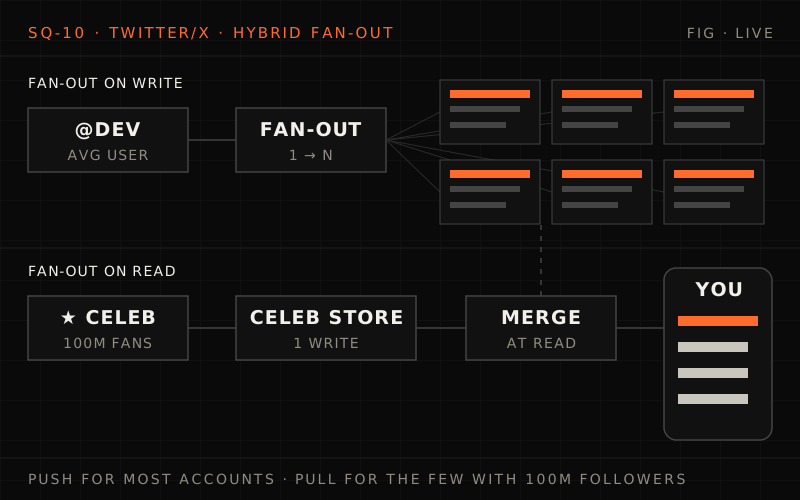
- Push (fan-out on write) for most accounts: when a normal user tweets, workers insert the tweet ID into each follower's cached timeline. Reads are then a single cache lookup, which is what a 50:1 read-heavy system wants.
- Pull (fan-out on read) for celebrities: above a follower threshold (10,000 in this design), tweets are not pushed. Each follower's timeline merges them in at read time from the celebrity's own recent-tweets list.
- Hybrid: fast reads for nearly everyone, without one post triggering a hundred million writes.
System Architecture#
%% title: Twitter high-level architecture
flowchart TD
  subgraph CL["Clients"]
    WEB@{ icon: "sd:browser", label: "Web" }
    IOS@{ icon: "tech:apple", label: "iOS" }
    AND@{ icon: "tech:android", label: "Android" }
  end
  GW["API GATEWAY / LB<br/>Rate Limiting · Auth · Routing"]:::edge
  WEB & IOS & AND --> GW
  subgraph TWS["Twitter services"]
    direction TB
    subgraph WP["Write path"]
      TS1["Tweet Service"]:::core
      FO["Fan-Out Service"]:::hot
      SG@{ icon: "sd:database", label: "Social Graph" }
      TST@{ icon: "sd:database", label: "Tweet Storage<br/>(Manhattan)" }
      TC1@{ icon: "tech:redis", label: "Timeline Cache<br/>(Redis)" }
      TS1 ==> FO
      SG --> FO
      TS1 --> TST
      FO ==> TC1
    end
    subgraph RP["Read path"]
      TS2["Tweet Service"]:::core
      TC2@{ icon: "tech:redis", label: "Timeline Cache<br/>(Redis)" }
      TLS["Timeline Service"]:::core
      CM["CELEBRITY MERGE<br/>(Pull celebrity tweets at read time)"]:::service
      TS2 --> TC2
      TC2 ==> TLS
      TLS --> CM
    end
    subgraph ST["Search & trends"]
      direction TB
      SS["Search Service"]:::service
      TR["Trending Service"]:::service
      ES@{ icon: "tech:elasticsearch", label: "Elasticsearch Cluster" }
    end
    WP ~~~ RP
    RP ~~~ ST
  end
  GW ==> TS1
  class WEB,IOS,AND client
  class SG,TST,ES store
  class TC1,TC2 cache
The Two Timeline Approaches#
Approach 1: Fan-out on write (Push)
User A posts tweet → Fan-Out Service → write to all followers' timelines:
- Follower 1 timeline ←
tweet_id - Follower 2 timeline ←
tweet_id - Follower 3 timeline ←
tweet_id - ...
- Follower N timeline ←
tweet_id
ok — Fast reads (timeline already assembled)
no — Slow writes for users with many followers
no — Celebrity problem: 100M writes per tweet!
Approach 2: Fan-out on read (Pull)
User B requests timeline → Timeline Service:
- Look up all users B follows
- Fetch recent tweets from each
- Merge and sort by timestamp
- Return top N tweets
ok — Fast writes (just store the tweet)
no — Slow reads (must query many users)
no — Doesn't scale for users following many accounts
Approach 3: Hybrid (Twitter's actual approach)
- Regular users (< 10K followers, this design's threshold): Fan-out on write
- Celebrities (> 10K followers): Fan-out on read
At read time:
- Fetch pre-computed timeline from cache
- Fetch celebrity tweets separately
- Merge and sort
- Return to user
ok — Best of both worlds
ok — Fast reads for most users
ok — Handles celebrity problem
Fan-out strategies
Q1/3 With pure fan-out on read, what makes each home timeline request expensive?
Answer & explanation
Answer: C
Pull makes writes trivial but moves the work to reads, which run at 300K/s. Users following many accounts make each read a large scatter-gather.
Q2/3 A user follows 300 regular accounts and 3 celebrities. How does the hybrid design build their home timeline?
Answer & explanation
Answer: A
Push is decided per author, not per reader. Regular authors fan out on write; celebrity tweets sit in a per-author index merged in at read time.
Q3/3 Why can't a 100M-follower celebrity simply use fan-out on write with more workers?
Answer & explanation
Answer: D
One tweet would cost 100M writes. Even scaled up, that write storm per celebrity tweet is the problem the hybrid avoids.
Phase 4: Deep Dives (20 minutes)#
"Let's dive deeper. Tell me about the fan-out service."
Deep Dive 1: Fan-Out Service (Week 3 Concepts)#
The Problem#
When a user with 1,000 followers tweets
- Write tweet to storage
- Insert
tweet_idinto 1,000 follower timelines - Must complete within 5 seconds
When a celebrity with 100M followers tweets
- Same tweet storage
- Insert into 100M timelines = IMPOSSIBLE in 5 seconds
- At 100K inserts/second = ~17 minutes!
Solution: Don't fan out to celebrity followers at all. Instead, merge celebrity tweets at read time.
Implementation#
# timeline/fanout_service.py

"""
Fan-Out Service for Twitter Timeline

Distributes tweets to follower timelines using a hybrid
push/pull approach based on follower count.
"""

from dataclasses import dataclass
from typing import List, Set
from enum import Enum
import asyncio


class FanoutStrategy(Enum):
    PUSH = "push"      # Fan-out on write
    PULL = "pull"      # Fan-out on read (celebrities)


@dataclass
class FanoutConfig:
    celebrity_threshold: int = 10_000  # Followers above this = celebrity
    batch_size: int = 1000             # Followers per batch
    max_concurrent_batches: int = 100  # Parallel batch processing
    timeline_max_size: int = 800       # Max tweets in timeline cache


@dataclass
class Tweet:
    tweet_id: str
    author_id: str
    content: str
    timestamp: int
    is_celebrity: bool = False


class FanoutService:
    """
    Hybrid fan-out service using push for regular users,
    pull for celebrities.

    Applies concepts:
    - Week 3: Async message processing
    - Week 4: Cache-aside pattern for timelines
    - Week 1: Partitioning by user_id
    """

    def __init__(
        self,
        config: FanoutConfig,
        social_graph,
        timeline_cache,
        tweet_storage,
        message_queue
    ):
        self.config = config
        self.social_graph = social_graph
        self.timeline_cache = timeline_cache
        self.tweet_storage = tweet_storage
        self.queue = message_queue

    async def process_tweet(self, tweet: Tweet) -> None:
        """
        Process a new tweet for fan-out.

        1. Store the tweet
        2. Determine fan-out strategy
        3. If push: queue fan-out jobs
        4. If pull: mark author as celebrity
        """
        # Store tweet first (source of truth)
        await self.tweet_storage.store(tweet)

        # Get follower count to determine strategy
        follower_count = await self.social_graph.get_follower_count(
            tweet.author_id
        )

        strategy = self._determine_strategy(follower_count)

        if strategy == FanoutStrategy.PUSH:
            # Regular user: fan out to all followers
            await self._push_fanout(tweet)
        else:
            # Celebrity: don't fan out, mark for pull
            await self._mark_celebrity_tweet(tweet)

    def _determine_strategy(self, follower_count: int) -> FanoutStrategy:
        """Determine push vs pull based on follower count."""
        if follower_count > self.config.celebrity_threshold:
            return FanoutStrategy.PULL
        return FanoutStrategy.PUSH

    async def _push_fanout(self, tweet: Tweet) -> None:
        """
        Fan out tweet to all follower timelines.

        Uses batching and parallelism for efficiency.
        """
        # Page through the followers (a push-path author's set
        # usually comes back whole, in one page)
        cursor = None
        while True:
            followers, cursor = await self.social_graph.get_followers(
                tweet.author_id, cursor=cursor
            )

            # Process in batches for efficiency
            batches = self._create_batches(
                followers,
                self.config.batch_size
            )

            # Queue batch jobs (processed by workers)
            for batch in batches:
                await self.queue.enqueue({
                    "type": "fanout_batch",
                    "tweet_id": tweet.tweet_id,
                    "author_id": tweet.author_id,
                    "timestamp": tweet.timestamp,
                    "follower_ids": batch
                })

            if cursor is None:
                break

    async def process_fanout_batch(
        self,
        tweet_id: str,
        author_id: str,
        timestamp: int,
        follower_ids: List[str]
    ) -> None:
        """
        Process a batch of follower timeline updates.

        Called by queue workers.
        """
        # Create timeline entry (minimal data)
        entry = {
            "tweet_id": tweet_id,
            "author_id": author_id,
            "timestamp": timestamp
        }

        # Update each follower's timeline cache
        tasks = [
            self._update_timeline(follower_id, entry)
            for follower_id in follower_ids
        ]

        await asyncio.gather(*tasks, return_exceptions=True)

    async def _update_timeline(
        self,
        user_id: str,
        entry: dict
    ) -> None:
        """
        Add tweet to user's cached timeline.

        Uses Redis list with LPUSH + LTRIM pattern.
        """
        timeline_key = f"timeline:{user_id}"

        # Push to front of list
        await self.timeline_cache.lpush(timeline_key, entry)

        # Trim to max size (keep only recent 800)
        await self.timeline_cache.ltrim(
            timeline_key,
            0,
            self.config.timeline_max_size - 1
        )

    async def _mark_celebrity_tweet(self, tweet: Tweet) -> None:
        """
        Mark tweet for celebrity pull-based delivery.

        Store in celebrity tweets index for merge at read time.
        """
        await self.timeline_cache.zadd(
            f"celebrity_tweets:{tweet.author_id}",
            {tweet.tweet_id: tweet.timestamp}
        )

        # Trim old celebrity tweets (keep last 100)
        await self.timeline_cache.zremrangebyrank(
            f"celebrity_tweets:{tweet.author_id}",
            0,
            -101
        )

    def _create_batches(
        self,
        items: List[str],
        batch_size: int
    ) -> List[List[str]]:
        """Split list into batches."""
        return [
            items[i:i + batch_size]
            for i in range(0, len(items), batch_size)
]Deep Dive 2: Timeline Service with Celebrity Merge (Week 4 Concepts)#
"How does the timeline read work with the celebrity merge?"
Serve one home timeline in 200 ms
A user follows 300 ordinary accounts and 12 celebrities. Walk through serving their home timeline within 200 ms.
One strong answer
- Read the precomputed timeline (a list of tweet IDs) from the timeline cache shard that owns this user.
- Find the celebrities they follow (cached) and fetch each one's recent tweet IDs. Those lists are hot keys read by millions, so replicate them widely.
- Merge by time, remove duplicates and keep the top N.
- Hydrate: batch-fetch the tweet bodies and authors in one multi-get rather than N separate calls.
- Filter: drop tweets that were deleted, or from accounts the user has since unfollowed or blocked.
Everything is memory-resident and batched, with the expensive work done earlier on the write path.
The Solution#
%% title: Timeline read with celebrity merge
sequenceDiagram
  autonumber
  participant U as User
  participant TS as Timeline Service
  participant TC as Timeline cache (Redis)
  participant G as Social graph
  participant CT as Celebrity tweets (Redis)
  participant TW as Tweet store
  U->>TS: Request home timeline
  TS->>TC: STEP 1 · LRANGE timeline:user123 0 799
  TC-->>TS: [tweet_501, tweet_499, tweet_495, ...]
  Note over TS,TC: Pre-computed timeline · tweets from regular users they follow
  TS->>G: STEP 2 · Get followed users where follower_count > 10K
  G-->>TS: [elonmusk, taylorswift, cristiano]
  TS->>CT: STEP 3 · ZREVRANGE celebrity_tweets:elonmusk 0 19
  TS->>CT: ZREVRANGE celebrity_tweets:taylorswift 0 19
  CT-->>TS: [tweet_503, tweet_500, tweet_498, ...]
  TS->>TS: STEP 4 · Merge [cached_timeline] + [celebrity_tweets], sort by timestamp descending
  Note over TS: Result: [tweet_503, tweet_501, tweet_500, tweet_499, ...]
  TS->>TW: STEP 5 · Hydrate · MGET tweet:503 tweet:501 tweet:500 tweet:499 ...
  TW-->>TS: full tweet content
  TS-->>U: Return full tweet objects to client
A tweet is stored first. An author with 1,000 followers is pushed: one batch of 1,000 ids, LPUSH into each timeline and LTRIM to 800. An author over 10,000 followers gets one ZADD to their celebrity tweets set instead. Reading, LRANGE returns the pushed ids (501, 499, 495), ZREVRANGE pulls followed celebrities' recent ids (503, 500, 498), the lists are merged newest first and one MGET hydrates them.
Implementation#
# timeline/timeline_service.py

"""
Timeline Service with Celebrity Merge

Constructs user's home timeline by merging pre-computed
timeline with celebrity tweets fetched at read time.
"""

from dataclasses import dataclass
from typing import List, Optional
import asyncio
import heapq


@dataclass
class TimelineEntry:
    tweet_id: str
    author_id: str
    timestamp: int


@dataclass
class FullTweet:
    tweet_id: str
    author_id: str
    author_name: str
    content: str
    timestamp: int
    likes: int
    retweets: int
    replies: int


class TimelineService:
    """
    Timeline service with hybrid push/pull architecture.

    Applies concepts:
    - Week 4: Cache-aside for timeline reads
    - Week 1: Read optimization through pre-computation
    - Week 3: Async parallel fetching
    """

    CELEBRITY_THRESHOLD = 10_000
    DEFAULT_TIMELINE_SIZE = 50
    MAX_CELEBRITIES_TO_FETCH = 100

    def __init__(
        self,
        timeline_cache,
        tweet_storage,
        social_graph,
        user_service
    ):
        self.timeline_cache = timeline_cache
        self.tweet_storage = tweet_storage
        self.social_graph = social_graph
        self.user_service = user_service

    async def get_home_timeline(
        self,
        user_id: str,
        count: int = 50,
        max_id: Optional[str] = None
    ) -> List[FullTweet]:
        """
        Get user's home timeline with celebrity merge.

        Merges pre-computed timeline (push) with
        celebrity tweets (pull) at read time.
        """
        # Step 1: Get pre-computed timeline from cache
        cached_timeline = await self._get_cached_timeline(
            user_id, count * 2  # Fetch extra for merge buffer
        )

        # Step 2: Get celebrities this user follows
        celebrities = await self._get_followed_celebrities(user_id)

        # Step 3: Fetch recent tweets from celebrities
        celebrity_tweets = await self._fetch_celebrity_tweets(
            celebrities
        )

        # Step 4: Merge and sort
        merged = self._merge_timelines(
            cached_timeline,
            celebrity_tweets
        )

        # Step 5: Apply pagination
        if max_id:
            merged = [t for t in merged if t.tweet_id < max_id]

        # Step 6: Hydrate tweets (get full content)
        tweet_ids = [t.tweet_id for t in merged[:count]]
        full_tweets = await self._hydrate_tweets(tweet_ids)

        return full_tweets

    async def _get_cached_timeline(
        self,
        user_id: str,
        count: int
    ) -> List[TimelineEntry]:
        """Fetch pre-computed timeline from Redis."""
        timeline_key = f"timeline:{user_id}"

        # Check if timeline exists
        exists = await self.timeline_cache.exists(timeline_key)

        if not exists:
            # Rebuild timeline for inactive user
            await self._rebuild_timeline(user_id)

        # Fetch timeline entries
        entries = await self.timeline_cache.lrange(
            timeline_key, 0, count - 1
        )

        return [
            TimelineEntry(**entry)
            for entry in entries
        ]

    async def _get_followed_celebrities(
        self,
        user_id: str
    ) -> List[str]:
        """Get list of celebrities the user follows."""
        # Get all users this person follows
        following = await self.social_graph.get_following(user_id)

        # Filter to celebrities (high follower count)
        celebrities = []
        for followed_id in following:
            follower_count = await self.social_graph.get_follower_count(
                followed_id
            )
            if follower_count > self.CELEBRITY_THRESHOLD:
                celebrities.append(followed_id)
                if len(celebrities) >= self.MAX_CELEBRITIES_TO_FETCH:
                    break

        return celebrities

    async def _fetch_celebrity_tweets(
        self,
        celebrity_ids: List[str]
    ) -> List[TimelineEntry]:
        """Fetch recent tweets from celebrities in parallel."""
        if not celebrity_ids:
            return []

        # Parallel fetch from all celebrities
        tasks = [
            self._get_celebrity_recent_tweets(celeb_id)
            for celeb_id in celebrity_ids
        ]

        results = await asyncio.gather(*tasks)

        # Flatten results
        all_tweets = []
        for tweets in results:
            all_tweets.extend(tweets)

        return all_tweets

    async def _get_celebrity_recent_tweets(
        self,
        celebrity_id: str,
        count: int = 20
    ) -> List[TimelineEntry]:
        """Get recent tweets from a celebrity."""
        key = f"celebrity_tweets:{celebrity_id}"

        # Sorted set: score = timestamp
        tweet_data = await self.timeline_cache.zrevrange(
            key, 0, count - 1, withscores=True
        )

        return [
            TimelineEntry(
                tweet_id=tweet_id,
                author_id=celebrity_id,
                timestamp=int(score)
            )
            for tweet_id, score in tweet_data
        ]

    def _merge_timelines(
        self,
        cached: List[TimelineEntry],
        celebrity: List[TimelineEntry]
    ) -> List[TimelineEntry]:
        """
        Merge two sorted timelines by timestamp.

        Uses heap merge for O(n log k) efficiency.
        """
        # Convert to tuples for heap: (-timestamp, entry)
        # Negative because heapq is min-heap
        all_entries = [
            (-e.timestamp, i, e)
            for i, e in enumerate(cached + celebrity)
        ]

        heapq.heapify(all_entries)

        merged = []
        seen_ids = set()

        while all_entries and len(merged) < 200:
            _, _, entry = heapq.heappop(all_entries)

            # Deduplicate (same tweet might appear twice)
            if entry.tweet_id not in seen_ids:
                seen_ids.add(entry.tweet_id)
                merged.append(entry)

        return merged

    async def _hydrate_tweets(
        self,
        tweet_ids: List[str]
    ) -> List[FullTweet]:
        """Fetch full tweet content from storage."""
        if not tweet_ids:
            return []

        # Batch fetch from tweet storage
        tweets = await self.tweet_storage.mget(tweet_ids)

        # Get author info
        author_ids = list(set(t.author_id for t in tweets if t))
        authors = await self.user_service.mget(author_ids)
        author_map = {a.user_id: a for a in authors}

        return [
            FullTweet(
                tweet_id=t.tweet_id,
                author_id=t.author_id,
                author_name=author_map.get(t.author_id, {}).get("name", "Unknown"),
                content=t.content,
                timestamp=t.timestamp,
                likes=t.likes,
                retweets=t.retweets,
                replies=t.replies
            )
            for t in tweets if t
        ]

    async def _rebuild_timeline(self, user_id: str) -> None:
        """
        Rebuild timeline for inactive user.

        Called when user returns after 30+ days of inactivity
        and their timeline has been evicted from cache.
        """
        # Get users they follow
        following = await self.social_graph.get_following(user_id)

        # Fetch recent tweets from each (excluding celebrities)
        all_tweets = []
        for followed_id in following:
            follower_count = await self.social_graph.get_follower_count(
                followed_id
            )
            if follower_count <= self.CELEBRITY_THRESHOLD:
                tweets = await self.tweet_storage.get_user_tweets(
                    followed_id, limit=50
                )
                all_tweets.extend(tweets)

        # Sort by timestamp
        all_tweets.sort(key=lambda t: t.timestamp, reverse=True)

        # Store in cache
        timeline_key = f"timeline:{user_id}"
        for tweet in all_tweets[:800]:
            await self.timeline_cache.rpush(timeline_key, {
                "tweet_id": tweet.tweet_id,
                "author_id": tweet.author_id,
                "timestamp": tweet.timestamp
            })

        # Set TTL (30 days)
await self.timeline_cache.expire(timeline_key, 30 * 86400)Fan-out service and timeline merge
Q1/3 Why does
_push_fanoutenqueue batches of 1,000 followers for workers rather than updating every timeline inside the post request?Answer & explanation
Answer: B
The author only waits for the tweet to be stored. Fan-out is asynchronous, so a 5,000-follower author does not block on 5,000 writes.
Q2/3 What does the LPUSH followed by LTRIM to 800 entries buy the system?
Answer & explanation
Answer: D
Without the trim, every timeline would grow forever with each followed author's tweets. The cap is what makes the 250M x 16 KB estimate hold.
Q3/3 A user returns after 45 days and their
timeline:key is gone. What happens?Answer & explanation
Answer: B
Evicting idle timelines keeps memory for active users. The first load after a gap is slower, which the lesson accepts.
Deep Dive 3: Social Graph Service (Week 1 Concepts)#
"How do you store and query the social graph efficiently?"
Two questions, 420 billion edges
Fan-out needs "all followers of X", and the timeline needs "everyone X follows". How would you store the follow graph so both are fast, even for an account with 200 million followers?
One strong answer
- Store each edge twice: a forward list (user → accounts they follow) and a reverse list (account → its followers), each partitioned by its owner's ID, so either question is a read of one partitioned list.
- Page through huge lists: fan-out workers stream a big follower list in batches with a cursor instead of loading 200M rows at once. With the hybrid design, celebrity follower lists aren't on the posting path at all.
- Keep counts separately: follower counts are maintained counters, not a COUNT over the edges.
- Membership checks ("does A follow B?") are a lookup in A's forward list, which is small and cacheable.
The Problem#
Scale
- 600M users
- Average 700 followers per user (estimate)
- Total edges: ~420 billion relationships (estimate)
Queries needed
- Get all followers of user X (for fan-out)
- Get all users that X follows (for timeline)
- Check if A follows B
- Get follower count
Naive approach (SQL)
- followers table: (
follower_id,followee_id) - "Get followers of @elonmusk": Returns 240M+ rows!
- Not practical
Implementation#
# graph/social_graph_service.py

"""
Social Graph Service

Stores and queries follow relationships using a
hybrid approach: Redis for hot data, distributed
storage for full graph.
"""

from dataclasses import dataclass
from typing import List, Set, Optional, Tuple
from enum import Enum
import time


@dataclass
class FollowRelation:
    follower_id: str
    followee_id: str
    timestamp: int


class SocialGraphService:
    """
    Social graph with optimized follower/following queries.

    Uses Redis sets for fast membership checks and
    counts, with Manhattan/Cassandra for full graph storage.

    Applies concepts:
    - Week 1: Partitioning by user_id
    - Week 4: Caching hot data (follower counts)
    - Week 5: Eventual consistency for graph updates
    """

    def __init__(self, redis_client, graph_storage):
        self.redis = redis_client
        self.storage = graph_storage

    async def follow(
        self,
        follower_id: str,
        followee_id: str
    ) -> bool:
        """
        Create a follow relationship.

        Updates both directions for bidirectional queries.
        """
        # Check if already following
        if await self.is_following(follower_id, followee_id):
            return False

        timestamp = int(time.time())

        # Store in persistent storage
        await self.storage.put(
            FollowRelation(follower_id, followee_id, timestamp)
        )

        # Update Redis caches
        # 1. Add to follower's "following" set
        await self.redis.sadd(
            f"following:{follower_id}",
            followee_id
        )

        # 2. Add to followee's "followers" set
        await self.redis.sadd(
            f"followers:{followee_id}",
            follower_id
        )

        # 3. Increment follower count
        await self.redis.incr(f"follower_count:{followee_id}")
        await self.redis.incr(f"following_count:{follower_id}")

        return True

    async def unfollow(
        self,
        follower_id: str,
        followee_id: str
    ) -> bool:
        """Remove a follow relationship."""
        if not await self.is_following(follower_id, followee_id):
            return False

        # Remove from persistent storage
        await self.storage.delete(follower_id, followee_id)

        # Update Redis caches
        await self.redis.srem(f"following:{follower_id}", followee_id)
        await self.redis.srem(f"followers:{followee_id}", follower_id)
        await self.redis.decr(f"follower_count:{followee_id}")
        await self.redis.decr(f"following_count:{follower_id}")

        return True

    async def is_following(
        self,
        follower_id: str,
        followee_id: str
    ) -> bool:
        """Check if follower follows followee. O(1) operation."""
        return await self.redis.sismember(
            f"following:{follower_id}",
            followee_id
        )

    async def get_followers(
        self,
        user_id: str,
        cursor: Optional[str] = None,
        count: int = 1000
    ) -> Tuple[List[str], Optional[str]]:
        """
        Get one page of a user's followers: (follower_ids, next_cursor).
        next_cursor is None when there are no more pages.

        For users with many followers, uses cursor-based
        pagination to avoid loading millions of IDs.
        """
        # Small follower sets (up to the 10,000 celebrity threshold,
        # so every push-path author) come back whole, in one page
        follower_count = await self.get_follower_count(user_id)

        if follower_count <= 10_000:
            return list(await self.redis.smembers(
                f"followers:{user_id}"
            )), None

        # For large sets, use cursor-based scan
        return await self._scan_followers(
            user_id, cursor, count
        )

    async def get_following(
        self,
        user_id: str
    ) -> List[str]:
        """Get all users that user_id follows."""
        return list(await self.redis.smembers(
            f"following:{user_id}"
        ))

    async def get_follower_count(self, user_id: str) -> int:
        """Get follower count. O(1) operation."""
        count = await self.redis.get(f"follower_count:{user_id}")
        return int(count) if count else 0

    async def get_following_count(self, user_id: str) -> int:
        """Get following count. O(1) operation."""
        count = await self.redis.get(f"following_count:{user_id}")
        return int(count) if count else 0

    async def _scan_followers(
        self,
        user_id: str,
        cursor: Optional[str],
        count: int
    ) -> Tuple[List[str], Optional[str]]:
        """Cursor-based scan for large follower sets: one page and the next cursor."""
        start_cursor = int(cursor) if cursor else 0

        new_cursor, followers = await self.redis.sscan(
            f"followers:{user_id}",
            cursor=start_cursor,
            count=count
        )

        # SSCAN returns cursor 0 when the scan is complete
return list(followers), (str(new_cursor) if new_cursor else None)Deep Dive 4: Trending Topics (Week 8 Concepts)#
"How do you compute trending topics in real-time?"
Implementation#
# trending/trending_service.py

"""
Trending Topics Service

Computes trending hashtags and topics using
sliding window counts with decay.
"""

from dataclasses import dataclass
from typing import List, Dict, Tuple, Optional
from collections import defaultdict
import time
import math


@dataclass
class TrendingTopic:
    topic: str
    tweet_count: int
    velocity: float  # Rate of growth
    score: float


class TrendingService:
    """
    Real-time trending topics computation.

    Uses time-bucketed counts with exponential decay
    to identify rapidly growing topics.

    Applies concepts:
    - Week 8: Stream processing
    - Week 4: Time-windowed aggregation
    - Week 3: Async event processing
    """

    BUCKET_SIZE_SECONDS = 60      # 1-minute buckets
    WINDOW_SIZE_BUCKETS = 60      # Look at last 60 minutes
    DECAY_FACTOR = 0.95           # Recent tweets count more
    MIN_TWEETS_THRESHOLD = 100    # Minimum to be trending

    def __init__(self, redis_client, location_service):
        self.redis = redis_client
        self.location_service = location_service

    async def record_hashtag(
        self,
        hashtag: str,
        tweet_id: str,
        location: Optional[str] = None
    ) -> None:
        """
        Record a hashtag occurrence from a tweet.

        Updates both global and location-specific counts.
        """
        current_bucket = self._get_current_bucket()

        # Increment global count for this bucket
        await self.redis.hincrby(
            f"trending:global:{current_bucket}",
            hashtag.lower(),
            1
        )

        # Increment location-specific count
        if location:
            await self.redis.hincrby(
                f"trending:{location}:{current_bucket}",
                hashtag.lower(),
                1
            )
            await self.redis.expire(
                f"trending:{location}:{current_bucket}", 3600 * 2
            )

        # Set expiry on bucket (auto-cleanup)
        await self.redis.expire(
            f"trending:global:{current_bucket}",
            3600 * 2  # 2 hours
        )

    async def get_trending(
        self,
        location: Optional[str] = None,
        count: int = 10
    ) -> List[TrendingTopic]:
        """
        Get current trending topics.

        Combines raw counts with velocity (growth rate)
        to surface rapidly emerging topics.
        """
        # Get counts from recent buckets
        topic_counts = await self._aggregate_buckets(location)

        # Calculate velocity and score
        scored_topics = []
        for topic, counts in topic_counts.items():
            if sum(counts) < self.MIN_TWEETS_THRESHOLD:
                continue

            total_count = self._weighted_count(counts)
            velocity = self._calculate_velocity(counts)
            score = self._calculate_score(total_count, velocity)

            scored_topics.append(TrendingTopic(
                topic=topic,
                tweet_count=sum(counts),
                velocity=velocity,
                score=score
            ))

        # Sort by score and return top N
        scored_topics.sort(key=lambda t: t.score, reverse=True)
        return scored_topics[:count]

    async def _aggregate_buckets(
        self,
        location: Optional[str]
    ) -> Dict[str, List[int]]:
        """Aggregate counts from recent time buckets."""
        current_bucket = self._get_current_bucket()
        prefix = f"trending:{location or 'global'}"

        # Collect counts from each bucket
        topic_counts = defaultdict(list)

        for i in range(self.WINDOW_SIZE_BUCKETS):
            bucket = current_bucket - i
            bucket_data = await self.redis.hgetall(f"{prefix}:{bucket}")

            for topic, count in bucket_data.items():
                if topic not in topic_counts:
                    # First seen in an older bucket: zero-fill the newer
                    # ones so index 0 always means "the current minute"
                    topic_counts[topic] = [0] * i
                topic_counts[topic].append(int(count))

            # Pad with zeros if bucket doesn't have this topic
            for topic in topic_counts:
                if len(topic_counts[topic]) <= i:
                    topic_counts[topic].append(0)

        return dict(topic_counts)

    def _weighted_count(self, counts: List[int]) -> float:
        """
        Calculate weighted count with exponential decay.

        More recent buckets count more heavily.
        """
        total = 0.0
        for i, count in enumerate(counts):
            weight = self.DECAY_FACTOR ** i
            total += count * weight
        return total

    def _calculate_velocity(self, counts: List[int]) -> float:
        """
        Calculate velocity (rate of change).

        Compare recent period to earlier period.
        """
        if len(counts) < 10:
            return 0.0

        recent = sum(counts[:5])   # Last 5 minutes
        earlier = sum(counts[5:10]) or 1  # 5-10 minutes ago

        return (recent - earlier) / earlier

    def _calculate_score(
        self,
        weighted_count: float,
        velocity: float
    ) -> float:
        """
        Calculate trending score.

        Combines volume with velocity to surface
        both popular and rapidly growing topics.
        """
        # Log scale for volume (diminishing returns)
        volume_score = math.log10(weighted_count + 1)

        # Velocity boost for growing topics
        velocity_boost = max(0, velocity) * 2

        return volume_score * (1 + velocity_boost)

    def _get_current_bucket(self) -> int:
        """Get current time bucket."""
return int(time.time()) // self.BUCKET_SIZE_SECONDSSocial graph and trending
Q1/3 Why does the social graph keep both
followers:{user}andfollowing:{user}sets for every follow?Answer & explanation
Answer: D
Each write updates both directions so both hot queries are direct lookups. A single (follower, followee) table indexed one way cannot serve both cheaply.
Q2/3 Fetching @elonmusk's 240M followers for any job: how does
get_followersavoid loading them all at once?Answer & explanation
Answer: A
Small sets come back in one SMEMBERS; large ones use SSCAN with a cursor so no caller materialises hundreds of millions of IDs.
Q3/3 Why does the trending score multiply log10(volume) by a velocity boost instead of ranking by raw count?
Answer & explanation
Answer: C
Trending is about change: a hashtag jumping in the last 5 minutes should beat one that has been large all day. The 100-tweet minimum is a separate filter, not what the score does.
Phase 5: Scaling and Edge Cases#
Scaling Strategies#
Timeline cache sharding
- Partition by
user_idhash - Each shard handles ~10M users
- 3x replication for fault tolerance
- Total: 250M active users / 10M ≈ 25 shards × 3 replicas ≈ 75 Redis nodes
Fan-out workers
- Queue-based processing (Kafka)
- Horizontal scaling based on queue depth
- Priority lanes for time-sensitive tweets
- Backpressure handling during peaks
Tweet storage
- Manhattan (Twitter's distributed KV store)
- Partitioned by
tweet_id - Separate hot (recent) and cold (archive) tiers
Multi-datacenter
- Active-active in multiple regions
- Route users to nearest datacenter
- Async replication of tweets and timelines
Edge Cases#
Edge case 1: Celebrity mentions another celebrity
- Scenario: @elonmusk replies to @Cristiano
- Problem: Both have 100M+ followers
- Solution:
- Store tweet in both celebrity tweet indexes
- Users following both see it once (deduplication at read)
- Reply appears in both users' mention timelines
Edge case 2: Reply arrives before original tweet
- Scenario: Fan-out is slow, reply completes first
- Problem: User sees reply to tweet they haven't received yet
- Solution:
- Store
parent_tweet_idwith replies - At read time, fetch parent if not in timeline
- Display as thread with "Show original tweet"
- Store
Edge case 3: Inactive user returns after 30 days
- Scenario: User's timeline evicted from cache
- Problem: No pre-computed timeline exists
- Solution:
- Detect cache miss on timeline request
- Rebuild timeline from followed users' tweets
- Cache rebuilt timeline
- Slightly slower first load (acceptable)
Edge case 4: Viral tweet (massive engagement)
- Scenario: Tweet gets millions of likes/retweets rapidly
- Problem: Hot key for like/retweet counters
- Solution:
- Counter sharding (
like_count_1,like_count_2, ...) - Aggregate on read or periodically
- Eventually consistent counts (acceptable for social)
- Counter sharding (
Edge case 5: Major event (Super Bowl, Elections)
- Scenario: 10x normal tweet volume
- Problem: Fan-out queues back up
- Solution:
- Pre-scale based on event calendar
- Prioritize timeline reads over real-time delivery
- Acceptable to have 10-30 second delays
- Graceful degradation: show slightly stale timeline
Scaling and edge cases
Q1/3 Why is the timeline cache partitioned by user_id hash rather than by tweet_id?
Answer & explanation
Answer: A
Timelines are keyed per reader. Partitioning by tweet_id would scatter one user's timeline across shards and turn every read into a fan-in.
Q2/3 A tweet goes viral and its like counter becomes a hot key. What does the lesson do?
Answer & explanation
Answer: D
Splitting one counter into N spreads writes across N keys. A slightly stale like count is acceptable for social features.
Q3/3 During the Super Bowl, fan-out queues back up at 10x volume. Which trade-off does the design choose?
Answer & explanation
Answer: B
Availability for reads (99.99%) matters more than the 5-second delivery target during a spike. Pre-scaling from the event calendar reduces the backlog.
Phase 6: Monitoring and Operations#
Timeline health
| Metric | Value | Status |
|---|---|---|
| Timeline read latency (p50) | 45ms | healthy |
| Timeline read latency (p99) | 180ms | good |
| Cache hit rate | 99.2% | healthy |
| Celebrity merge time | 25ms | healthy |
Fan-out pipeline
| Metric | Value | Status |
|---|---|---|
| Fan-out queue depth | 45K | normal |
| Fan-out latency (p50) | 1.2s | good |
| Fan-out latency (p99) | 4.8s | watch |
| Failed fan-outs | 0.01% | healthy |
Tweet ingestion
| Metric | Value | Status |
|---|---|---|
| Tweets/second | 6,200 | normal |
| Tweet storage latency | 15ms | healthy |
| Search indexing lag | 2.1s | good |
Infrastructure
| Metric | Value | Status |
|---|---|---|
| Redis cluster CPU | 45% | healthy |
| Redis memory usage | 72% | normal |
| Kafka consumer lag | 12K msgs | healthy |
| API error rate | 0.02% | healthy |
Alerting Strategy#
CRITICAL (PagerDuty)
- Timeline read latency p99 > 500ms
- Fan-out queue depth > 1M messages
- Cache hit rate < 95%
- Tweet storage failures > 0.1%
WARNING (Slack)
- Fan-out latency p99 > 10 seconds
- Redis memory > 85%
- Celebrity merge taking > 100ms
- Search indexing lag > 30 seconds
INFO (Dashboard)
- Tweets per second trends
- Top trending topics
- Celebrity tweet frequency
- User engagement metrics
Timeline operations
Q1/3 The timeline cache hit rate falls below 95%, a critical alert. What happens on each miss?
Answer & explanation
Answer: B
A miss turns a cheap cache read into fan-out on read across everyone the user follows. A few misses are fine (returning users); a wave of them can overload the stores behind the cache.
Q2/3 During a major live event, fan-out queues back up. What does the design choose to protect?
Answer & explanation
Answer: B
Most people are reading, not posting. Serving a slightly stale timeline quickly beats making everyone wait for a perfectly fresh one.
Q3/3 "Celebrity merge time" rises from 25 ms to 150 ms. What is the most likely cause?
Answer & explanation
Answer: B
Every follower of a celebrity reads that celebrity's list at read time, so a handful of keys take an enormous share of reads. Replicating those keys across more cache nodes spreads the load.
Final Challenge: Delete It Everywhere, Now#
The interviewer smiles. "One more. It sounds small."
"Someone posts a tweet by mistake and deletes it 30 seconds later. By then it's been fanned out to their followers' timelines, cached, indexed for search and counted toward trends. It has to disappear from every one of those places quickly. How?"
- The tweet ID already sits in many followers' cached timelines
- The tweet body is cached and indexed for search
- Retweets and replies may reference it
- Users expect it gone within seconds, not hours
Do you scrub every timeline?
Removing the ID from every timeline it was pushed into is a fan-out as expensive as posting it. Is there a cheaper way to make it disappear everywhere at once?
One strong answer
- Tombstone the source of truth: mark the tweet deleted in the tweet store immediately.
- Filter at hydration: timelines hold only IDs, and every read hydrates them from the tweet store or cache, so a deleted tweet is dropped at read time wherever its ID still sits. No timeline has to be touched first.
- Invalidate the copies: evict the tweet body from caches, delete it from the search index, and stop it counting toward trends.
- References: retweets and quotes point at the original, so they render as "this post was deleted".
- Clean up lazily: a background job (or plain ageing past the 800-entry limit) removes the stale IDs later.
- Celebrity tweets are easier: they were never pushed, so removing them from the account's own recent-tweets list (plus the cache eviction) is enough.
Final challenge · Quest check
Q1/4 Why not remove a deleted tweet's ID from every follower's timeline straight away?
Answer & explanation
Answer: B
One tombstone in the tweet store plus a check during hydration makes the tweet vanish from every timeline immediately. The stale IDs can be cleaned up whenever it's cheap.
Q2/4 A celebrity deletes a tweet. Where must it disappear from first?
Answer & explanation
Answer: B
Celebrity tweets are pulled at read time from the account's own list, never pushed, so that list (and any cached copy of the tweet) is all there is to fix.
Q3/4 An ordinary account goes viral and gains 5 million followers in a day. What should change?
Answer & explanation
Answer: B
Push or pull is a per-account decision based on follower count. Crossing the threshold flips the account to the celebrity path for what it posts next.
Q4/4 The timeline cache holds 800 tweet IDs of about 20 bytes each for 250 million active users. Roughly how much memory is that before replication?
Answer & explanation
Answer: B
250M × 800 × 20 bytes = 4 × 10¹² bytes ≈ 4 TB, or about 12 TB with three replicas. Storing IDs rather than full tweets is what makes the whole timeline layer fit in memory.
Interview Conclusion#
"Excellent work. You've covered the fan-out problem really well. Any questions?"
"Thank you! I'm curious—how does Twitter handle the case where a user unfollows someone? Do you remove old tweets from their timeline cache?"
"Great question. We don't actively remove tweets on unfollow—that would be expensive. Instead, when serving the timeline, we filter out tweets from users that are no longer followed. The old tweets naturally age out as new ones push them past the 800-tweet limit."
Summary: Concepts Applied#
- Week 1: Data at scale
- Partitioning — User-based sharding for timelines
- Read optimization — Pre-computed timelines
- Hot keys — Celebrity handling with pull-based reads
- Week 2: Failure-first design
- Graceful degradation — Stale timelines during peaks
- Retries — Fan-out job retry with idempotency
- Timeouts — Fast-fail on slow fan-out batches
- Week 3: Messaging & async
- Kafka — Fan-out job queue
- Backpressure — Queue depth monitoring and scaling
- Event-driven — Tweet → Fan-out → Timeline update
- Week 4: Caching
- Redis lists — Timeline storage with
LPUSH/LTRIM - Cache-aside — Rebuild timeline on miss
- Multi-tier — Hot timelines in memory, cold on disk
- Week 5: Consistency
- Eventual consistency — Timelines (acceptable lag)
- Strong consistency — Tweet storage (source of truth)
- Read-your-own-writes — Author sees their tweet immediately
- Week 8: Analytics pipeline
- Trending topics — Real-time stream processing
- Time-bucketed counts — Sliding window aggregation
- Velocity scoring — Detect rapidly growing topics
- Week 10: Production readiness
- SLOs — < 5s fan-out, < 200ms reads
- Observability — Queue depth, cache hit rate, latencies
- Graceful degradation — Prioritize reads during overload
The fan-out problem
- Single tweet can trigger 100M+ write operations
- Hybrid push/pull elegantly solves celebrity problem
- Pre-computed timelines enable 300K QPS reads
Real-time at scale
- 500M tweets/day delivered in seconds
- Breaking news spreads globally in real-time
- Trending topics computed on live stream
Cache as the serving layer
- Timeline cache IS the primary serving store (rebuildable from tweet storage)
- Database is the source of truth for persistence, not for serving
- Inverts traditional cache/DB relationship
Asymmetric social graph
- Followers ≠ Following (unlike Facebook)
- Creates unique scaling challenges
- Enables powerful interest-based discovery
Sources#
Twitter Engineering Blog:
- Blog
Twitter Engineering: https://blog.twitter.com/engineering
- Read
How Twitter Uses Redis to Scale (2014): https://highscalability.com/how-twitter-uses-redis-to-scale-105tb-ram-39mm-qps-10000-ins/
- Read
Timelines at Scale: https://www.infoq.com/presentations/Twitter-Timeline-Scalability/
- Blog
Infrastructure Behind Twitter: https://blog.twitter.com/engineering/en_us/topics/infrastructure/2017/the-infrastructure-behind-twitter-scale
Architecture Deep Dives:
- Read
High Scalability - Twitter Architecture: https://highscalability.com/the-architecture-twitter-uses-to-deal-with-150m-active-users/
- Read
System Design Primer - Twitter: https://github.com/donnemartin/system-design-primer/blob/master/solutions/system_design/twitter/README.md
Statistics:
- Read
Backlinko - Twitter Statistics: https://backlinko.com/twitter-users
- Read
Business of Apps - X Statistics: https://www.businessofapps.com/data/twitter-statistics/
- Read
DemandSage - Twitter Users: https://www.demandsage.com/twitter-statistics/
Open Source:
- Read
Twitter Algorithm (Open Sourced 2023): https://github.com/twitter/the-algorithm
Self-Assessment Checklist#
After studying this case study, you should be able to:
- Explain fan-out on write vs fan-out on read trade-offs
- Design a hybrid push/pull timeline system
- Solve the celebrity problem (users with 100M+ followers)
- Implement timeline cache using Redis lists
- Design a social graph service with efficient queries
- Calculate real-time trending topics with velocity scoring
- Handle the reply-before-original edge case
- Scale timeline delivery to 300K+ QPS
- Implement graceful degradation during traffic spikes
- Build observability for fan-out pipeline health
- Articulate when eventual consistency is acceptable
This case study covers Twitter's architecture for delivering 500 million tweets per day to 600 million users worldwide, with a focus on the fan-out problem and timeline construction.
this lesson in shorts · 3
play them all →One idea from this lesson in about a minute each, made for your phone.



- 0/7stages cleared
Follow-up drills
0 of 11 practisedYou presented Twitter/X. Now the interviewer pushes back. Answer each follow-up out loud or in the box, then reveal a strong answer.
“Walk me through the fan-out numbers. Why can't you push every tweet to every follower?”
Pushes on · the cost of fan-out on write, average versus worst case
Go deeper · reading trail
all reading →Real write-ups from the teams that built these systems. Each opens on the publisher's site in a new tab.
Timelines at Scale
Raffi Krikorian · 2013- What
- Twitter's head of platform on how home timelines were served.
- Key idea
- Tweets fan out on write into Redis-held timelines so reads are cheap, while accounts with enormous follower counts make write fan-out costly.
- Why here
- The fan-out and celebrity-merge deep dives of this quest, from the system it is modelled on.
Twitter's Recommendation Algorithm
2023- What
- Twitter's 2023 explanation of how the For You timeline is built.
- Key idea
- Candidate sourcing pulls the best tweets from several sources, a machine-learning model ranks them, and heuristics and filters finish the feed in a service called Home Mixer.
- Why here
- The timeline service of this quest after fan-out: ranking turns a list of tweet IDs into a feed.
blog.x.com answers automated checkers with HTTP 403; the page was verified through an Internet Archive snapshot taken 2026-03-10.
the-algorithm: Source code for the X Recommendation Algorithm
2023- What
- The open-sourced code of X's recommendation system.
- Key idea
- Separate services and jobs, such as SimClusters community embeddings and the timeline ranker, power For You, Search, Explore and Notifications.
- Why here
- Lets you see the social-graph and ranking services from this quest as real modules.
New lessons by email
New lessons, side quests and case files as they ship, at most once a week. No spam, unsubscribe anytime.
Discussion · …
Public: everyone reading this lesson sees comments. Be kind and keep it on the material.