Want it harder? Hide the model answer and work each phase in a scratchpad against its time budget, then reveal and score yourself. Or simply read on: the checkpoints below work either way.
How Do You Promise to Never Lose a Single File Out of 500 Trillion?
Imagine this challenge: You're storing 500 trillion objects—hundreds of exabytes of data—for millions of customers worldwide. Hard drives fail constantly. Data centers lose power. Natural disasters strike. And yet, you design to lose, on average, only 1 object out of 10 million... every 10,000 years.
This is Amazon S3—the storage system that delivers strong read-after-write consistency (since 2020) on top of a 99.999999999% durability design target at planetary scale. It's not just cloud storage. It's an engineering marvel that other services are measured against.
Storage
- Objects stored: 500+ Trillion
- Data stored: Hundreds of Exabytes
- Single object max size: 50 TB (raised from 5 TB in December 2025)
Requests
- Requests per second: 200+ Million
- GET/HEAD requests per prefix: 5,500/second (at least, per partitioned prefix)
- PUT/COPY/POST/DELETE requests per prefix: 3,500/second (at least)
Durability
- Durability: 99.999999999% (11 nines, designed for)
- Availability (Standard): 99.99% (designed for; the SLA is 99.9%)
- Availability zones (min): 3 per region
Architecture
- Microservices: 300+
- AWS Regions: 39 (as of October 2026)
- Storage classes: 8 main classes (plus S3 on Outposts)
History
- Launched: March 14, 2006
- First AWS service: First to reach general availability (SQS had a 2004 beta, GA in July 2006)
- Years of operation: 20 years (as of March 2026)
This is the system we'll design today—and discover how AWS achieved the impossible: strong consistency at 11 nines of durability.
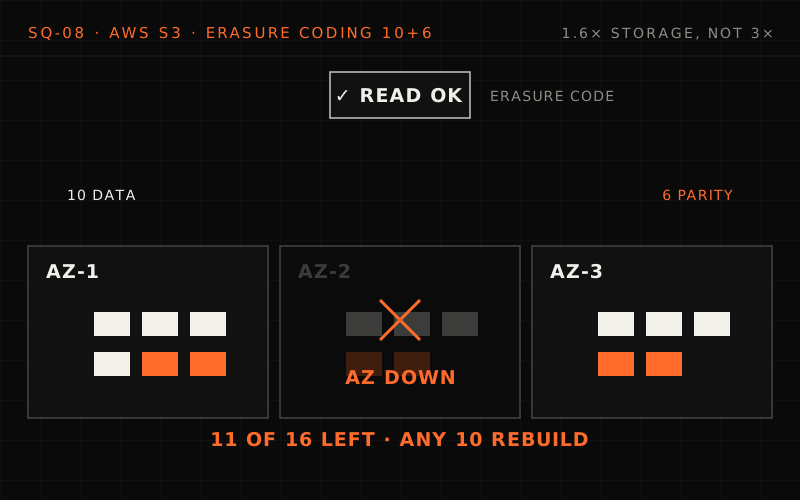
S3 stores 500 trillion+ objects at 200 million+ requests a second, designed for 11 nines, which at this scale is a floor (~5,000 objects a year). A PUT is erasure-coded into 10 data and 6 parity shards across three AZs, bracketed, then committed in the index; any 10 of 16 shards rebuild the object at 1.6x storage instead of 3x. The deep dives cover AZ loss and repair, strong read-after-write consistency, index partitioning and storage classes, then 503 backoff, correlated failures, concurrent writes and protecting data from stolen keys.
The Interview Begins#
You walk into the interview room. The interviewer smiles and gestures to the whiteboard.
"Thanks for coming in. Today we're going to design a distributed object storage system like S3. I'm interested in how you think about durability, consistency, and scale. Please think out loud—this is collaborative."
They write on the whiteboard:
Requirements
- Store objects up to 50 TB each
- 11 nines (99.999999999%) durability
- Strong read-after-write consistency
- Handle millions of requests per second
- Multiple storage tiers for cost optimization
- Global availability across multiple regions
"Take a few minutes to think about this, then walk me through your approach. We have about 45 minutes."
Phase 1: Requirements Clarification (5 minutes)#
Before diving in, you take a breath and start asking questions.
Your Questions#
"Before I start designing, let me clarify some requirements. What's the target scale—how many objects and how much data?"
"Think planetary scale. Hundreds of trillions of objects, exabytes of data."
"For durability, you mentioned 11 nines. What does that mean in practice?"
"If you store 10 million objects, you might lose 1 object every 10,000 years. Durability is non-negotiable—data loss is catastrophic."
"What about consistency? Traditional distributed systems trade consistency for availability."
"We need strong read-after-write consistency. After a write succeeds, any subsequent read must return the latest data. No stale reads."
"What are the latency requirements for reads and writes?"
"First byte latency around 100-200ms for small objects. Large objects can be slower but must support parallel downloads."
"Perfect. Let me summarize the requirements."
Functional Requirements#
1. Object operations
- PUT: Upload objects up to 50 TB (a single PUT is capped at 5 GB, so large objects use multipart upload)
- GET: Download objects (full or byte-range)
- DELETE: Remove objects
- LIST: Enumerate objects with prefix filtering
- HEAD: Get object metadata without content
- Multipart upload for large objects
2. Organization
- Buckets: Containers for objects
- Keys: Unique identifiers within buckets
- Prefixes: Logical grouping (like folders)
- Metadata: Custom key-value pairs per object
3. Data management
- Versioning: Keep all versions of objects
- Lifecycle policies: Auto-transition storage tiers
- Replication: Cross-region copying
- Encryption: At rest and in transit
4. Access control
- IAM policies: User-level permissions
- Bucket policies: Resource-level permissions
- ACLs: Fine-grained object access
- Presigned URLs: Temporary access
Non-Functional Requirements#
1. Durability
- 99.999999999% (11 nines)
- 1 object lost per 10 million over 10,000 years
- Survive AZ failures (region failures need cross-region replication)
2. Availability
- 99.99% for Standard tier
- 99.9% for infrequent access tiers
- Graceful degradation under load
3. Consistency
- Strong read-after-write for all operations
- Strong consistency for LIST operations
- No stale reads after successful writes
4. Performance
- First byte latency: 100-200ms
- 3,500 PUT/second per prefix
- 5,500 GET/second per prefix
- Unlimited aggregate throughput
Phase 2: Back of the Envelope Estimation (5 minutes)#
"Let me work through the numbers to understand the scale."
Before the numbers: what do 11 nines buy you at this scale?
Eleven nines of durability means roughly a 10⁻¹¹ chance per object per year of losing it. With 500 trillion objects stored, how many would you expect to lose each year at exactly that rate? Is 11 nines a comfortable target or a floor?
One strong answer
- Expected loss: 5 × 10¹⁴ objects × 10⁻¹¹ = ~5,000 objects a year.
- So it's a floor. At this scale even a published 11 nines would mean thousands of customers losing data every year, so the real design has to beat it by a wide margin.
- Where durability comes from: with hundreds of drives failing every day, durability is mostly about how quickly lost redundancy is rebuilt, not just how much redundancy you start with.
Storage Estimation#
- Scale
- Objects stored: 500 trillion
- Average object size: ~500 KB (highly variable)
- Total storage: ~250 exabytes
- Storage overhead
- Erasure coding overhead: ~1.6x for 10+6 (vs 3x for replication)
- Metadata per object: ~1 KB
- Metadata storage: 500 trillion × 1 KB = 500 PB
- With durability overhead
- Raw storage needed: 250 EB × 1.6 = 400 EB
- Across 3+ AZs: Distributed globally
Request Estimation#
- Total requests/second: 200+ million (AWS's published figure)
- Per-prefix limits (AWS: "at least", per partitioned prefix):
- GET/HEAD per prefix: 5,500/second
- PUT/DELETE per prefix: 3,500/second
- Daily requests (if that rate held all day): 200M × 86,400 = ~17 trillion requests/day
Key Metrics Summary#
Storage
- Objects: 500 trillion
- Raw data: ~250 exabytes
- With redundancy: ~400 exabytes
Requests
- Rate: 200+ million/second
- Daily: ~17 trillion
- Per-prefix GET limit: 5,500/second
Infrastructure
- Availability Zones: 3+ per region
- Regions: 39
- Hard drives: Tens of millions
Durability math
- Annual loss probability per object: ~0.000000001% (10⁻¹¹)
- Objects at risk: 1 in 100 billion/year
- Expected loss at exactly 11 nines: 500T × 10⁻¹¹ ≈ ~5,000 objects/year (so 11 nines is a floor to beat, not a comfortable margin)
Requirements and estimation
Q1/3 The estimate puts customer data at ~250 EB. Roughly how much raw disk would plain 3x replication need instead of erasure coding?
Answer & explanation
Answer: C
3 copies of 250 EB is ~750 EB, nearly double the ~400 EB budgeted with 10+6 erasure coding. At exabyte scale that gap is hundreds of exabytes of drives, which is why the design rejects simple replication.
Q2/3 A batch job issues 20,000 PUTs/second, all under the single prefix
logs/. What does the requirements sheet predict?Answer & explanation
Answer: A
Limits apply per prefix (3,500 PUT/s, 5,500 GET/s). "Unlimited aggregate throughput" comes from using many prefixes in parallel, not from pushing one prefix harder.
Q3/3 Which observation would violate the strong read-after-write requirement?
Answer & explanation
Answer: D
Strong consistency means once a write succeeds, every later read sees it. A 404 after a successful PUT is a stale read. Slow large downloads and lower tier availability are latency and availability concerns, not consistency.
Phase 3: High-Level Design (10 minutes)#
"Now let me sketch out the high-level architecture."
Sketch it first: where do the bytes go, and where is that written down?
Sketch the layers a PUT passes through. Where does the object's data end up, and where is the record of where it went?
One strong answer
- Front end: DNS, load balancers, authentication against IAM and bucket policies, and a request router.
- Storage layer: the data is erasure-coded into shards and written to storage nodes spread across several Availability Zones.
- Index (metadata) layer: records the key, version and the location of every shard, partitioned by bucket and key prefix.
- The PUT succeeds only once enough shards are durably written and the metadata is committed, and that's what makes read-after-write possible.
Splitting metadata from data lets each scale on its own: small, hot, partitioned records on one side; enormous, mostly idle bytes on millions of drives on the other. A repair service works in the background, rebuilding lost shards.
System Architecture#
%% title: S3 high-level architecture
flowchart TD
  subgraph CL["Clients"]
    direction TB
    SDK@{ icon: "sd:code", label: "AWS SDK" }
    REST@{ icon: "sd:api", label: "REST API" }
    CLI@{ icon: "sd:terminal", label: "AWS CLI" }
    CON@{ icon: "sd:browser", label: "Console" }
  end
  subgraph REG["AWS Region"]
    direction TB
    FE["FRONT END LAYER<br/>DNS → Load Balancer → Authentication → Routing"]:::edge
    subgraph IDX["Index/metadata layer"]
      direction TB
      PE["Partition Engine"]:::core
      GM@{ icon: "sd:database", label: "Global Metadata" }
      LM["Lifecycle Manager"]:::service
    end
    subgraph STL["Storage layer"]
      direction TB
      SN["Storage Nodes"]:::core
      EC["Erasure Coding"]:::service
      RS["Repair Service"]:::service
      subgraph AZS["Availability zones"]
        direction TB
        subgraph AZ3["AZ-3"]
          D3@{ icon: "sd:servers", label: "Disks" }
        end
        subgraph AZ2["AZ-2"]
          D2@{ icon: "sd:servers", label: "Disks" }
        end
        subgraph AZ1["AZ-1"]
          D1@{ icon: "sd:servers", label: "Disks" }
        end
      end
      SN ~~~ AZS
      EC ~~~ AZS
      RS ~~~ AZS
    end
    FE ==> IDX
    IDX ==> STL
  end
  CL ==> FE
  class SDK,REST,CLI,CON client
  class GM,D3,D2,D1 store
Component Breakdown#
1. Front End Layer#
Purpose: Handle all incoming requests, authentication, routing
Key components:
- DNS Service: Route requests to correct region/endpoint
- Load Balancers: Distribute traffic across API servers
- Authentication: Validate IAM credentials, bucket policies
- Request Router: Direct to correct storage nodes
2. Index/Metadata Layer#
Purpose: Track object locations without storing data
Key components:
- Partition Engine: Distribute keys across index partitions
- Global Metadata Store: Map keys to physical storage locations
- Lifecycle Manager: Handle versioning, retention, expiration
3. Storage Layer#
Purpose: Physical storage with durability guarantees
Key components:
- Storage Nodes: Thousands of servers with HDDs/SSDs
- Erasure Coding: Split data into shards with parity
- Repair Service: Detect and recover from failures
- Cross-AZ Distribution: Spread across availability zones
Data Flow: PUT Object#
%% title: PUT object flow
sequenceDiagram
  autonumber
  participant C as Client
  participant F as Front end
  participant I as Index layer
  participant S as Storage layer
  C->>F: CLIENT REQUEST · PUT /bucket/key HTTP/1.1
  Note over C,F: Content-Length: 1048576<br/>x-amz-content-sha256: #lt;checksum#gt;
  Note over F: FRONT END<br/>DNS resolves to regional endpoint<br/>Load balancer routes to API server<br/>Authenticate request (SigV4)<br/>Validate bucket policy
  F->>I: INDEX LAYER
  Note over I: Look up the key's partition (bucket, then key prefix)<br/>Acquire write lock on key<br/>Generate storage location
  I->>S: STORAGE LAYER
  Note over S: Erasure code the data (e.g., 10 data + 6 parity)<br/>Write shards to storage nodes across AZs<br/>Calculate and store checksums<br/>BRACKETING: Verify data can be reconstructed
  S-->>I: shards written
  Note over I: COMMIT<br/>Update metadata index<br/>Release write lock
  I-->>F: committed
  F-->>C: 200 OK
  Note over C,S: DURABILITY: Data survives if ANY 10 of 16 shards survive
High-level design
Q1/2 In the PUT flow, why does the client get 200 OK only after the index layer commits the metadata update?
Answer & explanation
Answer: B
The index layer is what makes an object findable: it maps the key to shard locations. Acknowledging before the commit would let a read miss the object. Erasure coding happens in the storage layer before the commit, not after it.
Q2/2 What does the "bracketing" step in the storage layer protect against?
Answer & explanation
Answer: C
Bracketing verifies that the written shards can be decoded back to data matching the original checksum before success is returned. Concurrent writers are handled by the index layer's write lock, not by bracketing.
Phase 4: Deep Dives (20 minutes)#
"Let's dive into how you achieve 11 nines of durability."
Deep Dive 1: Erasure Coding for Durability (Week 1 Concepts)#
The Problem#
Hard drive failure rates
- Annual failure rate: roughly 1-2% per drive (Backblaze's 2025 fleet: 1.36%)
- At S3 scale (tens of millions of drives): hundreds of drives fail daily
- Must lose ZERO customer data
Simple replication (3x)
- Store 3 copies across AZs
- Problem: 3x storage overhead
- Problem: All 3 could fail (rare but possible)
Need: High durability with lower storage overhead
Can you beat three copies?
Three full copies across three Availability Zones cost 3× the storage. Design something cheaper that still survives losing an entire AZ. What do you give up?
One strong answer
- Erasure coding: split each object into k data shards and compute m parity shards; any k of the k + m rebuild it. With 10 + 6, any 10 of 16 shards are enough.
- Overhead: 16 ÷ 10 = 1.6× instead of 3×.
- Placement is what survives an AZ: spread the 16 shards so no AZ holds more than 6 (say 6, 5 and 5). Losing a whole AZ still leaves at least 10.
- The cost: reading through a failure or rebuilding means fetching 10 shards and decoding, which uses more network and CPU than reading one replica. That's why small or very hot objects may be better off replicated.
The Solution: Erasure Coding#
%% title: Erasure coding architecture
flowchart TD
  OD@{ icon: "sd:file", label: "ORIGINAL DATA<br/>1 MB object" }
  EE["ERASURE ENCODE (Reed-Solomon 10+6)<br/>Split into 10 data shards + compute 6 parity shards"]:::core
  SH["16 SHARDS (~100 KB each)<br/>D1 D2 D3 D4 D5 D6 D7 D8 D9 D10<br/>P1 P2 P3 P4 P5 P6"]:::hot
  subgraph DIST["Distribute across AZs and drives"]
    direction TB
    A1@{ icon: "sd:servers", label: "AZ-1 (drives A-E)<br/>D1 · D4 · D7<br/>P1 · P4 · D10" }
    A2@{ icon: "sd:servers", label: "AZ-2 (drives F-J)<br/>D2 · D5 · D8<br/>P2 · P5" }
    A3@{ icon: "sd:servers", label: "AZ-3 (drives K-P)<br/>D3 · D6 · D9<br/>P3 · P6" }
  end
  OD ==> EE
  EE ==> SH
  SH ==> DIST
  class OD client
class A1,A2,A3 store- RECOVERY: Can reconstruct from ANY 10 of 16 shards. Can lose up to 6 shards (or entire AZ) and still recover.
- OVERHEAD: 1.6x storage (vs 3x for replication)
A 1 MB object is Reed-Solomon encoded into 10 data and 6 parity shards of about 100 KB, placed at most 6 per Availability Zone (6, 5, 5): 1.6× storage instead of 3×, and bracketing checks that the shards decode to the original checksum before the 200 OK. When AZ-1 loses power its 6 shards are unreachable, but any 10 of 16 rebuild the object, and the repair service rebuilds the lost shards on healthy drives.
Implementation#
# storage/erasure_coding.py

"""
Erasure Coding for 11 Nines Durability

Uses Reed-Solomon coding to achieve extreme durability
with only 1.6x storage overhead (vs 3x for replication).
"""

from dataclasses import dataclass
from typing import List, Optional, Tuple
import hashlib


@dataclass
class Shard:
    """A single shard of erasure-coded data."""
    shard_id: int
    data: bytes
    checksum: str
    storage_node: str
    availability_zone: str


@dataclass
class ErasureConfig:
    """Configuration for erasure coding."""
    data_shards: int = 10      # K: minimum shards to reconstruct
    parity_shards: int = 6     # M: redundant shards
    # Total = 16 shards, can lose up to 6


class ErasureCodingService:
    """
    Erasure coding service for S3 durability.

    Uses Reed-Solomon (10, 6) coding:
    - Split data into 10 data shards
    - Compute 6 parity shards
    - Can reconstruct from any 10 of 16 shards

    Applies concepts:
    - Week 1: Replication and partitioning
    - Week 1: Data durability strategies
    """

    def __init__(self, config: ErasureConfig, storage_nodes: List):
        self.config = config
        self.storage_nodes = storage_nodes
        self.total_shards = config.data_shards + config.parity_shards

    async def encode_and_store(
        self,
        object_key: str,
        data: bytes
    ) -> List[Shard]:
        """
        Encode data and distribute shards across AZs.

        Steps:
        1. Calculate checksum of original data
        2. Split into data shards
        3. Compute parity shards
        4. Distribute across AZs (ensuring AZ diversity)
        5. Verify (bracketing) before confirming
        """
        # Step 1: Original checksum
        original_checksum = self._compute_checksum(data)

        # Step 2: Split into data shards
        data_shards = self._split_data(data, self.config.data_shards)

        # Step 3: Compute parity shards
        parity_shards = self._compute_parity(data_shards)

        # Step 4: Select storage nodes (AZ-aware)
        all_shards = data_shards + parity_shards
        shard_placements = self._select_nodes(len(all_shards))

        # Step 5: Write shards to storage
        stored_shards = []
        for i, (shard_data, (node, az)) in enumerate(
            zip(all_shards, shard_placements)
        ):
            checksum = self._compute_checksum(shard_data)
            shard = Shard(
                shard_id=i,
                data=shard_data,
                checksum=checksum,
                storage_node=node,
                availability_zone=az
            )
            await self._write_shard(shard)
            stored_shards.append(shard)

        # Step 6: BRACKETING - verify we can reconstruct
        if not await self._verify_reconstruction(
            stored_shards, original_checksum
        ):
            raise DurabilityError("Bracketing verification failed")

        return stored_shards

    async def read_and_decode(
        self,
        shards: List[Shard]
    ) -> bytes:
        """
        Read shards and reconstruct original data.

        Can reconstruct from any K (10) of N (16) shards.
        """
        # Read available shards
        available = []
        for shard in shards:
            try:
                data = await self._read_shard(shard)
                if self._verify_checksum(data, shard.checksum):
                    available.append((shard.shard_id, data))
            except Exception:
                continue  # Shard unavailable

        # Need at least K shards
        if len(available) < self.config.data_shards:
            raise DurabilityError(
                f"Only {len(available)} shards available, "
                f"need {self.config.data_shards}"
            )

        # Reconstruct using Reed-Solomon
        return self._reconstruct(available)

    def _select_nodes(self, count: int) -> List[Tuple[str, str]]:
        """
        Select storage nodes ensuring AZ diversity.

        Critical: No more than ceil(count/3) shards per AZ
        This ensures we can lose an entire AZ and still reconstruct.
        """
        placements = []
        az_counts = {}
        max_per_az = (count + 2) // 3  # Ceiling division

        for node in self.storage_nodes:
            az = node.availability_zone
            if az_counts.get(az, 0) < max_per_az:
                placements.append((node.id, az))
                az_counts[az] = az_counts.get(az, 0) + 1
            if len(placements) == count:
                break

        return placements

    async def _verify_reconstruction(
        self,
        shards: List[Shard],
        expected_checksum: str
    ) -> bool:
        """
        Bracketing: Verify data can be reconstructed.

        This is critical - we don't confirm write success
        until we've proven the data is recoverable.
        """
        try:
            reconstructed = await self.read_and_decode(shards)
            actual_checksum = self._compute_checksum(reconstructed)
            return actual_checksum == expected_checksum
        except Exception:
            return False

    def _compute_checksum(self, data: bytes) -> str:
return hashlib.sha256(data).hexdigest()Deep Dive 2: Strong Consistency (Week 5 Concepts)#
"S3 moved from eventual to strong consistency in 2020. How?"
How can a read be stale?
Object metadata is cached on many front-end nodes so reads are fast. A client overwrites an object and immediately reads it back through a different node. What can go wrong, and what must every read check to be safe without giving up the cache?
One strong answer
- What goes wrong: the second node's cached metadata can still point to the old version, so the read returns stale data. That was the pre-2020 eventual-consistency behaviour.
- The fix: writes update the metadata synchronously, and every read asks a small authoritative record of each object's latest write (the lesson's "witness") whether its cached copy is current, refreshing only when it isn't.
- Why it's cheap: the check is tiny compared with fetching metadata, so most reads still use the cache. Strong consistency arrived without a throughput penalty.
The Problem#
Scenario 1: Read-after-write
PUT /bucket/key → 200 OK
GET /bucket/key → 404 Not Found  (stale!)
(Strictly, new keys were already read-after-write consistent before 2020, unless a GET or HEAD for that key had run before the PUT and cached the miss.)
Scenario 2: Read-after-update
PUT /bucket/key v1 → 200 OK
PUT /bucket/key v2 → 200 OK
GET /bucket/key → returns v1  (stale!)
Why it happened
- Metadata replicated asynchronously
- Different nodes might see different versions
- LIST operations even worse
Impact
- Data lakes: Missing files in queries
- Analytics: Incorrect results
- Required workarounds: Sleep, external databases
The Solution: Strong Consistency#
%% title: Strong consistency architecture — PUT and GET flows
sequenceDiagram
  autonumber
  participant C as Client
  participant S3 as S3
  participant SL as Storage layer
  participant M as Primary metadata node
  participant R as Metadata replicas
  C->>S3: Client sends PUT
  S3->>SL: Write data to storage layer
  S3->>M: Update metadata (SYNCHRONOUSLY)
  M->>R: Replicate to ALL metadata replicas
  R-->>M: Wait for acknowledgment from majority
  S3-->>C: 200 OK only after metadata is consistent
  Note over C,R: GET FLOW (after strong consistency)
  C->>R: Read metadata
  R->>M: Confirm latest version (witness / read quorum)
  Note over R: A minority replica may lag a majority write,<br/>so every read checks the latest version<br/>No more stale reads
TRADE-OFFS
- Before: Higher throughput, eventual consistency
- After: Same throughput(!), strong consistency
AWS achieved this through (per Werner Vogels' "Diving Deep on S3 Consistency"):
- A cache-coherence protocol for the metadata caching layer
- A "witness" that tracks the latest write per object, so a read can detect stale cached metadata
- Automated reasoning (formal proofs) to verify the new protocol
Implementation#
# metadata/consistency.py

"""
Strong Consistency for S3 Metadata

Ensures read-after-write consistency for all operations.
"""

from dataclasses import dataclass
from typing import Optional, List
from datetime import datetime
import asyncio


@dataclass
class MetadataEntry:
    """Object metadata entry."""
    bucket: str
    key: str
    version_id: str
    etag: str
    size: int
    storage_class: str
    last_modified: datetime
    shard_locations: List[str]


class StrongConsistencyMetadataStore:
    """
    Metadata store with strong read-after-write consistency.

    Key mechanism: synchronous replication to a majority before
    acknowledging the write, and majority reads (R + W > N) so a
    read always overlaps the latest write.

    Applies concepts:
    - Week 5: Strong vs eventual consistency
    - Week 5: Consensus protocols
    """

    def __init__(self, replicas: List, quorum_size: int, node_id: str):
        self.replicas = replicas
        self.quorum_size = quorum_size  # Majority
        self.node_id = node_id  # this (primary) metadata node

    async def put_metadata(
        self,
        entry: MetadataEntry
    ) -> bool:
        """
        Store metadata with strong consistency.

        Only returns success after majority of replicas
        have durably stored the metadata.
        """
        # Generate monotonic version
        entry.version_id = self._generate_version_id()

        # Write to all replicas in parallel
        write_tasks = [
            self._write_to_replica(replica, entry)
            for replica in self.replicas
        ]

        # Wait for quorum (majority)
        results = await asyncio.gather(
            *write_tasks,
            return_exceptions=True
        )

        successes = sum(1 for r in results if r is True)

        if successes >= self.quorum_size:
            # Quorum achieved - write is durable and consistent
            return True
        else:
            # Rollback on failure
            await self._rollback(entry)
            return False

    async def get_metadata(
        self,
        bucket: str,
        key: str
    ) -> Optional[MetadataEntry]:
        """
        Read metadata - guaranteed to return latest version.

        A majority write can leave a minority of replicas behind,
        so a single "nearest" replica could be stale. Read a majority
        and keep the newest version (any two majorities overlap).
        """
        results = await asyncio.gather(
            *(self._read_from_replica(r, bucket, key) for r in self.replicas),
            return_exceptions=True
        )
        responses = [r for r in results if not isinstance(r, Exception)]
        if len(responses) < self.quorum_size:
            raise QuorumUnavailableError(bucket, key)

        entries = [e for e in responses if e is not None]
        return max(entries, key=lambda e: e.version_id, default=None)

    async def list_objects(
        self,
        bucket: str,
        prefix: str
    ) -> List[MetadataEntry]:
        """
        List objects - strongly consistent.

        After a PUT, the object is immediately visible in LIST.
        """
        # Same rule as get_metadata: use a replica confirmed current
        # (via the witness / a quorum check), not just the nearest one
        replica = await self._select_current_replica(bucket, prefix)

        # Read from partition responsible for this prefix
        partition = self._get_partition(bucket, prefix)

        return await self._list_from_partition(replica, partition, prefix)

    def _generate_version_id(self) -> str:
        """Generate monotonically increasing version ID."""
        # Zero-padded timestamp + per-node sequence: sorts in write order
        # (a random uuid4 would not, so max() could pick an old write)
        import time
        self._seq = getattr(self, "_seq", 0) + 1
return f"{time.time_ns():020d}-{self.node_id}-{self._seq:08d}"Erasure coding and consistency
Q1/3 With 10+6 Reed-Solomon, AZ-1 (holding 6 shards) goes dark and, at the same moment, one more drive in AZ-2 fails. Can a GET be served?
Answer & explanation
Answer: D
Recovery needs any 10 of the 16 shards. Losing an AZ costs 6, which the code tolerates on its own; one extra failure drops below 10. It does not matter whether survivors are data or parity shards, only how many there are.
Q2/3 Why does
_select_nodescap placement at ceil(16/3) = 6 shards per AZ?Answer & explanation
Answer: A
The 6 parity shards are the loss budget. If one AZ held 7 or more shards, a single AZ outage could make objects unrecoverable. Even disk usage is a side effect, not the reason for the cap.
Q3/3 Before 2020, a GET right after a successful PUT could return 404. What was the root cause described in the lesson?
Answer & explanation
Answer: B
The stale reads came from asynchronous metadata replication: different metadata nodes could see different versions. The fix was to replicate metadata synchronously and acknowledge only after the replicas agreed.
Deep Dive 3: Index Partitioning (Week 1 Concepts)#
"How do you index 500 trillion objects?"
The Problem#
Challenge
- Cannot fit in single index (way too large)
- Cannot scan linearly (too slow)
- Must support prefix queries
- Must handle hot prefixes
Requirements
- O(1) lookups by key
- O(n) prefix scans (where n = matching keys)
- Automatic scaling
- No hotspots
The Solution: Key Partitioning#
Object key: s3://my-bucket/2024/logs/server1/app.log
Partitioning strategy
- Hash bucket name → Bucket partition —
hash("my-bucket") → Partition 42 - Within bucket, partition by key prefix —
"2024/logs" → Sub-partition 7 - Keys sorted within partition for efficient prefix scans
Partition structure — Bucket partition 42
| Sub-partition | Prefix | Entries |
|---|---|---|
| Sub-part 1 | "" |
key1 → loc, key2 → loc, ... |
| Sub-part 2 | "a" |
a/b → loc, a/c → loc, ... |
| Sub-part 7 | "2024" |
2024/logs/ →, 2024/data/ →, ... |
| ... |
Dynamic partitioning
- S3 monitors request rates and splits busy prefixes automatically (AWS documents the behaviour, not the trigger)
- In this design: split a partition when it runs hot, near the published 5,500 GET/sec per prefix
- Splits happen automatically, transparently
- AWS states no limit on the number of prefixes in a bucket
Hot prefix handling
- Problem: All keys start with "2024/" → hot partition
- Solution: Spread load across several prefixes (each prefix gets its own 3,500 PUT / 5,500 GET per second)
- Instead of:
2024/log-001.txtfor everything - Use:
2024/shard-07/log-001.txt
- Instead of:
Pre-2018 guidance was to randomize the leading characters; since July 2018 AWS says that is no longer needed, because S3 splits busy prefixes automatically
Implementation#
# index/partition_manager.py

"""
Index Partitioning for S3

Dynamically partitions index to handle 500+ trillion objects.
"""

from dataclasses import dataclass
from typing import List, Optional, Dict
import hashlib


@dataclass
class Partition:
    """An index partition."""
    partition_id: str
    prefix_range: tuple  # (start_prefix, end_prefix)
    request_rate: float
    node_assignment: str


class PartitionManager:
    """
    Manages index partitions for S3.

    Key features:
    - Dynamic splitting based on load
    - Prefix-based range partitioning
    - Automatic rebalancing

    Applies concepts:
    - Week 1: Hash vs range partitioning
    - Week 1: Hot key handling
    """

    # Thresholds for partition operations
    SPLIT_THRESHOLD_RPS = 5500  # GET requests/second
    MIN_PARTITION_SIZE = 1000   # Objects

    def __init__(self, partition_store):
        self.partition_store = partition_store

    def get_partition_for_key(
        self,
        bucket: str,
        key: str
    ) -> Partition:
        """
        Find the partition responsible for a key.

        Uses hierarchical lookup:
        1. Hash bucket to bucket partition
        2. Binary search within bucket for key prefix
        """
        # Level 1: Bucket partition
        bucket_hash = self._hash_bucket(bucket)
        bucket_partition = self._get_bucket_partition(bucket_hash)

        # Level 2: Key prefix partition
        key_partition = self._find_key_partition(bucket_partition, key)

        return key_partition

    async def check_and_split(
        self,
        partition: Partition
    ) -> List[Partition]:
        """
        Check if partition needs splitting due to high load.

        Triggered when request rate exceeds threshold.
        """
        if partition.request_rate < self.SPLIT_THRESHOLD_RPS:
            return [partition]  # No split needed

        # Split partition in half by prefix
        start, end = partition.prefix_range
        mid = self._find_split_point(partition)

        new_partitions = [
            Partition(
                partition_id=f"{partition.partition_id}-a",
                prefix_range=(start, mid),
                request_rate=partition.request_rate / 2,
                node_assignment=self._select_node()
            ),
            Partition(
                partition_id=f"{partition.partition_id}-b",
                prefix_range=(mid, end),
                request_rate=partition.request_rate / 2,
                node_assignment=self._select_node()
            )
        ]

        # Atomic partition update
        await self.partition_store.atomic_split(partition, new_partitions)

        return new_partitions

    def _hash_bucket(self, bucket: str) -> int:
        """Hash bucket name to partition number."""
        return int(hashlib.md5(bucket.encode()).hexdigest(), 16) % 10000

    def _find_split_point(self, partition: Partition) -> str:
        """
        Find optimal split point for partition.

        Analyzes key distribution to split evenly.
        """
        # Sample keys in partition
        keys = self.partition_store.sample_keys(partition, n=1000)

        # Find median prefix
        keys.sort()
        median_key = keys[len(keys) // 2]

        # Extract common prefix
return self._extract_prefix(median_key)Deep Dive 4: Storage Classes and Lifecycle (Week 4 Concepts)#
"How do storage classes work for cost optimization?"
Storage Classes#
| Storage Class | Durability | Availability | Use Case |
|---|---|---|---|
| S3 Standard | 99.999999999% (11 nines) | 99.99% | Frequent access |
| S3 Express One Zone | 99.999999999% | 99.95% (1 AZ) | Single-digit ms latency |
| S3 Standard-IA | 99.999999999% | 99.9% | Infrequent access |
| S3 One Zone-IA | 99.999999999% (in 1 AZ) | 99.5% (1 AZ) | Recreatable data |
| S3 Intelligent Tiering | 99.999999999% | 99.9% | Unknown access |
| S3 Glacier Instant | 99.999999999% | 99.9% | Archive (ms access) |
| S3 Glacier Flexible | 99.999999999% | 99.99% | Archive (min-hours) |
| S3 Glacier Deep Archive | 99.999999999% | 99.99% | Archive (12-48 hours) |
Cost comparison (per GB/month, us-east-1, as of October 2026)
| Class | Price |
|---|---|
| S3 Standard | $0.023 |
| S3 Standard-IA | $0.0125 |
| S3 Glacier Instant | $0.004 |
| S3 Glacier Deep | $0.00099 |
Glacier Deep is 23x cheaper than Standard!
Lifecycle Policies#
# lifecycle/policy_engine.py

"""
S3 Lifecycle Policy Engine

Automatically transitions objects between storage classes
based on age and access patterns.
"""

from dataclasses import dataclass
from typing import List, Optional
from datetime import datetime, timedelta
from enum import Enum


class StorageClass(Enum):
    STANDARD = "STANDARD"
    STANDARD_IA = "STANDARD_IA"
    INTELLIGENT_TIERING = "INTELLIGENT_TIERING"
    GLACIER_INSTANT = "GLACIER_IR"
    GLACIER_FLEXIBLE = "GLACIER"
    GLACIER_DEEP = "DEEP_ARCHIVE"


@dataclass
class LifecycleRule:
    """A lifecycle transition rule."""
    rule_id: str
    prefix_filter: Optional[str]
    tag_filter: Optional[dict]
    transitions: List[dict]  # [{days: 30, storage_class: "STANDARD_IA"}]
    expiration_days: Optional[int]


class LifecyclePolicyEngine:
    """
    Evaluates and applies lifecycle policies to objects.

    Common pattern:
    1. Standard for 30 days (frequent access)
    2. Standard-IA for 60 days (occasional access)
    3. Glacier for 1 year (rare access)
    4. Delete after 7 years (compliance)

    Applies concepts:
    - Week 4: Cache tiering strategies
    - Week 8: Data lifecycle management
    """

    def __init__(self, metadata_store, storage_service):
        self.metadata = metadata_store
        self.storage = storage_service

    async def evaluate_object(
        self,
        bucket: str,
        key: str,
        rules: List[LifecycleRule]
    ) -> Optional[StorageClass]:
        """
        Determine if object should transition.
        """
        obj_metadata = await self.metadata.get(bucket, key)

        for rule in rules:
            if not self._matches_filter(obj_metadata, rule):
                continue

            age_days = (datetime.utcnow() - obj_metadata.last_modified).days

            # Check expiration
            if rule.expiration_days and age_days >= rule.expiration_days:
                return "DELETE"

            # Check transitions (in reverse order - most aggressive first)
            for transition in sorted(
                rule.transitions,
                key=lambda t: t['days'],
                reverse=True
            ):
                if age_days >= transition['days']:
                    target_class = StorageClass(transition['storage_class'])
                    if target_class != obj_metadata.storage_class:
                        return target_class

        return None  # No transition needed

    async def apply_transition(
        self,
        bucket: str,
        key: str,
        target_class: StorageClass
    ) -> bool:
        """
        Transition object to new storage class.

        For Glacier classes, this involves:
        1. Reading object from current storage
        2. Re-encoding for archive (more aggressive erasure coding)
        3. Writing to archive storage
        4. Updating metadata
        """
        if target_class == "DELETE":
            return await self._delete_object(bucket, key)

        # Get current object location
        current_shards = await self.metadata.get_shard_locations(bucket, key)

        # Transition to new storage class
        new_shards = await self.storage.transition(
            current_shards,
            target_class
        )

        # Update metadata atomically
        await self.metadata.update_storage_class(
            bucket, key, target_class, new_shards
        )

return TrueIndex partitioning and storage tiers
Q1/3 Why does the index use range partitioning by key prefix (keys sorted inside a partition) rather than hashing every full key?
Answer & explanation
Answer: C
Sorted ranges let a prefix scan cost O(n) in matching keys. Hashing balances load but turns every LIST into a scatter-gather. Range partitions can still get hot, which is why S3 splits them dynamically.
Q2/3 A partition serving
2024/keeps climbing in traffic. What triggers S3 to split it?Answer & explanation
Answer: B
Splits are load-driven: S3 monitors request rate per partition and splits automatically and transparently once it passes the threshold. Object count alone does not trigger a split.
Q3/3 Application logs are read heavily for a few weeks, rarely after that, and must be kept 7 years for compliance. Best setup?
Answer & explanation
Answer: D
The access pattern is known and decays with age, which is exactly what lifecycle transitions are for. Deep Archive from day one would make the heavily-read first weeks take 12+ hours per retrieval; Standard forever is ~23x pricier per GB than Deep Archive.
Phase 5: Scaling and Edge Cases#
Scaling Strategies#
Automatic partition scaling
- S3 monitors request rates per prefix
- Automatically splits hot partitions
- No manual intervention needed
- Transparent to applications
Workload decorrelation
At S3's scale, individual workload spikes average out:
- Millions of customers
- Trillions of objects
- Most data is idle most of the time
- Hot spots become statistically rare
Best practices for clients
- Spread high-throughput workloads across multiple prefixes
- Bad: every request under
logs/2024-01-01/ - Good:
logs/2024-01-01/part-00/…part-15/read and written in parallel - (Random leading characters were pre-2018 advice; no longer needed)
- Bad: every request under
- Implement exponential backoff for 503 errors
- Start with 100ms delay
- Double on each retry
- Max 5 retries
- Use multipart upload for large objects
- Parallel part uploads
- Retry individual parts on failure
Edge Cases#
Edge case 1: Entire AZ failure
- Scenario: Entire availability zone loses power
- Impact: ~33% of shards unavailable
- Solution:
- Erasure coding allows reconstruction from 10 of 16 shards
- Even with 6 shards in failed AZ, data is recoverable
- Repair service immediately starts re-replicating
- No data loss, brief availability impact
Edge case 2: Correlated disk failures
- Scenario: Heat wave causes accelerated disk failures
- Impact: Higher than normal failure rate
- Solution:
- Continuous health monitoring
- Proactive migration from stressed disks
- Spare capacity on all disks for fast recovery
- Parallel re-replication across thousands of drives
Edge case 3: Hot object
- Scenario: Single object gets millions of requests
- Impact: Could overwhelm storage nodes
- Solution:
- Caching at front end layer
- Object replicated to more nodes automatically
- CloudFront integration for CDN caching
- Request throttling with 503 errors + backoff
Edge case 4: Concurrent writes to same key
- Scenario: Two clients PUT same key simultaneously
- Impact: Which version wins?
- Solution:
- Last-writer-wins semantics
- Timestamps determine winner
- Versioning available to keep all versions
- Conditional writes (If-Match) for optimistic locking
Scaling and edge cases
Q1/3 Your uploader starts getting bursts of 503 errors from S3. What is the recommended client reaction?
Answer & explanation
Answer: B
503 is S3 throttling a busy partition. Immediate retries add load to the very partition that is overloaded; backoff gives it time to split.
Q2/3 Two services may PUT the same key concurrently and must never silently overwrite each other's update. What should they use?
Answer & explanation
Answer: D
Last-writer-wins is the default, and it is exactly what causes the silent overwrite. If-Match gives optimistic locking; versioning can additionally keep every version.
Q3/3 A whole AZ loses power. Why is this "a brief availability impact, no data loss" rather than a durability incident?
Answer & explanation
Answer: A
With at most 6 shards per AZ, an AZ outage stays inside the parity budget. S3 does not keep full copies per AZ; it keeps shards and repairs the lost ones in parallel across many drives.
Phase 6: Monitoring and Operations#
Durability health
| Metric | Value |
|---|---|
| Shard integrity | 100% |
| Objects with all shards | 99.9999999% |
| Repair queue depth | 12,345 |
| Repair throughput | 1.2M/hour |
Availability
| Metric | Value |
|---|---|
| Request success rate | 99.99% |
| 503 rate | 0.001% |
| GET latency (p50) | 45ms |
| PUT latency (p50) | 85ms |
Storage
| Metric | Value |
|---|---|
| Total objects | 512T |
| Total storage | 287 EB |
| Daily growth | +0.3 EB |
| Disk utilization | 67% |
Request patterns
| Metric | Value |
|---|---|
| GET requests/sec | 187M |
| PUT requests/sec | 23M |
| LIST requests/sec | 8M |
| Hot partitions | 142 |
Alerting Strategy#
CRITICAL (PagerDuty)
- Durability below 99.9999999%
- Any data loss detected
- Region-wide availability < 99.9%
- Repair queue > 1M objects
WARNING (Slack)
- 503 rate > 0.01%
- Disk utilization > 80%
- Hot partition count > 500
- Latency p99 > 500ms
INFO (Dashboard)
- Daily storage growth
- Traffic patterns
- Storage class distribution
Durability in operation
Q1/3 The repair queue climbs towards 1 million objects. No object has been lost. Why is that still a critical alert?
Answer & explanation
Answer: B
Every object in the queue is running with reduced redundancy. The longer it waits, the bigger the chance that more shards fail before it's rebuilt: repair speed is durability.
Q2/3 The 503 rate rises above its warning threshold. What should a well-behaved client do on a 503?
Answer & explanation
Answer: B
A 503 means slow down: S3 is splitting a hot partition or shedding load. Immediate retries add to the problem; exponential backoff gives it room to recover.
Q3/3 Disk utilisation is 67% with a warning at 80%. Why does spare capacity matter for durability, not just for growth?
Answer & explanation
Answer: A
When a drive dies, its shards are rebuilt onto thousands of other drives at once. Without headroom, repairs slow down and objects stay under-protected for longer.
Final Challenge: When the Delete Is Legitimate#
The interviewer leans in. "Your 11 nines are safe. Now the customer's aren't."
"An attacker steals a customer's access keys and runs a script that deletes or overwrites every object in their most important bucket. Every request is properly authenticated. Your durability is perfect. How does your design protect this customer?"
- The DELETE and PUT requests are valid and signed with real credentials
- Erasure coding and repair are working exactly as designed
- The customer needs their data back, and a guarantee it can't happen again
- Auditors require some records to be unchangeable for years
Durability is not the same as protection
Erasure coding protects against failing hardware. What protects against a valid request that destroys data? List the features you'd offer and what each one stops.
One strong answer
- Versioning: an overwrite creates a new version and a plain DELETE adds a delete marker, so earlier versions stay recoverable.
- MFA Delete: permanently deleting versions, or turning versioning off, requires a second factor that stolen access keys don't include.
- Object Lock (write once, read many): a retention period during which a version can't be deleted or overwritten. In compliance mode nobody can shorten it, not even an administrator.
- Replication to a separate account: a copy in another region, owned by an account the stolen keys can't touch.
- Least privilege and detection: keys scoped to what each application needs, plus alerts on unusual bulk deletes.
- The trade-off: keeping old versions costs money, so lifecycle rules expire noncurrent versions after a chosen number of days.
Final challenge · Quest check
Q1/4 Eleven nines of durability protects an object against which of these?
Answer & explanation
Answer: A
Durability is about not losing data the system was asked to keep. A valid delete or overwrite is the system doing what it was told, so protecting against it takes versioning, locks and access control.
Q2/4 With versioning enabled, what does a plain DELETE (with no version ID) do?
Answer & explanation
Answer: B
The object disappears from normal listings, but its versions are still there. Removing the delete marker restores it.
Q3/4 Which feature stops even an administrator with full credentials from deleting a version before its retention date?
Answer & explanation
Answer: C
In compliance mode, nobody can shorten the retention period or delete the locked version until it expires. That's what auditors mean by write once, read many.
Q4/4 With 10 + 6 erasure coding, how much raw capacity does 1 PB of customer data occupy?
Answer & explanation
Answer: B
16 shards for every 10 shards of data is 1.6×, against 3× for three full copies. At hundreds of exabytes that difference is enormous.
Interview Conclusion#
"Excellent work. You've covered durability, consistency, and scaling really well. Any questions?"
"Thank you! I'm curious about the 2020 strong consistency change. How did AWS achieve it without sacrificing performance?"
"Great question. Werner Vogels' write-up describes extending the metadata caching layer with a cache-coherence protocol and a 'witness' that tracks the latest write to each object, so a read can tell when its cached metadata is stale. They verified it with automated reasoning, and it shipped with no performance or price penalty."
Summary: Concepts Applied#
- Week 1: Data at scale
- Partitioning — Key-based index partitioning
- Replication — Multi-AZ data distribution
- Hot keys — Automatic partition splitting
- Week 2: Failure-first design
- Erasure coding — Survive up to 6 shard failures
- Checksums — Detect and repair corruption
- Bracketing — Verify before confirming write
- Week 4: Caching
- Storage tiers — Hot, warm, cold, frozen
- Lifecycle — Automatic tier transitions
- Week 5: Consistency
- Strong consistency — Read-after-write
- Synchronous replication — Majority (quorum) before ACK, reads check the latest version
- Conflict resolution — Last-writer-wins
- Week 10: Production readiness
- 11 nines durability design target (the SLA covers availability, not durability)
- Continuous repair monitoring
- Automatic scaling without intervention
Durability
- 11 nines (99.999999999%)
- 1 object lost per 10 million over 10,000 years
- Erasure coding (e.g. 10+6 = 1.6x overhead) instead of 3x replication; AWS doesn't publish its exact scheme
Scale
- 500+ trillion objects
- Hundreds of exabytes
- 200+ million requests/second (as of March 2026)
Consistency
- Strong read-after-write since 2020
- No stale reads
- No performance penalty
Innovation
- First major public cloud object store (2006)
- Strong consistency at massive scale (CAP still applies: in a partition it chooses consistency)
- 8 main storage classes for every use case
- Foundation for AWS ecosystem
Sources#
Official AWS:
- Docs
AWS S3 Documentation: https://docs.aws.amazon.com/s3/
- Read
S3 Consistency: https://aws.amazon.com/s3/consistency/
- Read
S3 Storage Classes: https://aws.amazon.com/s3/storage-classes/
- Docs
S3 Performance Guidelines: https://docs.aws.amazon.com/AmazonS3/latest/userguide/optimizing-performance.html
Architecture Deep Dives:
- Blog
ByteByteGo - How S3 Stores 350 Trillion Objects: https://blog.bytebytego.com/p/how-amazon-s3-stores-350-trillion
- Read
High Scalability - Behind AWS S3's Massive Scale: https://highscalability.com/behind-aws-s3s-massive-scale/
- Read
System Design One - S3 Durability: https://newsletter.systemdesign.one/p/amazon-s3-durability
Strong Consistency:
- Blog
AWS Blog - S3 Strong Consistency: https://aws.amazon.com/blogs/aws/amazon-s3-update-strong-read-after-write-consistency/
- Read
InfoQ - S3 Strong Consistency: https://www.infoq.com/news/2020/12/aws-s3-strong-consistency/
Recent Updates:
- Read
Blocks and Files - S3 Updates 2025: https://blocksandfiles.com/2025/12/03/aws-s3/
- Blog
AWS Blog - Twenty years of Amazon S3 (March 2026): https://aws.amazon.com/blogs/aws/twenty-years-of-amazon-s3-and-building-whats-next/
- Read
AWS - S3 maximum object size raised to 50 TB: https://aws.amazon.com/about-aws/whats-new/2025/12/amazon-s3-maximum-object-size-50-tb/
Self-Assessment Checklist#
After studying this case study, you should be able to:
- Explain erasure coding and why it's superior to replication for durability
- Calculate durability math (11 nines)
- Design an index partitioning scheme for trillions of objects
- Explain how S3 achieved strong consistency without sacrificing performance
- Describe bracketing and why it's critical for durability
- Design lifecycle policies for cost optimization
- Handle hot prefixes by spreading load across multiple prefixes
- Implement exponential backoff for 503 errors
- Explain the trade-offs between different storage classes
- Design for correlated failures (AZ failure, disk batch failure)
- Monitor durability and availability at scale
- Articulate why S3 is considered the "greatest cloud service"
This case study covers AWS S3, the object store that set the bar for cloud durability, demonstrating how to achieve 11 nines of durability with strong consistency at planetary scale.
this lesson in shorts · 4
play them all →One idea from this lesson in about a minute each, made for your phone.


- 0/7stages cleared
Follow-up drills
0 of 11 practisedYou presented AWS S3. Now the interviewer pushes back. Answer each follow-up out loud or in the box, then reveal a strong answer.
“Eleven nines sounds like "never". With 500 trillion objects, is it?”
Pushes on · what a durability percentage means at this object count
Go deeper · reading trail
all reading →Real write-ups from the teams that built these systems. Each opens on the publisher's site in a new tab.
Building and operating a pretty big storage system called S3
Andy Warfield · 2023- What
- A guest post by S3's distinguished engineer, based on his FAST 2023 keynote.
- Key idea
- Drives keep growing while their I/O stays flat, so S3 manages 'heat' (requests per disk) by spreading each customer's data over very many drives to avoid hotspots.
- Why here
- The storage layer of this quest seen from inside: why placement and spreading data over many drives matters for durability and speed.
Diving Deep on S3 Consistency
Werner Vogels · 2021- What
- How S3 became strongly consistent for every request in 2020 without a performance hit.
- Key idea
- S3 kept its metadata cache but added a cache coherence protocol: a new witness component is notified of every write and tells readers when the cached view is stale.
- Why here
- The strong consistency deep dive of this quest, with the real mechanism S3 used.
Summary of the Amazon S3 Service Disruption in the Northern Virginia (US-EAST-1) Region
2017- What
- AWS's postmortem of the February 2017 S3 outage in US-EAST-1.
- Key idea
- A playbook command removed more servers than intended, taking out the index subsystem that holds all object metadata, which then needed a slow full restart.
- Why here
- Why this quest partitions the index into cells: one oversized subsystem took a whole region of S3 down.
New lessons by email
New lessons, side quests and case files as they ship, at most once a week. No spam, unsubscribe anytime.
Discussion · …
Public: everyone reading this lesson sees comments. Be kind and keep it on the material.