Want it harder? Hide the model answer and work each phase in a scratchpad, then reveal and score yourself. Or simply read on: the checkpoints below work either way.
The Impossible Made Simple
When Facebook acquired WhatsApp for $19 billion in 2014, something didn't add up.
The messaging app was handling about 50 billion messages daily — with only about 32 engineers (Wired later put the figure at 35), and roughly 10 of them on the Erlang backend.
How is that even possible?
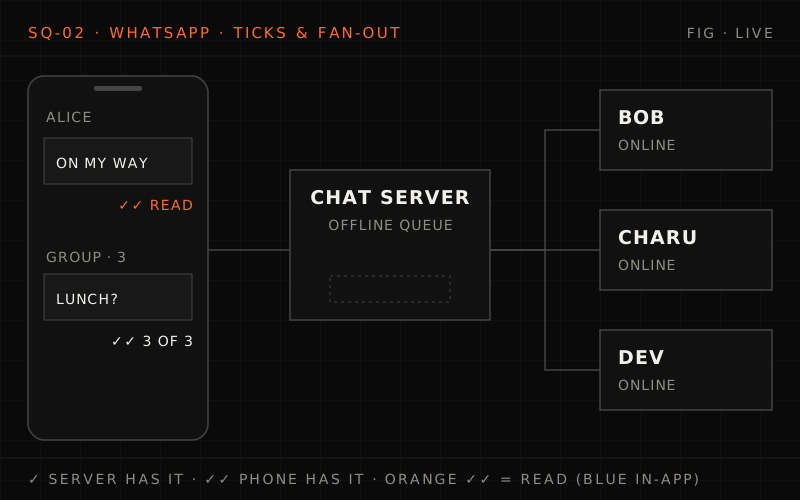
The WhatsApp paradox (2014 acquisition)
- Messages per day: ~50 Billion (inbound + outbound)
- Engineers: ~32 (Wired: 35; ~10 on the Erlang server) · ~55 employees total
- Servers: ~550
- Cost per user: Fraction of competitors
- Connections per server: ~1 Million in production; 2M+ shown possible, 2.8M peak (Industry: ~100K typical)
- Technology stack: Erlang + FreeBSD (Not Java, not Linux)
For comparison:
- Facebook Messenger: engineering teams many times larger
- Most messaging apps: far larger teams for similar scale
So how did about 32 engineers run it?
Today's scale (latest public figures)
- Monthly active users: 3+ Billion (April 2025)
- Daily messages: 100+ Billion (last official figure, Oct 2020)
- Peak messages/second: ~3 Million (our estimate; not published)
- Countries: 180+
- Updates tab (Status + Channels) daily users: ~1.5 Billion (June 2025)
- Voice/video calls: 2+ Billion minutes/day (2018, last published figure)
- Encryption: End-to-End (Signal Protocol) — WhatsApp can't read messages
- Availability target (this design): 99.99%
This is the system we'll design today — and understand why their technology choices matter.
WhatsApp delivers 100 billion+ messages a day to 50 million connected phones: at 2 million connections a server that is 25 servers instead of 500, and deleting delivered messages shrinks 50 TB a day to ~2.5 TB. Erlang chat servers route encrypted blobs via a user registry with one tick, two ticks and blue ticks, while media goes to a separate store. The deep dives cover ~2 KB Erlang processes, the Signal Protocol, offline queues deleted only on ACK and presence with a 60 s TTL, then celebrity status, sender keys, linked devices and the 32-engineer lesson.
The Interview Begins#
You're interviewing at a startup that wants to build the next great messaging app. The CTO draws on the whiteboard:
"WhatsApp proved that a small team can build a messaging platform for billions. I want you to design a messaging system that can scale to that level. Walk me through how you'd approach it."
Build a messaging system that can handle billions of users with:
Requirements
- Support 2 billion users
- Handle 100+ billion messages per day
- Real-time message delivery (< 500ms for online users)
- Offline message storage and delivery
- End-to-end encryption (server cannot read messages)
- Group messaging (up to 1024 members)
- Media sharing (images, video, documents)
- Presence (online/offline/typing indicators)
- Message status (sent, delivered, read)
- 99.99% availability
Constraint: Build it with a small team (< 100 engineers)
"The team size constraint is intentional. I want to see if you understand that architecture choices determine how many engineers you need. WhatsApp proved you can do more with less."
Phase 1: Requirements Clarification#
"Let me make sure I understand the constraints and can make the right trade-offs."
Your Questions#
"First, what's the message delivery guarantee? Is it okay if a message is delayed, or must it be truly real-time?"
"For online users, we want sub-second delivery. For offline users, messages should be queued and delivered when they come online. Messages should never be lost."
"What about message ordering? If I send two messages quickly, must they arrive in order?"
"Within a single conversation, yes — messages must be ordered. But I don't care if Message A to Bob arrives before Message B to Alice, even if B was sent first."
"For end-to-end encryption, does the server ever need to read message content?"
"Never. The server should only route encrypted blobs. This is non-negotiable for user trust."
"What's the read/write ratio? How often do users check for messages vs send them?"
"Heavy read. Users open the app frequently to check for messages. For every message sent, there are probably 10 message reads/checks. Also, presence updates are extremely chatty — typing indicators, online status."
"What about media? Video messages can be large."
"Media follows a different path. Upload to storage, send a reference in the message. The encrypted media is stored separately from chat servers."
Requirements Summary#
Functional Requirements:
1. Messaging
- One-to-one messaging
- Group messaging (up to 1024 members)
- Message types: text, image, video, audio, document, location
- Message status: sent → delivered → read
- Reply, forward, delete (for everyone)
2. Presence
- Online/offline status
- Last seen timestamp
- Typing indicators
- Privacy controls (hide last seen)
3. Media handling
- Upload and download media
- Automatic compression
- Progressive loading (blurry → clear)
- Media forwarding (reuse uploaded media)
4. Security
- End-to-end encryption for all messages
- Device verification (QR code scan)
- Two-factor authentication
5. Sync
- Multi-device support
- Message sync across devices
- Local backup (encrypted)
Non-Functional Requirements:
Scale
- 2 billion users
- 500 million daily active users
- 100 billion messages/day
- 3 million messages/second (peak)
Latency
- Online delivery: < 500ms
- Offline delivery: < 5s after coming online
- Typing indicators: < 200ms
Availability
- 99.99% uptime
- Graceful degradation (messages queue if delays)
Storage
- Messages stored until delivered
- Delivered messages deleted from server
- Media retained for 30 days
Efficiency
- Minimal bandwidth (works on 2G)
- Minimal battery drain
- Small engineering team
Phase 2: Back of the Envelope Estimation#
"Let me work through the numbers to understand infrastructure needs."
Before the numbers: how many servers just to hold the connections?
500 million people use the app daily and about 10% are connected at the busiest moment. A typical server holds 50,000 to 100,000 persistent connections; a heavily tuned one can hold 2 million. How many connection servers do you need in each case?
One strong answer
- Connections: 500M × 10% = 50 million at peak.
- Typical servers: 50M ÷ 100K = 500 servers (1,000 at 50K each).
- Tuned servers: 50M ÷ 2M = 25 servers, 50 to 75 with redundancy.
Connection density, not message count, is what sets the size (and the staff) of a chat backend. That's why the runtime and kernel choices in the next phases matter so much.
Traffic Calculations#
- Daily messages: 100,000,000,000 (100 billion)
- Seconds per day: 86,400
- Average MPS: ~1.16 million messages/second
- Peak multiplier: 3x (evening hours globally)
- Peak MPS: ~3.5 million messages/second
- Each message triggers:
- Sender acknowledgment: 1 message
- Recipient delivery: 1 message
- Read receipt: 1 message
- Total events/message: ~3-4x
- Effective events/second: ~10-15 million at peak
Connection Calculations#
- Daily active users: 500 million
- Peak concurrent: ~10% = 50 million connections
- If each server handles 2 million connections:
- Servers needed: 25 servers (just for connections!)
- With redundancy: 50-75 servers
- WhatsApp showed one server could hold over 2 million connections (2.8M peak), and ran ~1 million per chat server in production in 2014. Most companies: 50,000-100,000 per server. This 10-40x efficiency is the key insight.
Storage Calculations#
- Average message size: ~500 bytes (encrypted)
- Daily messages: 100 billion
- Daily storage: 50 TB/day (if we stored everything)
- BUT: WhatsApp deletes messages after delivery!
- Undelivered at any time: ~5% of daily messages
- Actual storage: ~2.5 TB active
- Plus offline queues: ~10 TB
- Media storage is separate:
- Daily uploads: ~10 billion media files
- Average size: 100 KB (compressed)
- Daily media: ~1 PB/day
- 30-day retention: ~30 PB
- With deduplication: ~15 PB
Requirements and estimation
Q1/3 Peak is ~50 million concurrent connections. If your servers held the industry-typical 100,000 connections each instead of 2 million, how many connection servers would you need before redundancy?
Answer & explanation
Answer: C
50M / 100K = 500 servers, versus 50M / 2M = 25 at WhatsApp's density. That 20x gap is why per-server connection efficiency is the key insight of the estimate, not a detail.
Q2/3 Storing every message would take ~50 TB/day, yet active message storage is only a few TB. Why?
Answer & explanation
Answer: A
The server is a delivery queue, not an archive: delivered messages are deleted, leaving roughly 5% undelivered at any time. Media does go to separate storage, but that is not what shrinks message storage from 50 TB/day.
Q3/3 The interviewer requires ordering only within a conversation, not across conversations. What does that free you from?
Answer & explanation
Answer: D
Per-conversation ordering can be enforced locally for each chat; a global order across 100 billion messages a day would need costly system-wide coordination. Acks, offline storage and encryption are all still required; ordering scope does not touch them.
Phase 3: High-Level Architecture#
"WhatsApp's architecture is remarkably simple. That's the secret — simplicity enables a small team."
Sketch it first: what does the server actually keep?
Messages are end-to-end encrypted. What does the server need to know to deliver one, what does it store, and for how long? How does the sender learn the message arrived?
One strong answer
- Knows: routing metadata only: sender, recipient, time, size. The body is an encrypted blob it cannot open.
- Stores: the blob only until the recipient's device acknowledges it, then deletes it. Undelivered messages wait in the recipient's offline queue.
- Media: uploaded encrypted to separate storage; the message carries a reference, so chat servers never carry large payloads.
- Status: one tick when the server has accepted the message, two when the recipient's device has it, then a read receipt, each sent back as a small event.
Storing so little is what keeps the backend cheap: there is no growing archive of everyone's chats to shard, back up and protect.
The WhatsApp Philosophy#
1. Focus
- One thing, done exceptionally well: messaging.
- No social feed, no stories (initially), no ads (ads arrived only in June 2025, in the Updates tab).
- Feature creep is the enemy of reliability.
2. Reliability over features
- A message that doesn't deliver is worse than no feature.
- Every new feature adds complexity and potential failures.
- Say no to most feature requests.
3. Right tool for the job
- Erlang for concurrency (designed for telecom switches).
- FreeBSD for networking performance.
- Mnesia for in-memory distributed data.
- Unconventional, but perfect fit.
4. Small team = better communication
- 32 engineers means everyone knows the whole system.
- Founders reportedly close to the code in the early years (anecdotal, not documented).
- No coordination overhead between 50 microservice teams.
5. Let it crash
- Erlang philosophy: processes crash, supervisors restart.
- Don't try to handle every error — let it fail and recover.
- Simple, predictable failure recovery.
System Architecture#
%% title: A likely WhatsApp-style architecture
flowchart TD
  subgraph CL["Client layer"]
    direction TB
    AN@{ icon: "tech:android", label: "Android App" }
    IO@{ icon: "tech:apple", label: "iOS App" }
    WW@{ icon: "sd:browser", label: "WhatsApp Web" }
  end
  subgraph EG["Edge / gateway"]
    direction TB
    LB@{ icon: "sd:load-balancer", label: "LOAD BALANCERS<br/>GeoDNS routes to nearest data center" }
    subgraph CS["Chat servers (Erlang + FreeBSD)"]
      direction TB
      C1["Chat 1 · ~1-2M conns"]:::core
      C2["Chat 2 · ~1-2M conns"]:::core
      C3["Chat 3 · ~1-2M conns"]:::core
      CN["Chat N · ~1-2M conns"]:::core
    end
    LB ==> CS
  end
  CL ==>|"Persistent TCP · Noise Pipes encryption<br/>custom binary protocol"| LB
  subgraph BE["Backend services · Mnesia (Erlang distributed DB) + ETS (in-memory)"]
    direction TB
    MR["MESSAGE ROUTING<br/>Direct P2P between chat servers"]:::service
    OS@{ icon: "sd:queue", label: "OFFLINE STORE<br/>Queue for offline users" }
    MS@{ icon: "sd:object-storage", label: "MEDIA STORAGE<br/>S3-like blob store for media" }
    UR@{ icon: "sd:database", label: "USER REGISTRY<br/>User→Server mapping" }
    GM@{ icon: "sd:database", label: "GROUP METADATA<br/>Group membership" }
    KS@{ icon: "sd:key", label: "KEYS (for E2E)<br/>Public key distribution" }
    MR ~~~ UR
    OS ~~~ GM
    MS ~~~ KS
  end
  CS --> BE
  class AN,IO,WW client
  class LB edge
  class OS queue
class MS,UR,GM,KS store- Each connection = 1 Erlang process (a bare process starts at ~2.7 KB; real ones grow with buffers and session state).
- Each process handles: auth, presence, message routing.
- All backend services are backed by Mnesia (Erlang distributed DB) + ETS (in-memory).
Message Flow#
%% title: Message flow — Alice sends "Hello" to Bob
sequenceDiagram
  autonumber
  participant A as Alice's phone
  participant S as WhatsApp servers
  participant B as Bob's phone
  A->>A: ENCRYPT · with a per-message key from the Signal session with Bob
  A->>S: SEND · encrypted blob + recipient: bob@wa
  S-->>A: ACK (SENT) · server received message (single tick)
  S->>S: LOOKUP · where is Bob connected? User registry → Server 7
  opt IF BOB IS ONLINE
    S->>B: ROUTE · forward to Bob's process
    B-->>S: DELIVERED ACK · Bob's device got it
    S-->>A: DELIVERED (double tick)
  end
  opt BOB READS THE MESSAGE
    B-->>S: READ RECEIPT · Bob opened the chat
    S-->>A: READ (blue double tick)
endHigh-level architecture
Q1/3 Alice's message shows a single tick for hours. What does that tell her?
Answer & explanation
Answer: B
A single tick is the server's ACK; the double tick only comes after Bob's device sends a delivered ACK, typically when he comes online. Read status is a separate, later step (the blue ticks), so a single tick says nothing about reading.
Q2/3 Alice is connected to one chat server and Bob to another. How does Alice's server know where to send the message?
Answer & explanation
Answer: C
The user registry maps each user to their chat server, so the message goes straight to Bob's process. GeoDNS only picks a data center for incoming client connections; broadcasting to every server would not scale.
Q3/3 Why is media uploaded to a separate blob store, with only a reference sent through the chat servers?
Answer & explanation
Answer: D
Chat servers are tuned for millions of small, chatty connections; pushing videos through them would choke that path. The message carries just a reference to the encrypted media. Media is still end-to-end encrypted, and the server never decrypts it.
Phase 4: Deep Dives#
Deep Dive 1: Why Erlang?#
Week 2 concepts: Failure handling, resilience. Week 10 concepts: Operational simplicity.
"WhatsApp's secret weapon is Erlang — a language designed in the 1980s for telephone switches. It's a perfect fit for messaging."
The Challenge:
Traditional approach (one OS thread per connection)
- Each connection = 1 OS thread
- OS thread = ~1MB of stack reserved (often more)
- Context switching is expensive
- 1 million connections = 1 million threads = ~1TB of stack reserved!
- Practical limit: ~50,000-100,000 connections/server
WhatsApp needs
- 1-2 million connections per server
- Each connection needs state (session, queue)
- Must handle failures gracefully
- Hot code reloading (no restarts for deploys)
Why Erlang Solves This:
ERLANG'S SUPERPOWERS
1. LIGHTWEIGHT PROCESSES
Erlang processes are NOT OS threads. They're managed by the BEAM virtual machine.
| OS Thread | Erlang Process |
|---|---|
| ~1MB stack reserved | ~2.7KB at spawn |
| Expensive switch | Cheap switch |
| Limited count | Millions possible |
WhatsApp runs 1 Erlang process per user connection. The bare processes for 2 million connections take only ~5GB; with socket buffers and session state, WhatsApp's January 2012 server held 2.28 million connections with roughly 27GB of its ~103GB of RAM still free (WhatsApp blog, January 2012). A thread per connection would reserve ~2TB of stack before doing any work.
2. "LET IT CRASH" PHILOSOPHY
- Traditional: Try to handle every error (complex, error-prone)
- Erlang: Let processes crash, supervisors restart them
%% title: Let it crash — supervisor restarts a crashed process
flowchart TD
  SUP["SUPERVISOR<br/>monitors children"]:::core
  UA["User A Process"]:::service
  UB["User B Process"]:::bad
  UC["User C Process"]:::service
  UB2["User B Process<br/>Supervisor restarts in milliseconds"]:::ok
  SUP --> UA & UB & UC
  UB -->|"CRASH!"| UB2
User A and C never notice. User B reconnects automatically.
3. HOT CODE RELOADING
Deploy new code WITHOUT restarting the server. Connections stay alive during deployments. No maintenance windows needed.
4. DISTRIBUTED BY DESIGN
Erlang processes can communicate across machines seamlessly. Send a message to a process on another server = same syntax. Built-in distribution, no external message queue needed.
WhatsApp's Erlang Customizations:
# Pseudocode: How WhatsApp structures connection handling
# (Actual WhatsApp code is Erlang, this shows the concept)

"""
WhatsApp Connection Handler

Each user connection runs as a single Erlang process.
This process:
1. Owns the TCP socket
2. Maintains user session state
3. Routes messages to/from the user
4. Dies cleanly when user disconnects
"""

class UserConnectionProcess:
    """
    Conceptual model of WhatsApp's per-user Erlang process.

    In Erlang, this is implemented with gen_server behavior.
    Memory: a few KB per process at spawn
    Lifecycle: Lives as long as user is connected
    """

    def __init__(self, socket, user_id):
        self.socket = socket
        self.user_id = user_id
        self.session_key = None
        self.message_queue = []  # For messages while processing
        self.last_seen = now()

        # Register this process in the global user registry
        UserRegistry.register(user_id, self.pid)

    def handle_message(self, msg):
        """
        Main message handler — called for every incoming message.

        Erlang processes have a mailbox — messages queue up
        and are processed one at a time.
        """
        match msg:
            case AuthRequest(credentials):
                self.handle_auth(credentials)

            case OutgoingMessage(recipient, encrypted_content):
                self.route_to_recipient(recipient, encrypted_content)

            case IncomingMessage(sender, encrypted_content):
                self.deliver_to_socket(sender, encrypted_content)

            case PresenceUpdate(status):
                self.broadcast_presence(status)

            case Disconnect():
                self.cleanup_and_die()

    def route_to_recipient(self, recipient_id, content):
        """
        Route message to another user.

        This is the core of WhatsApp's routing:
        1. Look up recipient's process (which server?)
        2. Send message directly to that process
        """
        # Find recipient's process (could be on any server)
        recipient_process = UserRegistry.lookup(recipient_id)

        if recipient_process:
            # Direct process-to-process communication
            # Works across servers in Erlang!
            send(recipient_process, IncomingMessage(
                sender=self.user_id,
                content=content
            ))
        else:
            # User offline — store for later
            OfflineStore.queue(recipient_id, content)

        # Server has the message: single tick (SENT). DELIVERED is
        # sent only when the recipient's DEVICE acks receipt.
        self.send_ack(MessageStatus.SENT)

    def cleanup_and_die(self):
        """
        Clean shutdown when user disconnects.

        In Erlang, when a process dies, all its memory
        is automatically reclaimed. No per-connection cleanup code needed.
        """
        UserRegistry.unregister(self.user_id)
        close(self.socket)
# Process simply terminates — Erlang handles cleanupThe "Island" Architecture:
To limit blast radius of failures, WhatsApp partitioned its backend into small independent "islands" (in 2014, pairs of Mnesia database nodes that each held one slice of the data and replicated within the pair). The diagram scales the same idea up to groups of chat servers.
%% title: WhatsApp's island architecture
flowchart TD
  subgraph I1["Island 1"]
    S1["Chat Servers 1, 2, 3, 4<br/>Users A-H<br/>Replica: 1a"]:::core
  end
  subgraph I2["Island 2"]
    S2["Chat Servers 5, 6, 7, 8<br/>Users I-P<br/>Replica: 2a"]:::core
  end
  subgraph I3["Island 3"]
    S3["Chat Servers 9, 10, 11<br/>Users Q-Z<br/>Replica: 3a"]:::core
  end
  X["Cross-Island Routing<br/>for A→Z messages"]:::edge
  S1 & S2 & S3 --> X
BENEFITS:
- Island 1 can fail without affecting Island 2
- Upgrades can be rolled out island by island
- Each island has its own replica for failover
- Limits "blast radius" of any failure
Deep Dive 2: End-to-End Encryption (Signal Protocol)#
Week 9 concepts: Security, encryption.
"WhatsApp uses the Signal Protocol for end-to-end encryption. This is critical — even WhatsApp can't read your messages."
%% title: End-to-end encryption overview
flowchart TD
  subgraph NO["Without E2EE"]
    direction LR
    A1@{ icon: "sd:user", label: "Alice" } -->|"#quot;Hi#quot;"| S1["Server<br/>Server can read #quot;Hi#quot;<br/>Hackers who breach server can read #quot;Hi#quot;<br/>Government subpoenas can access #quot;Hi#quot;"]:::bad
    S1 -->|"#quot;Hi#quot;"| B1@{ icon: "sd:user", label: "Bob" }
  end
  subgraph YES["With E2EE"]
    direction LR
    A2@{ icon: "sd:user", label: "Alice" } -->|"encrypted blob"| S2["Server<br/>Server sees random bytes<br/>Only Alice and Bob can decrypt<br/>Even WhatsApp can't read it"]:::ok
    S2 -->|"encrypted blob"| B2@{ icon: "sd:user", label: "Bob" }
  end
  NO ~~~ YES
  class A1,B1,A2,B2 client
Signal Protocol Components:
SIGNAL PROTOCOL: THE BUILDING BLOCKS
1. KEY PAIRS — each user has multiple key pairs:
- Identity Key (long-term): Generated once when you install WhatsApp · Never changes (unless you reinstall) · Public part uploaded to WhatsApp servers
- Signed Pre-Key (medium-term): Rotates periodically · Signed by Identity Key · Uploaded to servers
- One-Time Pre-Keys (ephemeral): Batch of ~100 keys uploaded · Each used once then discarded · Provides forward secrecy
2. X3DH KEY AGREEMENT — when Alice messages Bob for the first time:
%% title: X3DH key agreement
sequenceDiagram
  autonumber
  participant A as Alice
  participant S as Server
  participant B as Bob
  A->>S: "Give me Bob's keys"
  S-->>A: Bob's Identity Key, Signed Pre-Key, One-Time Pre-Key
  Note over A,B: Alice computes shared secret using:<br/>Her Identity Key + Bob's Signed Pre-Key<br/>Her Ephemeral Key + Bob's Identity Key<br/>Her Ephemeral Key + Bob's Signed Pre-Key<br/>Her Ephemeral Key + Bob's One-Time Pre-Key (if available)<br/>→ Shared Secret (only Alice and Bob can compute)
3. DOUBLE RATCHET — after initial key agreement, keys evolve with EVERY message:
- Message 1: Encrypt with Key_1
- Message 2: Encrypt with Key_2 (derived one-way from the chain key that produced Key_1)
- Message 3: Encrypt with Key_3 (derived one-way from the next chain key)
- ...
Benefits:
- Forward Secrecy: Compromise of Key_3 doesn't reveal Msg 1-2
- Post-Compromise Security: If a key leaks, the DH ratchet (fresh Diffie-Hellman keys exchanged as replies flow) makes later keys safe again
- Break-in Recovery: System "heals" itself once a new DH ratchet step happens
# encryption/signal_protocol.py

"""
Simplified illustration of Signal Protocol concepts.

The actual implementation uses:
- Curve25519 for key exchange
- AES-256-CBC for encryption
- HMAC-SHA256 for authentication
"""

from dataclasses import dataclass
from typing import Optional, Tuple
import os
import hashlib
import hmac


@dataclass
class KeyPair:
    """A public/private key pair."""
    public_key: bytes
    private_key: bytes


@dataclass
class SessionState:
    """State for an encrypted session with another user."""
    their_identity_key: bytes
    their_signed_prekey: bytes

    # Ratchet state
    root_key: bytes
    chain_key: bytes
    message_number: int = 0


class SignalSession:
    """
    Simplified Signal Protocol session.

    This illustrates the key concepts — actual implementation
    is more complex with proper cryptographic primitives.
    """

    def __init__(
        self,
        my_identity: KeyPair,
        their_identity_public: bytes,
        their_signed_prekey: bytes,
        their_one_time_prekey: Optional[bytes] = None
    ):
        self.my_identity = my_identity

        # Perform X3DH key agreement
        self.session = self._x3dh_key_agreement(
            their_identity_public,
            their_signed_prekey,
            their_one_time_prekey
        )

    def _x3dh_key_agreement(
        self,
        their_identity: bytes,
        their_signed_prekey: bytes,
        their_one_time_prekey: Optional[bytes]
    ) -> SessionState:
        """
        X3DH: Extended Triple Diffie-Hellman.

        Creates a shared secret from multiple DH exchanges.
        """
        # Generate ephemeral key for this session
        ephemeral = self._generate_keypair()

        # Perform multiple DH exchanges
        dh1 = self._dh(self.my_identity.private_key, their_signed_prekey)
        dh2 = self._dh(ephemeral.private_key, their_identity)
        dh3 = self._dh(ephemeral.private_key, their_signed_prekey)

        if their_one_time_prekey:
            dh4 = self._dh(ephemeral.private_key, their_one_time_prekey)
            shared_secret = self._kdf(dh1 + dh2 + dh3 + dh4)
        else:
            shared_secret = self._kdf(dh1 + dh2 + dh3)

        # Derive initial root and chain keys
        root_key, chain_key = self._derive_keys(shared_secret)

        return SessionState(
            their_identity_key=their_identity,
            their_signed_prekey=their_signed_prekey,
            root_key=root_key,
            chain_key=chain_key
        )

    def encrypt(self, plaintext: bytes) -> Tuple[bytes, int]:
        """
        Encrypt a message using current chain key.

        Each message gets a unique key (Double Ratchet).
        """
        # Derive message key from chain key
        message_key, new_chain_key = self._ratchet_chain(
            self.session.chain_key
        )

        # Encrypt with message key
        ciphertext = self._aes_encrypt(message_key, plaintext)

        # Update chain key (ratchet forward)
        message_number = self.session.message_number
        self.session.chain_key = new_chain_key
        self.session.message_number += 1

        return ciphertext, message_number

    def decrypt(self, ciphertext: bytes, message_number: int) -> bytes:
        """
        Decrypt a message.

        May need to skip ahead if messages arrive out of order.
        """
        # Derive the message key for this message number
        message_key = self._get_message_key(message_number)

        # Decrypt
        plaintext = self._aes_decrypt(message_key, ciphertext)

        return plaintext

    def _ratchet_chain(self, chain_key: bytes) -> Tuple[bytes, bytes]:
        """
        Symmetric ratchet: derive next keys from current.

        This is the "forward secrecy" mechanism — old keys
        can't be derived from new keys.
        """
        # Message key for current message
        message_key = hmac.new(chain_key, b"\x01", hashlib.sha256).digest()

        # New chain key for next message
        new_chain_key = hmac.new(chain_key, b"\x02", hashlib.sha256).digest()

        return message_key, new_chain_key


class GroupEncryption:
    """
    Group messaging uses a different approach.

    Instead of pairwise encryption, sender distributes
    a "sender key" to all group members.
    """

    def __init__(self, group_id: str, my_user_id: str):
        self.group_id = group_id
        self.my_user_id = my_user_id

        # Generate my sender key for this group
        self.my_sender_key = self._generate_sender_key()

        # Store other members' sender keys
        self.member_sender_keys = {}

    def distribute_sender_key(self, member_sessions: dict):
        """
        Send my sender key to all group members.

        Uses pairwise Signal sessions for secure distribution.
        """
        for member_id, session in member_sessions.items():
            # Encrypt sender key using pairwise session
            encrypted_key = session.encrypt(self.my_sender_key)
            # Send to member via normal message path
            yield member_id, encrypted_key

    def encrypt_for_group(self, plaintext: bytes) -> bytes:
        """
        Encrypt message using my sender key.

        All group members who have my sender key can decrypt.
        Much more efficient than pairwise encryption.
        """
        # Use sender key with chain ratchet
        message_key = self._derive_message_key()
        ciphertext = self._aes_encrypt(message_key, plaintext)

        # Ratchet forward
        self._ratchet_sender_key()

        return ciphertext

    def handle_member_left(self, member_id: str):
        """
        When someone leaves, all sender keys must be regenerated.

        This ensures the departed member can't read future messages.
        """
        # Generate new sender key
        self.my_sender_key = self._generate_sender_key()

        # Redistribute to remaining members
# (handled by caller)What WhatsApp CAN See (Metadata):
Encrypted (WhatsApp cannot read)
- Message content
- Media files (photos, videos, documents)
- Voice notes
- Voice and video call content
- Status updates
Not encrypted (WhatsApp can see)
- Who messaged whom (sender/recipient)
- When messages were sent
- Message size
- Device information
- Phone numbers
- Profile photos
- Group membership
- Online/offline status
This metadata is necessary for routing but reveals communication patterns even if content is secret.
Erlang and end-to-end encryption
Q1/3 Why can one Erlang server hold around 2 million connections when a thread-per-connection server tops out near 100,000?
Answer & explanation
Answer: B
WhatsApp's 2012 server held 2.28 million connections in roughly 70GB of RAM, a few tens of KB each including buffers; 2 million OS threads would reserve about 2TB of stack, plus expensive context switches. FreeBSD's network stack helps, but memory per connection is what sets the ceiling.
Q2/3 An attacker steals the message key for message 3 in an ongoing chat. Can they decrypt messages 1 and 2?
Answer & explanation
Answer: C
The ratchet derives each new key with a one-way function, so a later key reveals nothing about earlier ones. That is forward secrecy. Server deletion is irrelevant here: anyone holding ciphertext from earlier would still be protected by the key derivation, not by deletion.
Q3/3 A government subpoenas WhatsApp for a user's chats. With E2EE in place, what can WhatsApp actually provide?
Answer & explanation
Answer: D
Content is encrypted end to end; routing still needs sender, recipient, time and size, so that metadata is visible. Servers only hold public keys, which cannot decrypt anything.
Deep Dive 3: Offline Message Handling#
Week 3 concepts: Message queuing, delivery guarantees.
"Most users aren't online all the time. Offline message storage is critical."
Bob's phone was off for two days
Alice sent Bob 40 messages while his phone was off. He comes back on a flaky network that drops twice during the sync. How do you get all 40 to him, in order, with none missing and none shown twice?
One strong answer
- Queue per recipient: the 40 messages wait in Bob's offline queue, each with a message ID and a sequence number within the conversation.
- Delete only on ack: the server removes a message only after Bob's device confirms it. If the connection drops mid-sync, the unacknowledged ones are sent again (at-least-once).
- Dedup and order on the device: the client ignores IDs it already has and orders by the per-conversation sequence, so Bob sees each message once and in order.
- Close the loop: delivery receipts flow back to Alice as the messages land.
- Bound the queue: undelivered messages expire after 30 days, so a phone that never returns can't grow a queue forever.
%% title: Offline message flow — Alice sends a message to offline Bob
sequenceDiagram
  autonumber
  participant A as Alice
  participant W as WhatsApp
  participant Q as Bob's offline queue
  participant B as Bob
  Note over B: offline
  A->>W: Send (encrypted)
  W-->>A: ACK (single tick) · "Message received by server"
  W->>Q: Store in Offline Queue (Msg 1, Msg 2, ...)
  Note over A,B: ... TIME PASSES (Bob offline) ...
  B->>W: Bob comes online · TCP connection
  W->>B: Drain queue · send all pending msgs
  B-->>W: Delivery ACK
  W-->>A: Delivered (double tick)
  W->>Q: Delete from queue (delivered)
The server only routes Alice's encrypted blob: one tick when it ACKs, two when Bob's device ACKs delivery, blue ticks on the read receipt. If Bob is offline the message waits in his offline queue (kept up to 30 days), is drained when he reconnects, resent if the link drops before his ACK, de-duplicated by message ID on his device, and deleted only after that ACK.
# offline/message_store.py

"""
Offline Message Storage

WhatsApp's approach:
- Messages stored only until delivered
- After delivery confirmation, deleted from server
- This minimizes server storage and privacy exposure
"""

import asyncio
from dataclasses import dataclass
from typing import List, Optional
from datetime import datetime, timedelta


@dataclass
class QueuedMessage:
    """A message waiting for delivery."""
    message_id: str
    sender_id: str
    recipient_id: str
    encrypted_content: bytes
    timestamp: datetime
    expiry: datetime  # Messages expire after 30 days

    # Delivery tracking
    delivery_attempts: int = 0
    last_attempt: Optional[datetime] = None


class OfflineMessageStore:
    """
    Stores messages for offline users.

    Design principles:
    - In-memory for speed (Mnesia ETS tables)
    - Replicated for durability
    - Partitioned by recipient for scalability
    - Messages deleted after delivery
    """

    def __init__(self, db, max_queue_size: int = 10000):
        self.db = db  # Mnesia in actual WhatsApp
        self.max_queue_size = max_queue_size

        # TTL for stored messages
        self.message_ttl = timedelta(days=30)

    async def queue_message(
        self,
        sender_id: str,
        recipient_id: str,
        encrypted_content: bytes
    ) -> QueuedMessage:
        """
        Store message for offline recipient.
        """
        message = QueuedMessage(
            message_id=generate_id(),
            sender_id=sender_id,
            recipient_id=recipient_id,
            encrypted_content=encrypted_content,
            timestamp=datetime.utcnow(),
            expiry=datetime.utcnow() + self.message_ttl
        )

        # Check queue size limits
        queue_size = await self.db.count_for_recipient(recipient_id)
        if queue_size >= self.max_queue_size:
            # Drop oldest message (or reject new one)
            await self.db.delete_oldest(recipient_id)

        await self.db.save(message)
        return message

    async def get_pending_messages(
        self,
        recipient_id: str
    ) -> List[QueuedMessage]:
        """
        Get all pending messages for a user who just came online.

        Called when user establishes connection.
        """
        messages = await self.db.get_by_recipient(
            recipient_id,
            order_by="timestamp",
            limit=1000  # Batch size
        )

        # Filter expired messages
        now = datetime.utcnow()
        valid_messages = [m for m in messages if m.expiry > now]

        return valid_messages

    async def mark_delivered(
        self,
        message_ids: List[str]
    ):
        """
        Delete messages that have been delivered.

        This is called after receiving delivery ACK from recipient.
        """
        for message_id in message_ids:
            await self.db.delete(message_id)

    async def cleanup_expired(self):
        """
        Background job: Delete expired messages.

        Runs periodically to clean up messages that
        were never delivered (user never came back online).
        """
        now = datetime.utcnow()
        expired = await self.db.get_expired(now)

        for message in expired:
            await self.db.delete(message.message_id)

            # Optionally notify sender that message expired
            # (WhatsApp doesn't do this)


class WriteBackCache:
    """
    WhatsApp uses write-back caching for offline messages.

    - Messages stored in memory first (fast)
    - Asynchronously persisted to disk
    - Handles disk I/O slowdowns gracefully
    """

    def __init__(self, memory_store, disk_store):
        self.memory = memory_store   # ETS table
        self.disk = disk_store       # Mnesia disk table
        self.pending_writes = []

    async def store(self, message: QueuedMessage):
        """
        Store in memory immediately, persist async.
        """
        # Immediate: memory storage
        await self.memory.put(message.message_id, message)

        # Async: queue for disk persistence
        self.pending_writes.append(message)

        # Trigger background write (non-blocking)
        asyncio.create_task(self._flush_writes())

    async def _flush_writes(self):
        """
        Background: persist to disk.

        Batched for efficiency.
        """
        if len(self.pending_writes) >= 100:
            batch = self.pending_writes[:100]
            self.pending_writes = self.pending_writes[100:]

await self.disk.batch_write(batch)Deep Dive 4: Presence and Typing Indicators#
Week 4 concepts: Caching, real-time updates.
"Presence is the 'chattiest' part of the system — far more traffic than messages."
Presence without a storm
Presence events ("online", "typing…", last seen) outnumber messages roughly ten to one. How do you keep presence from costing more than messaging itself?
One strong answer
- Memory only: presence lives in an in-memory store with short time-to-live heartbeats. Nothing about it is durably written.
- Only to people who are looking: send status to users who have that chat open right now, not to every contact in someone's address book.
- Fire and forget: typing indicators are throttled and debounced; losing one is harmless, so no acks and no retries.
- Stale is fine: "last seen" can lag by seconds, so presence is eventually consistent by design.
- Keep it off the message path: a presence surge must never delay a real message.
For every message sent, there are ~10-100 presence events:
- User opens app (online)
- User starts typing (typing indicator)
- User stops typing
- User reads messages (last seen update)
- User closes app (offline)
- Repeated for every chat participant watching
With 500M daily active users
- Messages: ~100 billion/day
- Presence events: ~1 trillion/day
- This is 10x the message traffic!
Presence CANNOT go through the same path as messages. It needs aggressive optimization.
# presence/manager.py

"""
Presence Management

Optimizations a WhatsApp-scale presence system needs (a likely design):
1. Batching: Aggregate multiple presence updates
2. Rate limiting: Don't send typing every keystroke
3. TTL: Presence expires automatically
4. Selective delivery: Only send to active chats
"""

from dataclasses import dataclass
from typing import Dict, Set, Optional
from datetime import datetime, timedelta
from enum import Enum


class PresenceState(Enum):
    ONLINE = "online"
    OFFLINE = "offline"
    TYPING = "typing"


@dataclass
class UserPresence:
    """Current presence state for a user."""
    user_id: str
    state: PresenceState
    last_seen: datetime
    typing_in_chat: Optional[str] = None


class PresenceManager:
    """
    Manages presence state and notifications.

    Key optimizations:
    1. In-memory only (no persistence needed)
    2. TTL-based expiry (online expires in 60s)
    3. Rate limiting (typing indicator throttled)
    4. Subscription-based (only notify interested parties)
    """

    def __init__(self, redis_cluster, notification_service):
        self.redis = redis_cluster
        self.notifier = notification_service

        # TTLs
        self.online_ttl = timedelta(seconds=60)
        self.typing_ttl = timedelta(seconds=5)

    async def set_online(self, user_id: str):
        """
        Mark user as online.

        Uses Redis with TTL — automatically expires to offline.
        """
        presence = UserPresence(
            user_id=user_id,
            state=PresenceState.ONLINE,
            last_seen=datetime.utcnow()
        )

        # Store with TTL (auto-expires to offline)
        await self.redis.set(
            f"presence:{user_id}",
            presence.to_json(),
            ex=int(self.online_ttl.total_seconds())
        )

        # Notify subscribers
        await self._notify_subscribers(user_id, presence)

    async def set_typing(self, user_id: str, chat_id: str):
        """
        Mark user as typing in a specific chat.

        Rate limited: max 1 update per second per chat.
        """
        # Rate limit check
        rate_key = f"typing_rate:{user_id}:{chat_id}"
        if await self.redis.exists(rate_key):
            return  # Already sent recently, skip

        # Set rate limit marker (1 second)
        await self.redis.set(rate_key, "1", ex=1)

        # Update typing state
        await self.redis.set(
            f"typing:{user_id}:{chat_id}",
            "1",
            ex=int(self.typing_ttl.total_seconds())
        )

        # Notify only the other participant(s) of this chat
        await self._notify_chat_participants(
            chat_id,
            user_id,
            PresenceState.TYPING
        )

    async def get_presence(self, user_id: str) -> Optional[UserPresence]:
        """
        Get current presence for a user.

        Used when opening a chat to show current status.
        """
        data = await self.redis.get(f"presence:{user_id}")

        if data:
            return UserPresence.from_json(data)
        else:
            # No presence record = offline
            # Get last seen from persistent storage
            last_seen = await self._get_last_seen(user_id)
            return UserPresence(
                user_id=user_id,
                state=PresenceState.OFFLINE,
                last_seen=last_seen
            )

    async def _notify_subscribers(
        self,
        user_id: str,
        presence: UserPresence
    ):
        """
        Notify users who care about this user's presence.

        Optimization: Only notify users who have this user's
        chat currently open (not all contacts).
        """
        # Get list of users with this chat open
        subscribers = await self.redis.smembers(
            f"presence_subscribers:{user_id}"
        )

        for subscriber_id in subscribers:
            await self.notifier.send_presence_update(
                subscriber_id,
                presence
            )

    async def subscribe_to_presence(
        self,
        subscriber_id: str,
        target_user_id: str
    ):
        """
        Subscribe to presence updates for a user.

        Called when user opens a chat.
        """
        await self.redis.sadd(
            f"presence_subscribers:{target_user_id}",
            subscriber_id
        )

        # Auto-expire subscription after 10 minutes
        await self.redis.expire(
            f"presence_subscribers:{target_user_id}",
            600
        )

    async def unsubscribe_from_presence(
        self,
        subscriber_id: str,
        target_user_id: str
    ):
        """
        Unsubscribe from presence updates.

        Called when user closes a chat.
        """
        await self.redis.srem(
            f"presence_subscribers:{target_user_id}",
            subscriber_id
)Offline messages and presence
Q1/3 Bob comes online and the server starts draining his offline queue. When should each message be deleted from the server?
Answer & explanation
Answer: B
Writing to the socket does not prove arrival: if the connection drops mid-drain, deleting early would lose messages. The delivery ACK is the proof. The 30-day expiry is only a backstop for messages that are never delivered.
Q2/3 Bob's phone dies suddenly, so it never sends an "offline" event. How does the presence system still show him offline?
Answer & explanation
Answer: D
Presence is stored with a TTL, so missing heartbeats make it expire to offline automatically, with no explicit event needed. Relying on the client to announce "offline" fails exactly in the crash and network-loss cases.
Q3/3 Alice types 30 characters in about 3 seconds in one chat. Roughly how many typing updates does the presence manager send?
Answer & explanation
Answer: C
set_typingis rate-limited to one update per second per chat, so a 3-second burst yields about 3 updates. Per-keystroke updates are exactly the chatter that makes presence ~10x message traffic.
Phase 5: Scaling and Edge Cases#
"WhatsApp grew from 0 to 500 million users in 5 years. How did they scale without rewriting everything?"
"Erlang's design made horizontal scaling almost automatic. But they still faced challenges..."
WhatsApp's Scaling Journey#
- 2009 — Launch
- Few servers · Basic XMPP protocol · Thousands of users
- 2011 — 1 billion messages/day (October)
- Custom Erlang backend · Modified ejabberd
- 2012-2013 — 200 million monthly users (2013)
- 2 million connections on one server (January 2012) · Custom BEAM patches
- 2014 (acquisition) — 450 million monthly users (500 million by April)
- ~50 billion messages/day (in + out) · ~550 servers · 32 engineers
- 2020 — 2 billion users
- 100+ billion messages/day · Moved off IBM SoftLayer into Facebook's data centers (from 2017) · Still running on Erlang
Edge Cases#
Edge case 1: Celebrity with 10M Followers Posts Status
- Note: a design exercise. Real WhatsApp Status goes to your contacts, end-to-end encrypted with a sender key (WhatsApp security whitepaper), so this models a public-follower feed.
- Problem: Status update needs to reach 10 million people
- Impact: Massive fan-out, could overwhelm system
- Solution:
- Status updates are pull-based, not push
- User's device polls for updates when opening status tab
- Updates cached at edge servers
- Same update served to millions from cache
- No per-follower push notification
Edge case 2: Group with 1000 Members
- Problem: Each message needs 1000 deliveries
- Impact: 1 message = 1000x amplification
- Solution:
- Sender Key protocol (not pairwise encryption)
- Message encrypted once, decrypted by all members
- Group metadata (membership) changes trigger rekey
- Stagger delivery to avoid thundering herd
- Members who leave can't read future messages
Edge case 3: Network Partition
- Problem: User connected to Server A, recipient on Server B. Network between A and B fails
- Solution:
- Messages queued at Server A
- Periodic retry to deliver to Server B
- If partition heals, messages delivered
- If partition persists, messages expire after 30 days
- Sender simply never sees the double tick (no explicit failure notice)
Edge case 4: Device Goes Underwater (Literally)
- Problem: User's phone destroyed, never comes back online
- Impact: Their offline queue grows forever
- Solution:
- Messages expire after 30 days
- Expired messages deleted from server
- Sender never gets "delivered" status
- No infinite queue growth
- New device = new session, old messages lost
Scaling and edge cases
Q1/3 A celebrity with 10 million followers posts a status. Which design avoids a massive fan-out?
Answer & explanation
Answer: A
Pull plus edge caching serves one cached object to millions of readers, with no per-follower push. Staggering a push still does 10 million deliveries; it only spreads out the overload.
Q2/3 In a 1,000-member group, what does the Sender Key scheme change compared with pairwise encryption?
Answer & explanation
Answer: C
With a sender key shared over pairwise sessions, one ciphertext works for every member; the server still delivers it to each of them. A server that decrypts and re-encrypts would break end-to-end encryption, which is non-negotiable.
Q3/3 A user's phone is destroyed and never reconnects. What stops their offline queue from growing forever?
Answer & explanation
Answer: D
The 30-day TTL bounds queue growth; the sender simply never sees the double tick. The per-recipient queue does have a size cap, but it is thousands of messages, not one per sender.
Phase 6: Why 50 Engineers?#
By 2015 WhatsApp served 900 million users with about 50 engineers (Wired, September 2015).
"The small team is the most impressive part. Here's why it worked..."
1. Technology choices reduced complexity
Erlang's actor model:
- No mutex/lock management (huge complexity source)
- Built-in distribution (no Kafka/RabbitMQ to manage)
- Hot code reloading (no complex deployment pipelines)
- Supervision trees (automatic failure recovery)
FreeBSD:
- Simpler than Linux (one distribution)
- Better network stack for their use case
- Team had deep expertise (ex-Yahoo)
2. Focus reduced scope
What WhatsApp DIDN'T build:
- Advertising system (no ads = no ad tech team)
- Social feed (no feed ranking team)
- Recommendation engine (no ML team)
- Third-party integrations (no platform team)
- Multiple products (no product sprawl)
- Enterprise features (initially)
Every feature NOT built = engineers NOT needed
3. Communication overhead is quadratic
- Team of 50: 50 × 49 / 2 = 1,225 communication paths
- Team of 500: 500 × 499 / 2 = 124,750 paths
Larger teams spend more time coordinating than coding. Small teams move FASTER for well-scoped problems.
4. Deep expertise > broad knowledge
The aim (as commonly described, not documented in detail) was that every engineer knew:
- The entire codebase
- Erlang deeply (not just superficially)
- FreeBSD kernel internals
- The complete message flow
No "that's not my service" mentality. Anyone could debug any issue.
5. Code review by founders
In early days, the founders were reportedly closely involved in reviewing backend code. This ensured:
- Consistent style
- No unnecessary complexity
- Deep understanding by leadership
- Quality over velocity
Why a small team works
Q1/3 Communication paths in a team grow as n × (n − 1) / 2. How many paths does a team of 10 have?
Answer & explanation
Answer: C
10 × 9 / 2 = 45. A team of 50 has 1,225 and a team of 500 has 124,750: coordination cost grows with the square of headcount, while the work done grows at best linearly.
Q2/3 Which piece of infrastructure did Erlang's built-in distribution let WhatsApp avoid running?
Answer & explanation
Answer: B
Erlang processes on different machines exchange messages with the same syntax as local ones, so routing between servers needed no extra broker cluster to deploy, tune and staff.
Q3/3 What does Erlang's "let it crash" approach mean in practice?
Answer & explanation
Answer: C
Instead of defensive code for every possible error, each connection runs in its own lightweight process under a supervisor. One crash affects one user, who reconnects, and everyone else carries on.
Final Challenge: Add Linked Devices#
The interviewer smiles. "One more requirement, and it's a hard one."
"Users want the same account on their phone and up to three other devices at once, each working even when the phone is switched off. End-to-end encryption stays non-negotiable. What changes?"
- One account, up to four devices, all able to send and receive on their own
- The phone may be offline while the others are in use
- The server still must not be able to read any message
- A device that is offline for days must catch up when it returns
Who encrypts for whom now?
With one phone per account, each message was encrypted for one recipient device. Walk through what happens when Alice (two devices) messages Bob (four devices). Who encrypts what, what does the server track, and how does a new device get its history?
One strong answer
One sound design (close to what end-to-end messengers use):
- A key per device: every device has its own identity key and its own sessions. An account is a list of devices.
- The sender fans out: Alice's phone encrypts the message separately for each of Bob's four devices and for her own other device, so all of them show the conversation. The server can't do this fan-out: it can't read the message, so it can't re-encrypt it.
- The server tracks devices, not just users: a device list per account, and one delivery queue per device. Each device acknowledges and deletes from its own queue, with the same 30-day expiry.
- History to a new device: sent from an existing device of the same account, encrypted end to end; the server only relays it.
- Trust changes are visible: adding a device changes the account's key list, which the other side can be shown.
- The cost: N devices means N encryptions and N deliveries per message, which is fine for chats and is why large groups use sender keys instead.
Final challenge · Quest check
Q1/4 Alice has two devices and Bob has four. Alice sends Bob one message from her phone. With per-device encryption, how many encrypted copies does her phone produce?
Answer & explanation
Answer: C
One for each of Bob's four devices, plus one for Alice's own second device so her conversation stays in sync. The sending phone itself already has the plaintext.
Q2/4 Why can't the server just copy one encrypted message to all of Bob's devices?
Answer & explanation
Answer: B
A ciphertext made for one device's session can only be opened by that device. Only a party holding the plaintext, the sender, can encrypt it for the others.
Q3/4 One of Bob's devices is offline when the message arrives. What happens to its copy?
Answer & explanation
Answer: C
Each device is just another recipient with its own offline queue, under the same deliver-then-delete and 30-day expiry rules as before.
Q4/4 In a 1,000-member group using sender keys, how many times is each message's content encrypted when it is sent?
Answer & explanation
Answer: A
Sender keys are distributed to members pairwise ahead of time, so each message is encrypted once and every member can decrypt it. Membership changes trigger a rekey so people who leave can't read what follows.
Interview Conclusion#
"Excellent coverage. Quick questions:"
"If you were starting today, would you still use Erlang?"
"It depends. Erlang is still excellent for this use case, but:
Advantages of Erlang:
- Perfect for massive concurrency
- Battle-tested at WhatsApp scale
- 'Let it crash' philosophy reduces code complexity
Disadvantages:
- Smaller talent pool (hard to hire)
- Less library ecosystem than Go/Rust
- Learning curve for new engineers
Modern alternatives:
- Go: Good concurrency, larger talent pool
- Rust: Performance, growing ecosystem
- Elixir: Erlang VM with nicer syntax
For a startup, I'd probably choose Go for the talent pool. For WhatsApp's specific requirements, Erlang is still hard to beat."
"What's the hardest part of building a messaging system?"
"Three things:
-
Exactly-once delivery semantics — Messages should arrive once, in order, or clearly fail. Network unreliability makes this hard.
-
End-to-end encryption at scale — Key management, device verification, group re-keying. Most teams underestimate this complexity.
-
Presence at scale — The 'chattiest' part of the system. Easy to ignore, hard to scale. Presence storms are a classic source of overload."
Summary: Concepts Applied from 10-Week Course#
- Week 1: Data at scale
- Partitioning — Users partitioned across "islands"
- Replication — Each island has a replica
- In-memory storage — ETS/Mnesia for speed
- Week 2: Failure-first design
- Let it crash — Erlang supervision trees
- Process isolation — One crash doesn't affect others
- Circuit breakers — Island isolation
- Retry — Message redelivery for transient failures
- Week 3: Messaging & async
- Offline queues — Messages stored until delivered
- At-least-once delivery — With deduplication at client
- Backpressure — Queue size limits
- Week 4: Caching
- Presence caching — In-memory with TTL
- Write-back cache — For offline message persistence
- Edge caching — Media and status updates
- Week 5: Consistency
- Eventual consistency — Presence can be stale
- At-least-once — Messages, with client dedup
- Message ordering — Per-conversation, not global
- Week 9: Security
- End-to-end encryption — Signal Protocol
- Forward secrecy — Double Ratchet algorithm
- Key management — X3DH key agreement
- Server blind to content — it can't read messages (it still sees metadata)
- Week 10: Operations
- Hot code reloading — Deploy without restart
- Observability — Per-process stats in BEAM
- Small team — Simplicity enables velocity
Why WhatsApp Matters#
Efficiency
- 2M+ connections on a single server (vs ~100K typical)
- 50 billion messages/day with 32 engineers
- $19 billion acquisition with 55 employees
Reliability
- 99.99% uptime target (this design's)
- Messages reliably delivered worldwide
- Works on 2G networks in developing countries
Privacy
- End-to-end encryption by default
- Even WhatsApp can't read your messages
- Signal Protocol: Gold standard for secure messaging
Simplicity
- No ads for its first 16 years (they arrived in the Updates tab in June 2025), no social feed
- One feature done exceptionally well
- Focus enabled small team to move fast
"The best systems are simple enough that a small team can understand them completely, yet powerful enough to serve billions of users."
WhatsApp proved that architecture beats headcount.
Self-Assessment Checklist#
After studying this case study, you should be able to:
Architecture:
- Explain why Erlang is well-suited for messaging
- Design a connection handling system for millions of users
- Implement offline message queuing and delivery
Distributed Systems:
- Apply the "let it crash" philosophy
- Design supervision trees for failure recovery
- Handle network partitions gracefully
Security:
- Explain Signal Protocol at a high level
- Understand forward secrecy and its importance
- Design key exchange for end-to-end encryption
Performance:
- Optimize presence/typing for high frequency updates
- Use TTL-based expiry for ephemeral data
- Apply batching and rate limiting
Team Efficiency:
- Understand how technology choices affect team size
- Value simplicity over cleverness
- Focus on doing one thing well
Sources#
Architecture and Scale:
- Blog
ByteByteGo - How WhatsApp Handles 40 Billion Messages: https://blog.bytebytego.com/p/how-whatsapp-handles-40-billion-messages
- Blog
GetStream - How WhatsApp Works Architecture: https://getstream.io/blog/whatsapp-works/
- Read
High Scalability - WhatsApp Architecture Facebook Bought: https://highscalability.com/the-whatsapp-architecture-facebook-bought-for-19-billion/
- Blog
System Design One - 8 Reasons WhatsApp Scaled with 32 Engineers: https://newsletter.systemdesign.one/p/whatsapp-engineering
- Blog
Talent500 - How WhatsApp Powers 40 Billion Messages: https://talent500.com/blog/whatsapp-scalable-messaging-architecture/
- Blog
CometChat - WhatsApp Architecture and System Design: https://www.cometchat.com/blog/whatsapps-architecture-and-system-design
- Blog
WhatsApp Blog - 1 Million Is So 2011 (2.28M connections, ~103 GB server, January 2012): https://blog.whatsapp.com/1-million-is-so-2011
- Read
High Scalability - How WhatsApp Grew to Nearly 500 Million Users (Rick Reed, Erlang Factory 2014): https://highscalability.com/how-whatsapp-grew-to-nearly-500-million-users-11000-cores-an/
- Read
Wired (Cade Metz) - Why WhatsApp Only Needs 50 Engineers for Its 900M Users (September 2015): https://www.wired.com/2015/09/whatsapp-serves-900-million-users-50-engineers/
- Read
Axios - WhatsApp Brings Ads to the Updates Tab (June 2025): https://www.axios.com/2025/06/16/whatsapp-gets-ads-closer
Erlang and FreeBSD:
- Read
FreeBSD Foundation - WhatsApp Testimonial: https://freebsdfoundation.org/testimonial/whatsapp/
- Read
FreeBSD Forums - WhatsApp on FreeBSD Discussion: https://forums.freebsd.org/threads/whatsapp-on-freebsd.87908/
- Talk
Erlang Factory - Rick Reed Speaker Profile: http://www.erlang-factory.com/conference/SFBay2012/speakers/RickReed
- Blog
Medium - WhatsApp Engineering Inside: https://medium.com/codingurukul/whatsapp-engineering-inside-2-bdd1ec354748
- Read
Medium - WhatsApp's Billion-User Database with FreeBSD and Erlang: https://medium.com/@yashbatra11111/whatsapps-billion-user-database-how-freebsd-and-erlang-handled-the-impossible-5e699f7f078d
- Read
SlideShare - WhatsApp's Architecture: https://www.slideshare.net/slideshow/whatsapps-architecture/57522146
End-to-End Encryption:
- Blog
Signal.org - WhatsApp Integration Complete: https://signal.org/blog/whatsapp-complete/
- Wiki
Wikipedia - Signal Protocol: https://en.wikipedia.org/wiki/Signal_Protocol
- Read
WhatsApp FAQ - About End-to-End Encryption: https://faq.whatsapp.com/820124435853543
- Paper
WhatsApp Security Whitepaper - Transport Security (Noise Pipes): https://www.whatsapp.com/security/WhatsApp-Security-Whitepaper.pdf
- Blog
Gupshup - WhatsApp E2E Encryption Guide: https://www.gupshup.ai/resources/blog/whatsapp-end-to-end-encryption/
- Blog
Requestly Blog - WhatsApp Chat Security with E2EE: https://requestly.com/blog/how-whatsapp-ensures-chat-security-with-end-to-end-encryption/
- Blog
SDERay - Signal Protocol Engineering Deep Dive: https://sderay.com/how-end-to-end-encryption-works-the-engineering-behind-signal-whatsapp-security/
- Read
Medium - WhatsApp E2E Encryption How It Works: https://medium.com/@panghalamit/whatsapp-s-end-to-end-encryption-how-does-it-work-80020977caa0
- Paper
MIT Course Paper - WhatsApp Security Analysis: https://courses.csail.mit.edu/6.857/2016/files/36.pdf
System Design Resources:
- Read
GeeksforGeeks - How WhatsApp Handles 50 Billion Messages: https://www.geeksforgeeks.org/system-design/how-whatsapp-handles-50-billion-messages-a-day/
- Read
Medium - WhatsApp System Design Complete Architecture: https://medium.com/@yadavsatale/whatsapp-system-design-a-complete-architecture-deep-dive-8949f8d4eb2b
- Blog
TRTC - Definitive Guide to WhatsApp System Design: https://trtc.io/blog/details/whatsapp-system
- Read
Medium - System Design of WhatsApp for Android: https://medium.com/@YodgorbekKomilo/the-system-design-of-whatsapp-for-android-behind-the-scenes-of-a-global-messaging-giant-c80175b18016
- Read
Medium - Unpacking WhatsApp's System Design: https://medium.com/@lovejot.singh/unpacking-whatsapps-system-design-the-power-behind-your-messages-316280b38f78
Further Reading#
Official Documentation:
- Paper
WhatsApp Security Whitepaper: https://www.whatsapp.com/security/WhatsApp-Security-Whitepaper.pdf
- Docs
Signal Protocol Specifications: https://signal.org/docs/
- Blog
WhatsApp Engineering Blog: https://engineering.fb.com/ (Search for WhatsApp posts)
Conference Talks (Highly Recommended):
- Talk
Rick Reed - "Scaling to Millions of Simultaneous Connections" (Erlang Factory 2012)
- YouTube: Search "Rick Reed WhatsApp Erlang"
- Read
Rick Reed - "That's 'Billion' with a 'B': Scaling to the Next Level at WhatsApp" (Erlang Factory 2014)
- Details on scaling to hundreds of millions of users (11,000+ cores, 70M+ Erlang messages/second)
- Blog
Anton Lavrik - "A Reflection on Building the WhatsApp Server" (Code BEAM 2018)
- Post-Facebook acquisition insights
Engineering Blogs:
- Blog
High Scalability Blog: https://highscalability.com/ (Multiple WhatsApp articles)
- Blog
ByteByteGo Newsletter: https://blog.bytebytego.com/ (System design breakdowns)
- Blog
System Design One: https://newsletter.systemdesign.one/ (Engineering case studies)
- Read
The Pragmatic Engineer: https://newsletter.pragmaticengineer.com/ (Tech industry insights)
Erlang/BEAM Resources:
- Book
Learn You Some Erlang: https://learnyousomeerlang.com/ (Free online book)
- Docs
Erlang.org Documentation: https://www.erlang.org/doc/
- Book
BEAM Book: https://blog.stenmans.org/theBeamBook/ (BEAM VM internals)
- Read
Elixir Forum: https://elixirforum.com/ (Modern Erlang VM discussions)
Cryptography and Security:
- Docs
Signal Protocol Documentation: https://signal.org/docs/
- Docs
Double Ratchet Algorithm: https://signal.org/docs/specifications/doubleratchet/
- Docs
X3DH Key Agreement Protocol: https://signal.org/docs/specifications/x3dh/
- Book
Crypto101: https://www.crypto101.io/ (Free cryptography book)
Books:
- Book
"Designing Data-Intensive Applications" by Martin Kleppmann
- Chapters on messaging and distributed systems
- Book
"Programming Erlang" by Joe Armstrong (Erlang creator)
- Understanding the language that powers WhatsApp
- Book
"Designing Elixir Systems with OTP" by James Edward Gray II
- Modern take on BEAM VM patterns
- Book
"System Design Interview Vol 1 & 2" by Alex Xu
- Messaging system design patterns
Related Systems to Study:
- Read
Telegram: Different architecture (MTProto protocol)
- Docs
Signal: Open-source reference implementation
- Read
Discord: Modern take on real-time messaging
- Read
Slack: Enterprise messaging architecture
Research Papers:
- Paper
"The Signal Protocol" - Formal security analysis papers
- Read
"Asynchronous Ratcheting Trees" - Group messaging improvements
- Read
"SoK: Secure Messaging" - Survey of secure messaging systems
Podcasts and Videos:
- Blog
Software Engineering Daily: Episodes on messaging systems
- Talk
InfoQ: Conference talks on distributed systems
- Talk
Strange Loop Conference: Talks on Erlang/BEAM
"A few dozen engineers. Hundreds of millions of users. Tens of billions of messages a day. The right architecture makes the impossible possible."
this lesson in shorts · 3
play them all →One idea from this lesson in about a minute each, made for your phone.
- 0/7stages cleared
Follow-up drills
0 of 10 practisedYou presented WhatsApp Messaging. Now the interviewer pushes back. Answer each follow-up out loud or in the box, then reveal a strong answer.
“How many servers do you need just to hold the connections, and why does that number shape the whole design?”
Pushes on · sizing a chat backend by messages instead of connections
Go deeper · reading trail
all reading →Real write-ups from the teams that built these systems. Each opens on the publisher's site in a new tab.
1 million is so 2011
2012- What
- A short 2012 WhatsApp post showing one server holding over 2 million TCP connections.
- Key idea
- A single FreeBSD box running Erlang held 2.27 million open sockets with CPU to spare, the efficiency behind WhatsApp's tiny server fleet.
- Why here
- The 'Why Erlang?' deep dive of this quest in one screenshot: lightweight processes per connection and a tuned kernel.
Our link checker received HTTP 400 (bot filtering); the page was opened and read with a second fetcher on 2026-10-18.
How WhatsApp enables multi-device capability
2021- What
- How WhatsApp let up to four companion devices work without the phone, keeping end-to-end encryption.
- Key idea
- Each device has its own identity keys, and senders encrypt every message separately for each of the recipient's devices (client fan-out).
- Why here
- The Signal-protocol deep dive of this quest extended to many devices per user, and why the server never sees plaintext.
Deploying key transparency at WhatsApp
Sean Lawlor, Kevin Lewi · 2023- What
- WhatsApp's rollout of automatic checks that the public keys it hands out are genuine.
- Key idea
- Public keys are kept in an Auditable Key Directory whose changes can be verified with proofs, so a swapped key would be detectable.
- Why here
- Closes the gap in this quest's encryption design: end-to-end encryption is only as strong as the key directory.
New lessons by email
New lessons, side quests and case files as they ship, at most once a week. No spam, unsubscribe anytime.
Discussion · …
Public: everyone reading this lesson sees comments. Be kind and keep it on the material.