Introduction: Why Week 0?#
Before we dive into distributed systems, failure handling, and complex architectures, we need a solid foundation. This "Week 0" ensures everyone starts with the same vocabulary, mental models, and understanding of the building blocks.
What This Covers:
- Part 1: The System Design Interview Framework
- Part 2: Core Infrastructure Components
- Part 3: Back-of-the-Envelope Estimation Mastery
- Part 4: Networking Fundamentals
- Part 5: Operating System Concepts
- Part 6: Terminology and Theory
- Part 7: API Design
- Part 8: Databases in Depth
Think of this as the "boot camp" before the main training begins.
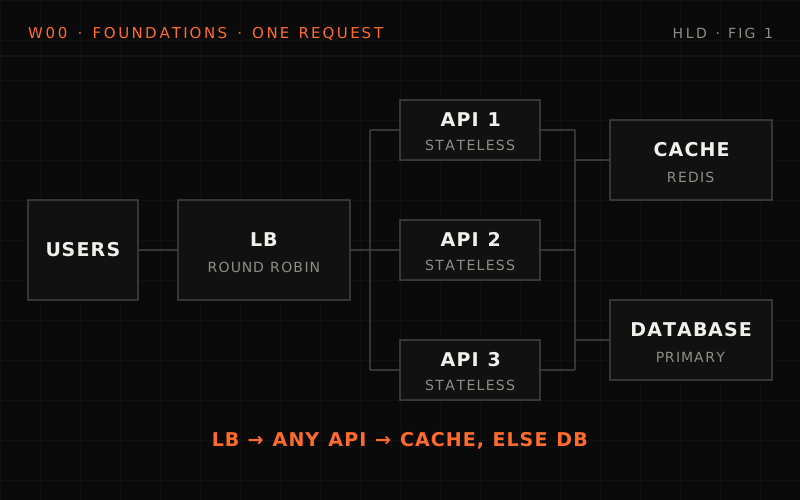
System design runs from requirements through high-level design (components and data flow, like the URL shortener's CDN, load balancer, stateless API servers, cache and database) to low-level design (schemas and API contracts). The interview follows four steps: clarify functional and non-functional requirements, estimate, draw the high-level design, then deep-dive. Architecture, sequence and ER diagrams, and sync vs async communication with REST, GraphQL, gRPC and WebSocket, complete the toolkit.
Chapter 1: What Is System Design?#
1.1 The Big Picture#
System design is the process of defining the architecture, components, modules, interfaces, and data flow of a system to satisfy specified requirements.
- Requirements
- High-level design (HLD) — "What are the major components and how do they interact?"
- System architecture
- Component identification
- Data flow between components
- Technology choices
- Scalability strategy
- Low-level design (LLD) — "How does each component work internally?"
- Database schemas
- API contracts
- Class diagrams
- Algorithm details
- Error handling
- Implementation
1.2 High-Level Design (HLD) Explained#
HLD answers: "What are we building and how do the pieces fit together?"
What HLD Includes#
- 1. Architecture diagram
- Visual representation of system components
- Shows how components connect
- Identifies boundaries (internal vs external)
- 2. Component identification
- What services/modules exist?
- What is each responsible for?
- Single Responsibility Principle
- 3. Data flow
- How does data move through the system?
- Request → Processing → Response path
- Async vs Sync communication
- 4. Technology choices
- Database: SQL vs NoSQL
- Cache: Redis vs Memcached
- Message Queue: Kafka vs RabbitMQ
- Justification for each choice
- 5. Scalability strategy
- Horizontal vs Vertical scaling
- Stateless vs Stateful components
- Load balancing approach
- 6. Non-functional requirements
- Latency targets (P50, P99)
- Availability targets (99.9%, 99.99%)
- Throughput requirements
HLD Example: URL Shortener#
%% title: URL shortener · high-level design
flowchart TD
  U@{ icon: "sd:users", label: "Users" } --> CDN@{ icon: "sd:cdn", label: "CDN<br/>(Static)" }
  CDN --> LB@{ icon: "sd:load-balancer", label: "Load balancer" }
  LB --> API
  subgraph API["API servers"]
    direction TB
    A1["API Server 1"]:::core
    A2["API Server 2"]:::core
    AN["API Server N"]:::core
  end
  API --> C@{ icon: "tech:redis", label: "Cache (Redis)<br/>short→long mapping" }
  API --> DB@{ icon: "sd:database", label: "Database (Primary)<br/>Mapping storage" }
  API --> CS["Counter service<br/>ID Gen"]:::service
  class U client
  class CDN,LB edge
  class C cache
  class DB store
Components:
- CDN: Serves static content (landing page)
- Load Balancer: Distributes traffic across API servers
- API Servers: Handles create/redirect requests (stateless)
- Cache: Fast lookup for popular URLs
- Database: Persistent storage for URL mappings
- Counter Service: Generates unique IDs for short codes
1.3 Low-Level Design (LLD) Explained#
LLD answers: "How does each piece work internally?"
What LLD Includes#
- 1. Database schema
- Table definitions
- Columns and data types
- Indexes and constraints
- Relationships (foreign keys)
- 2. API contracts
- Endpoints (REST/GraphQL/gRPC)
- Request/Response formats
- Error codes and messages
- Rate limiting rules
- 3. Class/module design
- Classes and their responsibilities
- Methods and their signatures
- Inheritance/Composition
- Design patterns used
- 4. Algorithms
- Core business logic
- Time/Space complexity
- Edge cases handling
- 5. Error handling
- Exception types
- Retry strategies
- Fallback behaviors
- 6. Data structures
- In-memory data structures
- Cache key formats
- Message formats
What breaks if the cache keeps every link for an hour?
A user creates a short link with expires_in set to 600 seconds (10 minutes). The service caches every short code for a flat 3600 seconds, whatever its expiry. What do people clicking that link see at minute 30, and why?
One strong answer
- They still get the 302 redirect, not the 410 Gone they should see: the link expired 20 minutes ago.
resolve()returns a cache hit straight away. Only the database path callsis_expired(), so a cached entry is never checked.- The fix is in the code below: the cache TTL is capped at the URL's remaining lifetime ("never past the URL's expiry"), both when the link is created and when a miss refills the cache.
LLD Example: URL Shortener#
| Field | Type | Null | Key | Default | Extra |
|---|---|---|---|---|---|
id |
BIGINT | NO | PRI | NULL | AI |
short_code |
VARCHAR(10) | NO | UNI | NULL | |
original_url |
VARCHAR(2048) | NO | NULL | ||
user_id |
BIGINT | YES | MUL | NULL | |
created_at |
TIMESTAMP | NO | NOW() | ||
expires_at |
TIMESTAMP | YES | NULL | ||
click_count |
BIGINT | NO | 0 |
Indexes
PRIMARY KEY (id)UNIQUE INDEX idx_short_code (short_code)INDEX idx_user_id (user_id)INDEX idx_expires_at (expires_at)— for cleanup job
API contract
POST /api/v1/shorten
Request:
{
    "url": "https://very-long-url.com/path/to/page",
    "custom_code": "optional-custom",  // optional
    "expires_in": 86400                 // optional, seconds
}

Response (201 Created):
{
    "short_url": "https://short.url/abc123",
    "short_code": "abc123",
    "original_url": "https://very-long-url.com/path/to/page",
    "expires_at": "2024-01-16T10:00:00Z",
    "created_at": "2024-01-15T10:00:00Z"
}

Response (400 Bad Request):
{
    "error": "invalid_url",
    "message": "The provided URL is not valid"
}

Response (409 Conflict):
{
    "error": "code_taken",
    "message": "The custom code is already in use"
}

---

GET /{short_code}

Response (302 Found):
Headers:
  Location: https://original-url.com/path
  Cache-Control: private, max-age=3600

Response (404 Not Found):
{
    "error": "not_found",
    "message": "Short URL not found"
}

Response (410 Gone):
{
    "error": "expired",
    "message": "This short URL has expired"
}Class design
from dataclasses import dataclass
from datetime import datetime, timedelta, timezone
from typing import Optional

@dataclass
class URL:
    """Domain entity for a shortened URL."""
    id: Optional[int]
    short_code: str
    original_url: str
    user_id: Optional[int]
    created_at: datetime
    expires_at: Optional[datetime]
    click_count: int = 0

    def is_expired(self) -> bool:
        if self.expires_at is None:
            return False
        return datetime.now(timezone.utc) > self.expires_at

    def increment_clicks(self) -> None:
        self.click_count += 1


class ShortCodeGenerator:
    """Generates unique short codes for URLs."""

    def __init__(self, counter_service):
        self.counter = counter_service
        self.alphabet = "abcdefghijklmnopqrstuvwxyzABCDEFGHIJKLMNOPQRSTUVWXYZ0123456789"

    def generate(self) -> str:
        """Generate a unique short code using counter-based approach."""
        # Get next unique ID from distributed counter
        unique_id = self.counter.get_next()

        # Convert to base62
        return self._to_base62(unique_id)

    def _to_base62(self, num: int) -> str:
        """Convert number to base62 string."""
        if num == 0:
            return self.alphabet[0]

        result = []
        while num > 0:
            result.append(self.alphabet[num % 62])
            num //= 62

        return ''.join(reversed(result))


class URLShortenerService:
    """Main service for URL shortening operations."""

    def __init__(self, repository, cache, code_generator):
        self.repository = repository
        self.cache = cache
        self.code_generator = code_generator

    def shorten(self, original_url: str, user_id: Optional[int] = None,
                custom_code: Optional[str] = None,
                expires_in: Optional[int] = None) -> URL:
        """Create a shortened URL."""

        # Validate URL
        if not self._is_valid_url(original_url):
            raise InvalidURLError(original_url)

        # Generate or validate short code
        if custom_code:
            if self.repository.exists(custom_code):
                raise CodeTakenError(custom_code)
            short_code = custom_code
        else:
            short_code = self.code_generator.generate()

        # Calculate expiration
        expires_at = None
        if expires_in:
            expires_at = datetime.now(timezone.utc) + timedelta(seconds=expires_in)

        # Create URL entity
        url = URL(
            id=None,
            short_code=short_code,
            original_url=original_url,
            user_id=user_id,
            created_at=datetime.now(timezone.utc),
            expires_at=expires_at
        )

        # Persist
        saved_url = self.repository.save(url)

        # Cache for fast lookups (never past the URL's expiry)
        self.cache.set(short_code, original_url, ttl=min(3600, expires_in or 3600))

        return saved_url

    def resolve(self, short_code: str) -> str:
        """Resolve short code to original URL."""

        # Try cache first
        cached = self.cache.get(short_code)
        if cached:
            # Async increment (don't block redirect)
            self._async_increment_clicks(short_code)
            return cached

        # Cache miss - query database
        url = self.repository.find_by_code(short_code)

        if not url:
            raise URLNotFoundError(short_code)

        if url.is_expired():
            raise URLExpiredError(short_code)

        # Update cache (never past the URL's expiry)
        ttl = 3600
        if url.expires_at:
            ttl = min(ttl, int((url.expires_at - datetime.now(timezone.utc)).total_seconds()))
        self.cache.set(short_code, url.original_url, ttl=ttl)

        # Async increment
        self._async_increment_clicks(short_code)

return url.original_url1.4 HLD vs LLD: When to Use Each#
| High-level design | Low-level design | |
|---|---|---|
| Audience | Stakeholders · Architects · Product Managers | Developers · Tech Leads · Code Reviewers |
| Focus | What components exist · How they interact · Why this architecture | How components work · Implementation details · Data structures |
| Abstraction | Boxes and arrows · Component names · Data flow | Code and schemas · Method signatures · Algorithm logic |
| Interview time | First 20-30 minutes · Most of the discussion | Last 15-20 minutes · Deep dive on 1-2 areas |
Interview tip: Start with HLD (big picture), then drill into LLD for critical components. Interviewers often ask: "Let's dive deeper into X"
HLD vs LLD
Q1/3 The interviewer says "Let's go deeper: what table and indexes back the redirect lookup?" Which level of design are you now in?
Answer & explanation
Answer: D
Schemas, indexes and API contracts are LLD: how a single component works internally. HLD stays at boxes and arrows (which components exist and how they talk), not column types.
Q2/3 In the URL shortener LLD,
resolve()increments the click count asynchronously. What is the main reason?Answer & explanation
Answer: B
The user only cares about the 302 coming back fast; the counter is bookkeeping that can lag. Async does not make the count more exact; if anything it trades precision for redirect latency.
Q3/3 What order does the lesson recommend for an interview?
Answer & explanation
Answer: C
HLD takes most of the discussion; then you deep-dive on the one or two areas the interviewer cares about. Starting from schemas buries you in details before you know which components even exist.
Chapter 2: The System Design Interview Framework#
2.1 The Four-Step Framework#
Every system design interview can be structured into four phases:
- Step 1 · Requirements clarification — 3-5 minutes
- Ask questions about scope
- Understand functional requirements
- Identify non-functional requirements
- Clarify constraints and assumptions
- Step 2 · Back-of-envelope estimation — 5-7 minutes
- Calculate traffic volume
- Estimate storage requirements
- Determine bandwidth needs
- Size infrastructure (servers, databases)
- Step 3 · High-level design — 15-20 minutes
- Draw the architecture diagram
- Identify core components
- Define data flow
- Discuss technology choices
- Step 4 · Deep dive — 10-15 minutes
- Database schema design
- API design
- Algorithm for critical paths
- Handle edge cases and failures
| Value | |
|---|---|
| New short links a day (assumed) | 10 million → ~115 a second |
| Reads per write (assumed) | 100:1 → 1 billion redirects a day, ~11,600/s |
| Peak traffic (assumed 2× the average) | ~23,000 redirects a second |
Bytes per urls row (assumed: ~100-byte URL, 7-char code, IDs, timestamps, counter, index overhead) |
~250 bytes |
| Rows a year | 10 million × 365 = 3.65 billion → ~0.9 TB a year |
| Codes with 7 base62 characters | 62^7 ≈ 3.5 trillion → ~960 years of codes at this rate |
Conclusion: redirects outnumber creates 100 to 1, so the design is built around the read path: a cache in front of the database and a click counter that never blocks the redirect. Storage under 1 TB a year and a 7-character code are not the hard parts.
2.2 Step 1: Requirements Clarification#
Goal: Understand what you're building before you build it.
Questions to Ask#
Functional requirements — what the system does
Core features
- "What are the main features we need to support?"
- "What can users do with this system?"
- "Are there different user types with different capabilities?"
Scope boundaries
- "What features are OUT of scope for this discussion?"
- "Should I focus on a particular aspect?"
- "Are we designing the entire system or a specific component?"
Data
- "What data do we need to store?"
- "How long do we keep the data?"
- "Who owns the data?"
Integrations
- "What external systems do we interact with?"
- "Are there existing APIs we must use?"
Non-functional requirements — how well the system performs
Scale
- "How many users do we expect?"
- "What's the read/write ratio?"
- "What's the expected growth rate?"
Performance
- "What latency is acceptable?"
- "Any specific SLA requirements?"
Availability
- "What's the uptime requirement?"
- "Can we have scheduled maintenance windows?"
Consistency
- "Do we need strong consistency?"
- "Is eventual consistency acceptable?"
Geography
- "Is this global or regional?"
- "Where are most users located?"
Three questions that change the design
The interviewer says only: "Design a Twitter-like social media platform." Before drawing anything, which three questions would you ask, and how could each answer change the architecture?
One strong answer
- Scope: feed only, or DMs, search and trending too? Each extra feature is more components to design in the same time.
- Scale and read/write ratio: 100 million users reading far more than they post points you at caching and the read path first.
- Latency and consistency: a P99 target for feed loads sets how fast reads must be; accepting eventual consistency lets the feed be served from copies that lag a little.
- Questions whose answers wouldn't change anything are a waste of the 3–5 minutes.
Example Dialogue#
Interviewer: "Design a Twitter-like social media platform."
You: "Before I start, I'd like to clarify some requirements. For scope - should I focus on the core feed experience, or include features like DMs, search, and trending topics?"
Interviewer: "Focus on the core feed - posting and viewing tweets."
You: "Got it. For scale - what's our expected user base?"
Interviewer: "Let's say 100 million monthly active users."
You: "And what's the read/write ratio? I imagine people view tweets far more often than they post."
Interviewer: "Yes, assume 1000:1 read to write ratio."
You: "For non-functional requirements - what latency targets?"
Interviewer: "Feed loads should be under 200ms at P99."
You: "Perfect. Let me summarize:
- Core features: Post tweets, view home timeline
- 100M MAU
- 1000:1 read/write ratio
- P99 latency < 200ms for feed loads
- I'll assume eventual consistency is acceptable for the feed.
Does this sound right?"
2.3 Functional vs Non-Functional Requirements#
| Functional (Features) | Non-functional (Quality Attributes) | |
|---|---|---|
| In one line | "What the system DOES" | "How WELL the system does it" |
| Examples | User can create account · User can upload photos · User can search content · User can send messages · Admin can ban users | 99.99% uptime · <100ms latency · Handle 1M requests/sec · Encrypt data at rest · GDPR compliant · Auto-scale during peaks |
| Affects | Feature set · User interface · Business logic | Architecture choices · Technology selection · Infrastructure sizing · Cost |
Interview tip: Always clarify BOTH types. Functional requirements tell you WHAT to build. Non-functional requirements tell you HOW to build it and what trade-offs to make.
Estimate it: a monthly maintenance window at 99.99%
Requirements say 99.99% uptime, and the team wants a one-hour maintenance window every month. A year has 8,760 hours. Does the window fit the budget? How much downtime a month does 99.99% allow?
One strong answer
- Budget: 0.01% × 8,760 h ≈ 0.88 h ≈ 52.6 minutes a year, about 4.4 minutes a month.
- The window: 12 × 1 hour = 12 hours a year, more than even 99.9% allows (8.76 hours).
- So at four nines, maintenance has to happen while the service stays up. That's why "Can we have scheduled maintenance windows?" is worth asking up front.
2.4 Common Non-Functional Requirements Reference#
Scalability
- Horizontal scaling (add more machines)
- Vertical scaling (bigger machines)
- Traffic: requests/second, concurrent users
- Data: storage growth rate
Availability
| Availability | Downtime/year | Class |
|---|---|---|
| 99% | 3.65 days | low availability |
| 99.9% | 8.76 hours | standard |
| 99.99% | 52.6 minutes | high availability |
| 99.999% | 5.26 minutes | mission critical |
Latency
| Percentile | Meaning |
|---|---|
| P50 | Median (50th percentile) |
| P90 | 90% of requests are faster |
| P99 | 99% of requests are faster |
| P999 | 99.9% of requests are faster |
Typical targets:
- API response: <100ms P99
- Page load: <1s P99
- Database query: <10ms P99
- Cache hit: <1ms P99
Consistency
- Strong — Read always returns latest write
- Eventual — Read might return stale data temporarily
- Causal — Related events appear in order
Durability
- Data survives failures
- Measured in "nines" (99.999999999% = 11 nines)
- Achieved through replication
Throughput
- Requests per second (RPS)
- Transactions per second (TPS)
- Messages per second (for queues)
- Bytes per second (for data transfer)
Requirements and the interview framework
Q1/3 "Feed loads must finish in under 200ms at P99." What kind of requirement is this?
Answer & explanation
Answer: A
Functional requirements say what the system does (post, view feed); non-functional ones say how well (latency, uptime, scale). Mentioning a feature does not make it functional; the 200ms P99 target is a quality attribute that drives architecture.
Q2/3 You learn the system has a 1000:1 read-to-write ratio. What should that change in your design?
Answer & explanation
Answer: C
A read-heavy workload means almost all load is reads, so caching and replicas pay off most. That is exactly why the ratio is asked during clarification: it shapes the architecture from step one.
Q3/3 Your service targets 99.9% availability (about 8.76 hours of downtime a year). Roughly what downtime budget do you get at 99.99%?
Answer & explanation
Answer: A
Each extra nine cuts the allowed downtime by 10x: 8.76 hours / 10 is about 52.6 minutes. About 5 minutes is the budget for five nines (99.999%), one more step up.
Chapter 3: Diagramming for System Design#
3.1 Types of Diagrams#
- Architecture diagram (Most Common)
- Shows components and their connections
- High-level view of the entire system
- Used in HLD phase
- Sequence diagram
- Shows how components interact over time
- Request/response flows
- Used for complex workflows
- Data flow diagram
- Shows how data moves through the system
- Transformations at each step
- Good for data pipelines
- Entity-relationship diagram (ERD)
- Shows database tables and relationships
- Used in LLD for database design
- State diagram
- Shows states and transitions
- Good for order status, user status, etc.
3.2 Architecture Diagram Basics#
Components You'll Draw#
| Component | Drawn as |
|---|---|
| Users/clients | A box per client type: "User" (person icon), "Mobile App", "Web Browser" |
| Servers/services | A box with the service name ("Service Name") |
| Databases | A box with a double-bordered "DB" inside |
| Load balancers | A box with a row of small server boxes, labelled "LB" |
| Caches | A box labelled "(( Cache ))" |
| Message queues | A box with a double line, labelled "Queue" |
| CDN | A box labelled "CDN" with a cloud icon |
Arrows
| Arrow | Meaning |
|---|---|
─────────▶ |
Synchronous call (request/response) |
- - - - -▶ |
Asynchronous call (fire and forget) |
◀────────▶ |
Bidirectional |
Layered Architecture Pattern#
%% title: Standard layered architecture
flowchart TD
  CL@{ icon: "sd:users", label: "Clients" } --> PRES
  subgraph PRES["Presentation layer (Edge)"]
    direction TB
    CDN@{ icon: "sd:cdn", label: "CDN" }
    WAF@{ icon: "sd:firewall", label: "WAF" }
    LB@{ icon: "sd:load-balancer", label: "LB" }
    GW@{ icon: "sd:gateway", label: "API GW" }
  end
  PRES --> APP
  subgraph APP["Application layer (Business logic)"]
    direction TB
    SA["Service A"]:::core
    SB["Service B"]:::core
    SC["Service C"]:::core
  end
  APP --> DATA
  subgraph DATA["Data layer (Persistence)"]
    direction TB
    CA@{ icon: "tech:redis", label: "Cache (Redis)" }
    PR@{ icon: "sd:database", label: "Primary (SQL)" }
    RE@{ icon: "sd:database", label: "Replica (SQL)" }
    Q@{ icon: "tech:kafka", label: "Queue (Kafka)" }
  end
  class CL client
  class CDN,WAF,LB,GW edge
  class CA cache
  class PR,RE store
  class Q queue
3.3 Sequence Diagram Basics#
%% title: Sequence diagram · user login flow
sequenceDiagram
  autonumber
  participant C as Client
  participant G as API Gateway
  participant A as Auth Service
  participant D as Database
  C->>G: POST /login
  G->>A: Validate credentials
  A->>D: Find user
  D-->>A: User data
  A-->>G: JWT token
  G-->>C: 200 OK + token
Key: solid arrow = synchronous request · dashed arrow = response
3.4 Data Flow Diagram Basics#
%% title: Data flow · image upload pipeline
flowchart TD
  S1@{ icon: "sd:camera", label: "Upload image" } --> S2["Validate format"]:::service
  S2 --> S3["Process resize"]:::core
  S3 --> S4@{ icon: "tech:s3", label: "Store in S3" }
  S1 -.-> O1["Raw bytes"]:::note
  S2 -.-> O2["Valid image"]:::note
  S3 -.-> O3["Multiple sizes"]:::note
  S4 -.-> O4["URLs stored"]:::note
  class S1 client
  class S4 store
Data transformation at each step:
- Raw bytes → Decoded image
- Decoded image → Validated (format, size, content)
- Validated → Multiple resolutions (thumb, medium, large)
- Processed images → Stored, URLs generated
3.5 Entity-Relationship Diagram Basics#
%% title: ERD · e-commerce system
flowchart TD
  U[("USER<br/>PK id<br/>email<br/>name<br/>created_at")]:::store
  O[("ORDER<br/>PK id<br/>FK user_id<br/>total<br/>status<br/>created_at")]:::core
  P[("PRODUCT<br/>PK id<br/>name<br/>price<br/>stock")]:::store
  OI[("ORDER_ITEM<br/>PK id<br/>FK order_id<br/>FK product_id<br/>quantity<br/>price")]:::service
  U -->|"1:N"| O
  O -->|"1:N"| OI
  P -->|"1:N"| OI
Relationships:
- User 1:N Order (one user has many orders)
- Order 1:N OrderItem (one order has many items)
- Product 1:N OrderItem, so Product M:N Order (via the OrderItem junction table)
Diagramming
Q1/2 You want to show how a login request moves Client -> API Gateway -> Auth Service -> Database and back, step by step. Which diagram fits best?
Answer & explanation
Answer: B
Sequence diagrams show interactions over time, request and response, in order. An architecture diagram shows which components exist and how they connect, but not the order of calls.
Q2/2 In the e-commerce ERD, products and orders have a many-to-many relationship. How is it stored?
Answer & explanation
Answer: B
M:N relationships go through a junction table; ORDER_ITEM holds order_id, product_id, quantity and price. A foreign key on PRODUCT would let a product belong to only one order.
Chapter 4: Communication in System Design#
4.1 Synchronous vs Asynchronous Communication#
Synchronous (Request-Response)
- Client → Server — Request
- Server — Processing... (could be slow); the client is (waiting)
- Server → Client — Response
Pros
- Simple to understand
- Immediate feedback
Cons
- Client blocked while waiting
- Tight coupling
- Single point of failure
Asynchronous (Message-Based)
- Producer → Queue — Send message
- Queue → Producer — ACK (received); the producer (continues work)
- Queue → Consumer — Poll/Push
- Consumer — Processing...
- Consumer → Queue — ACK (processed)
Pros
- Loose coupling
- Producer not blocked
- Handles traffic spikes (queue as buffer)
- Retry/replay possible
Cons
- More complex
- Eventual consistency
- Debugging harder
Synchronous: the client sends a request and is blocked until the server responds, and fails if the server is down. Asynchronous: the producer sends a message to a queue, gets an ACK at once and keeps working; the consumer processes the message later and ACKs it.
A video upload: wait or queue?
A user uploads a video that takes several minutes to process into different sizes. Should the upload request wait for processing to finish, or hand it to a queue? What does each choice cost?
One strong answer
- Queue it (asynchronous). Processing is slow, and a synchronous call keeps the client blocked and waiting the whole time.
- The queue also buffers upload spikes and lets a failed job be retried.
- The cost: the user doesn't get the finished video in the response, so the app must show "processing" and tell them later (eventual consistency, harder debugging).
4.2 When to Use Each#
Use synchronous when
- User needs immediate response
- Login, checkout, search results
- Operation is fast (<100ms)
- Strong consistency required
- Check balance before transfer
- Simple request-response pattern
Use asynchronous when
- Operation is slow
- Video processing, report generation
- Notification/event delivery
- Emails, push notifications
- Decoupling services
- Order placed → Inventory, Shipping, Email
- Handling traffic spikes
- Buffer requests during peak
- At-least-once delivery needed
- Payment webhooks, critical events
One API for partners, one between services
You need a public API that outside developers will use to create and read orders. You also need calls between your own microservices, where latency matters most. Pick an API style for each.
One strong answer
- Public API: REST. Resource URLs like
/orders/456with GET, POST, PUT and DELETE are simple, stateless and familiar to outside developers. - Internal calls: gRPC. A binary protocol with strongly typed
.protocontracts is fast, and you control both sides, so sharing the contract is easy. - The trade-off: gRPC's binary messages and contracts are harder for outsiders to try out than plain JSON over HTTP.
4.3 API Styles#
REST (Representational State Transfer)
- Resource-based URLs:
/users/123,/orders/456 - HTTP verbs: GET, POST, PUT, DELETE
- Stateless
- JSON/XML payloads
- Good for: CRUD operations, public APIs
Example:
| Request | Action |
|---|---|
GET /api/users/123 |
Get user 123 |
POST /api/users |
Create new user |
PUT /api/users/123 |
Update user 123 |
DELETE /api/users/123 |
Delete user 123 |
GraphQL
- Single endpoint:
/graphql - Client specifies exactly what data it needs
- Reduces over-fetching and under-fetching
- Good for: Complex frontends, mobile apps
Example:
query {
  user(id: 123) {
    name
    email
    orders(limit: 5) {
      id
      total
    }
  }
}
gRPC (Remote Procedure Call framework, originally from Google)
- Binary protocol (Protocol Buffers)
- Strongly typed contracts (.proto files)
- Bidirectional streaming
- Good for: Microservices, internal APIs, low latency
Example (.proto file):
service UserService {
  rpc GetUser(GetUserRequest) returns (User);
  rpc CreateUser(CreateUserRequest) returns (User);
}
WebSocket
- Full-duplex communication
- Persistent connection
- Server can push to client
- Good for: Chat, live updates, gaming
Sync vs async communication
Q1/3 When an order is placed, inventory, shipping and email must all react. Email is often slow and sometimes down. How should checkout talk to them?
Answer & explanation
Answer: C
This is the "decoupling services" case for async: the producer is not blocked, and a slow or down email service does not fail checkout. Calling everything synchronously couples checkout latency and availability to the slowest dependency.
Q2/3 A transfer must check the account balance before moving money. Which style fits that check, and why?
Answer & explanation
Answer: A
The lesson lists "check balance before transfer" under synchronous: you need the current answer before proceeding. Async gives retries and buffering but implies eventual consistency, which is wrong for a precondition check.
Q3/3 A mobile screen needs a user's name plus their last 5 orders. Over REST it takes several calls that return many unused fields. Which API style targets this problem?
Answer & explanation
Answer: A
GraphQL lets the client ask for exactly the fields it needs in one query, cutting over- and under-fetching. gRPC is fast and strongly typed, but its main sweet spot is internal service-to-service calls, not shaping a client's view.
Summary: Part 1 Concepts#
- System design = Requirements → HLD → LLD → Implementation
- HLD = Components + Interactions (the "what") · LLD = Internal details (the "how")
- Interview framework:
- Step 1: Clarify requirements (functional + non-functional)
- Step 2: Estimate scale (back-of-envelope)
- Step 3: Draw high-level design
- Step 4: Deep dive into critical components
- Non-functional requirements matter:
- Scalability (how much traffic)
- Availability (how much uptime)
- Latency (how fast)
- Consistency (how accurate)
- Communication styles:
- Sync: Fast, simple, blocking
- Async: Decoupled, resilient, complex
- API styles: REST (simple), GraphQL (flexible), gRPC (fast)
this lesson in shorts · 2
play them all →One idea from this lesson in about a minute each, made for your phone.

Go deeper · reading trail
all reading →Real write-ups from the teams that built these systems. Each opens on the publisher's site in a new tab.
Design Docs at Google
Malte Ubl · 2020- What
- A Google engineer's account of how design docs are written and reviewed at Google, and what goes in one.
- Key idea
- A design doc records context, goals and non-goals, the chosen design and the alternatives rejected, so trade-offs are argued before code exists.
- Why here
- It is the written form of the HLD-first habit this part teaches: requirements and non-goals up front, boxes and arrows next, details only where they matter.
On Designing and Deploying Internet-Scale Services
James Hamilton · 2007- What
- A classic paper from the Windows Live Services team listing practices for running large online services.
- Key idea
- Design for failure, automate everything, keep things simple and make operations a design input rather than an afterthought.
- Why here
- Its checklist reads like the non-functional requirements reference in this part: availability, scalability, operability and cost decide the architecture.
The C4 model for visualising software architecture
Simon Brown- What
- The reference site for C4, a lightweight notation for drawing software architecture at four zoom levels.
- Key idea
- Draw context, containers, components and code as separate diagrams, each for a different audience, instead of one diagram that tries to show everything.
- Why here
- It gives the diagram types in this part a shared vocabulary: the architecture diagram is a container view, and you zoom in only for the deep dive.
New lessons by email
New lessons, side quests and case files as they ship, at most once a week. No spam, unsubscribe anytime.
Discussion · …
Public: everyone reading this lesson sees comments. Be kind and keep it on the material.