Opening Story: The Black Friday That Almost Wasn't#
Picture a composite scenario, not any one named company. It's a November at a major e-commerce company. Black Friday traffic hits 10x normal volume. The order processing system—a synchronous chain of database writes and API calls—starts timing out. Orders are lost. Payments are charged but orders never created. Customer service is overwhelmed.
The post-mortem revealed the root cause: tight coupling. Every order required 7 synchronous operations to complete. When one service slowed down, everything backed up. The queue of pending requests grew until the system collapsed.
The fix? They rebuilt with message queues. Now, orders are accepted immediately, queued reliably, and processed asynchronously. The next Black Friday? Zero lost orders and far more headroom.
This is the power of messaging and async processing.
In 2018 a synchronous order chain collapsed on Black Friday: five services at 200 ms each make 1,000 ms, and five at 99.9% availability make 99.5%. Queuing the work fixes it: the API answers in 50 ms and consumers process at their own pace and retry failures, so nothing is lost. The week then adds queue vs log, the transactional outbox, backpressure, dead letter queues and a 7-year audit log onto that system.
Why This Week Matters#
In Week 1, you learned how to scale data (partitioning, replication). In Week 2, you learned how to handle failures (timeouts, retries, circuit breakers).
Week 3 teaches you how to decouple systems so failures don't cascade:
"How do you build systems where a slow downstream service doesn't bring down your entire platform?"
The answer: Stop waiting. Queue the work. Process it reliably. Handle failures gracefully.
The Central Problem#
Synchronous systems are fragile:
%% title: Synchronous order processing
flowchart TD
  U@{ icon: "sd:user", label: "User" } --> API["API"]:::core
  API --> INV@{ icon: "sd:warehouse", label: "Inventory" }
  INV --> PAY@{ icon: "sd:card", label: "Payment" }
  PAY --> SHIP@{ icon: "sd:truck", label: "Shipping" }
  SHIP --> EM@{ icon: "sd:mail", label: "Email" }
  API & INV & PAY & SHIP & EM -.-> F["If ANY step is slow or fails,<br/>the ENTIRE request fails."]:::bad
  class U client
class INV,PAY,SHIP,EM service- Response time = Sum of ALL service latencies
- Availability = Product of ALL service availabilities
- 5 services at 99.9% each = 99.5% overall
- 5 services at 200ms each = 1000ms response time
Asynchronous systems are resilient:
%% title: Asynchronous order processing
flowchart TD
  U@{ icon: "sd:user", label: "User" } --> API["API"]:::core
  API --> Q@{ icon: "sd:queue", label: "Queue" }
  Q --> OK(["Order Created!<br/>(Response: 50ms)"]):::ok
  Q --> MQ@{ icon: "sd:queue", label: "MESSAGE QUEUE<br/>Order #1 · Order #2 · Order #3<br/>Order #4 · Order #5" }
  MQ -.-> IC@{ icon: "sd:warehouse", label: "Inventory<br/>Consumer" }
  MQ -.-> PC@{ icon: "sd:card", label: "Payment<br/>Consumer" }
  MQ -.-> SC@{ icon: "sd:truck", label: "Shipping<br/>Consumer" }
  class U client
  class Q,MQ queue
  class IC,PC,SC service
Each consumer processes at its own pace. Failures are retried. Nothing is lost.
This week, you'll master the patterns that make async processing reliable.
Week 3 warm-up
Q1/2 An order request synchronously calls 5 services in a chain, each 99.9% available. Roughly what availability does the whole request get?
Answer & explanation
Answer: B
Availabilities multiply along a synchronous chain: 0.999^5 is about 0.995. Every extra hop makes the whole request less reliable. 99.9% would only hold if the request depended on a single service.
Q2/2 Each of those 5 services takes 200ms. What changes when the API just writes the order to a queue and returns?
Answer & explanation
Answer: C
Synchronous latency is the sum of every step. With a queue, the API only waits for the enqueue; consumers do the same work later, at their own pace. The work does not disappear, it just moves off the user's critical path.
What You'll Master This Week#
By Friday, you'll be able to:
- Choose the right messaging system for your use case (Kafka vs RabbitMQ vs SQS vs Redis Streams)
- Design reliable event pipelines that never lose messages
- Handle backpressure when producers outpace consumers
- Debug and recover from dead letter queue issues
- Build audit systems that are tamper-evident and queryable
The Week at a Glance#
- DAY 1: Queue vs Stream
- RabbitMQ mental model vs Kafka mental model
- When to use queues vs when to use logs
- Consumer groups and partitions
- Ordering guarantees and trade-offs
- DAY 2: Transactional Outbox
- Why "save then publish" loses messages
- The outbox pattern in detail
- Change Data Capture (CDC) alternatives
- Implementation in real codebases
- DAY 3: Backpressure and Flow Control
- Symptoms of backpressure (how to detect it)
- Response strategies (shed, slow, buffer)
- Rate limiting producers vs consumers
- Designing for bursty traffic
- DAY 4: Dead Letters and Poison Pills
- What belongs in a DLQ (and what doesn't)
- Debugging and replaying failed messages
- Poison pill detection and handling
- Operational tooling for DLQ management
- DAY 5: Mini Design — Audit Log System
- Immutability requirements
- Write-once, append-only storage
- Compliance and querying considerations
- Complete system design walkthrough
Day-by-Day Preview#
Day 1: Queue vs Stream#
The Problem We're Solving:
You're designing an order processing system. Someone says "just use Kafka." Someone else says "RabbitMQ is simpler." A third person mentions "SQS is managed, less ops burden."
How do you choose? What are you actually trading off?
What You'll Learn:
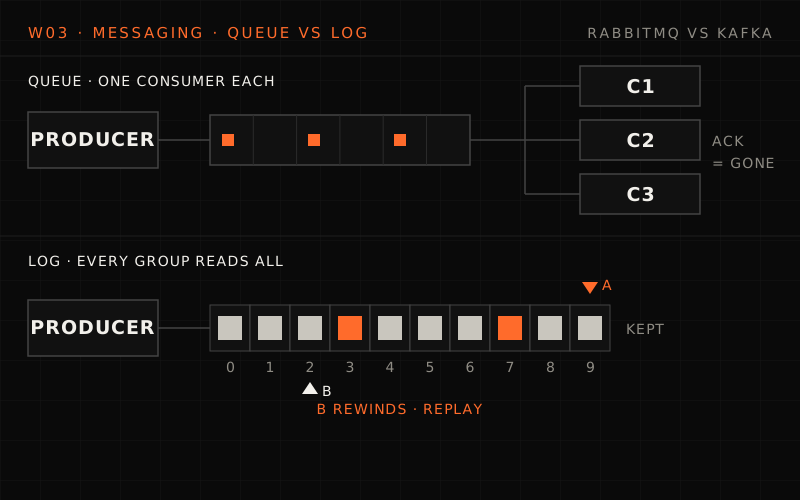
%% title: Queue vs stream: mental models
flowchart TD
  subgraph QM["QUEUE (RabbitMQ, SQS, Redis Lists)"]
    direction TB
    P1@{ icon: "sd:server", label: "Producer" } --> Q1@{ icon: "sd:queue", label: "msg · msg · msg · msg" }
    Q1 --> C1@{ icon: "sd:worker", label: "Consumer" }
  end
  subgraph SM["STREAM/LOG (Kafka, Kinesis, Redis Streams)"]
    direction TB
    P2@{ icon: "sd:server", label: "Producer" } --> S2@{ icon: "sd:stream", label: "msg · msg · msg · msg · msg · msg · msg …" }
    S2 -->|"offset 2"| CA["Consumer A"]:::service
    S2 -->|"offset 4"| CB["Consumer B"]:::service
  end
  QM ~~~ SM
  class P1,P2 client
  class Q1,S2 queue
  class C1 service
Queue (RabbitMQ, SQS, Redis Lists)
- Messages are CONSUMED (deleted after processing)
- Each message goes to ONE consumer
- No replay possible after consumption
- Great for: Task distribution, work queues
Stream/Log (Kafka, Kinesis, Redis Streams)
- Messages are RETAINED (not deleted after reading)
- Multiple consumers can read same message
- Replay possible (rewind offset)
- Great for: Event sourcing, audit logs, fan-out
Key Topics:
- Consumer groups and how they enable parallel processing
- Partition strategies and ordering guarantees
- At-least-once vs at-most-once vs exactly-once delivery
- Comparing: Kafka, RabbitMQ, SQS, Redis Streams
System Design: Order Processing Pipeline
You'll design a system where:
- Orders must be processed in sequence PER USER
- Orders can be parallelized ACROSS users
- Processing failures must be retried
- No order can be lost
The Challenge Question:
"You're using Kafka with 10 partitions. User A places 3 orders rapidly. How do you guarantee they're processed in order? What if processing the second order fails?"
Day 2: Transactional Outbox#
The Problem We're Solving:
You have this code:
def create_order(order):
    # Step 1: Save to database
    db.save(order)

    # Step 2: Publish event
    kafka.publish("order.created", order)

    return order
What happens if the process crashes after Step 1 but before Step 2?
The order is saved but the event is never published. Downstream systems never know about it. Your inventory is never reserved. The customer is never notified.
This is the dual-write problem, and it's everywhere.
What You'll Learn:
%% title: The dual-write problem
flowchart TD
  subgraph PROB["THE PROBLEM"]
    direction TB
    A1["App"]:::core --> DB1@{ icon: "sd:database", label: "DB<br/>ok · Saved" }
    A1 -.->|"CRASH! between writes"| K1@{ icon: "tech:kafka", label: "Kafka<br/>fail · Never Published" }
  end
  subgraph SOL["THE SOLUTION: TRANSACTIONAL OUTBOX"]
    direction TB
    A2["App"]:::core -->|"Single Transaction"| DB2
    subgraph DB2["DATABASE"]
      direction TB
      OT@{ icon: "sd:database", label: "Orders (table)<br/>order_id · user_id<br/>amount · ..." }
      OB@{ icon: "sd:database", label: "Outbox (table)<br/>id · event_type · payload<br/>created_at · published" }
    end
    DB2 --> POL["Outbox Poller / CDC<br/>(Separate process)"]:::service
    POL --> K2@{ icon: "tech:kafka", label: "Kafka" }
  end
  PROB ~~~ SOL
  class DB1 ok
  class K1 bad
  class OT store
  class OB,K2 queue
Both writes happen in ONE transaction. If the transaction fails, BOTH fail. Atomic.
Key Topics:
- The outbox pattern step-by-step
- Polling vs CDC (Change Data Capture) approaches
- Debezium and other CDC tools
- Handling slow outbox processing
- Exactly-once publishing guarantees
The Challenge Question:
"Your outbox table has 1 million unpublished messages because Kafka was down for 2 hours. Now Kafka is back. What happens? How do you handle the backlog?"
Day 3: Backpressure and Flow Control#
The Problem We're Solving:
Marketing sends a campaign to 5 million users at once. Each user action generates events. Your event processing system, designed for 10K events/second, suddenly receives 500K events/second.
What happens next?
Without backpressure handling:
- Queues grow unbounded → Memory exhausted → System crashes
- Consumers fall behind → Lag grows → Real-time becomes hours-delayed
- Database connections exhausted → Everything fails
What You'll Learn:
1. SHED LOAD (Drop excess messages)
When queue depth > threshold:
- → Reject new messages with 429
- → Or sample: keep 1 in 10 messages
Use when: Data loss acceptable (metrics, logs)
2. SLOW DOWN PRODUCERS
Producer checks queue depth before sending:
- → If high, add delay or reduce batch size
- → Or use blocking sends with timeout
Use when: Producers can tolerate slowdown
3. BUFFER DIFFERENTLY
Spill to disk when memory full:
- → Write overflow to local disk or S3
- → Process buffered messages when caught up
Use when: All messages must be processed eventually
4. SCALE CONSUMERS
Auto-scale based on queue depth or consumer lag:
- → Kubernetes HPA on custom metrics
- → Add consumer instances dynamically
Use when: You have scaling headroom
Key Topics:
- Detecting backpressure (queue depth, consumer lag, latency spikes)
- Rate limiting producers at the API gateway level
- Rate limiting to external providers (email, SMS)
- Designing for bursty traffic patterns
- Priority queues for critical vs best-effort messages
System Design: Event-Driven Notifications
You'll design a system where:
- Email, SMS, and push notifications are sent via external providers
- External providers have rate limits (1000 emails/second)
- Marketing can trigger 5M notifications at once
- Critical notifications (password reset) must be prioritized
The Challenge Question:
"Marketing sends 5M emails at once. Your email provider allows 1000/second. How do you handle this without blocking transactional emails like password resets?"
Day 4: Dead Letters and Poison Pills#
The Problem We're Solving:
Your DLQ (Dead Letter Queue) has 100,000 messages. Some are there because of transient failures (should retry). Some are there because of bad data (will never succeed). Some are there because of a bug in your code (needs a fix + replay).
How do you:
- Know why each message failed?
- Decide which to retry vs discard?
- Replay them safely?
- Prevent the same failures from happening again?
What You'll Learn:
WHY MESSAGES END UP IN DLQ
| TRANSIENT FAILURES | ACTION |
|---|---|
| Downstream service timeout | Auto-retry with backoff |
| Rate limit exceeded | Retry after cooldown |
| Network blip | Retry immediately |
| Database connection pool | Retry after delay |
| DATA PROBLEMS (Poison Pills) | ACTION |
|---|---|
| Malformed JSON | Log, alert, discard |
| Missing required field | Fix data, replay |
| Invalid foreign key | Fix reference, replay |
| Schema mismatch | Transform, replay |
| CODE BUGS | ACTION |
|---|---|
| Unhandled exception | Fix code, deploy, replay |
| Logic error | Fix code, deploy, replay |
| NPE on unexpected null | Fix code, deploy, replay |
Key Topics:
- DLQ message structure (original message + failure context)
- Retry policies: exponential backoff, max attempts, retry budget
- Poison pill detection (messages that crash consumers)
- Safe replay strategies (idempotency, ordering)
- Operational tooling: DLQ dashboards, bulk replay, selective purge
The Challenge Question:
"Your DLQ has 100K messages. 80% are from a bug that's now fixed. 15% are bad data that will never succeed. 5% are transient failures. How do you handle each category efficiently?"
Day 5: Mini Design — Audit Log System#
The Problem We're Solving:
Design an audit log for a financial system. Every action must be:
- Recorded — No action can happen without a log entry
- Immutable — Logs cannot be modified or deleted
- Queryable — "Show all actions by user X in 2023"
- Tamper-evident — Any modification attempt must be detectable
- Compliant — Meets regulatory requirements (7-year retention)
This is the capstone that combines everything from this week.
What You'll Design:
%% title: Audit log system architecture
flowchart TD
  SA@{ icon: "sd:server", label: "Service A" } & SB@{ icon: "sd:server", label: "Service B" } & SC@{ icon: "sd:server", label: "Service C" } -->|"Audit Events"| K
  subgraph K["KAFKA (Audit Topic)"]
    direction TB
    P0@{ icon: "sd:stream", label: "Partition 0: event · event · event · …" }
    P1@{ icon: "sd:stream", label: "Partition 1: event · event · event · …" }
    P2@{ icon: "sd:stream", label: "Partition 2: event · event · event · …" }
    RET["... · Retention: 7 days (then archived)"]:::note
  end
  K --> AR["Archiver<br/>(S3/Glacier)"]:::core
  K --> IX["Indexer<br/>(Elasticsearch or DB)"]:::core
  K --> VF["Verifier<br/>(Checksums)"]:::core
  AR --> CS@{ icon: "sd:object-storage", label: "Cold Store<br/>(7 years)" }
  IX --> HQ@{ icon: "sd:database", label: "Hot Query<br/>(90 days)" }
  VF --> TDET["Tamper<br/>Detection"]:::ok
  class SA,SB,SC service
  class P0,P1,P2 queue
  class CS,HQ store
Key Design Decisions:
- How to guarantee every action is logged (transactional outbox!)
- Immutable storage design (append-only, no deletes)
- Tamper-evidence (cryptographic hashing, Merkle trees)
- Query optimization for compliance queries
- Cost-effective long-term storage
Concepts Used from Weeks 1-3:
- Partitioning (Week 1): Events partitioned by tenant or user
- Replication (Week 1): Kafka replication for durability
- Idempotency (Week 2): Deduplication of audit events
- Transactional Outbox (Week 3): Guaranteed event capture
- Stream vs Queue (Week 3): Kafka for replay capability
Interview Scenarios You'll Master#
After this week, you'll confidently handle these interview questions:
Scenario 1: Order Processing System#
"Design a system that processes 10,000 orders per second with exactly-once semantics."
Your answer will include:
- Kafka with idempotent producers
- Consumer groups for parallel processing
- Transactional outbox for reliable event publishing
- DLQ for failed orders with retry logic
Scenario 2: Notification System#
"Marketing wants to send 10 million push notifications in an hour. Design the system."
Your answer will include:
- Queue-based architecture with priority lanes
- Backpressure handling (rate limiting to providers)
- Dead letter queue for failed deliveries
- Retry strategies with exponential backoff
Scenario 3: Event-Driven Architecture#
"How do you ensure events are never lost between microservices?"
Your answer will include:
- Transactional outbox pattern
- At-least-once delivery guarantees
- Idempotent consumers
- Dead letter queues for unprocessable events
Scenario 4: Compliance System#
"We need to log every user action for 7 years. How do you design this?"
Your answer will include:
- Kafka as the event backbone (with compaction disabled)
- Hot storage for recent data (Elasticsearch)
- Cold storage for archives (S3 Glacier)
- Tamper-evident design with checksums
Concepts We're Building On#
From Week 1 (Foundations of Scale)#
| WEEK 1 CONCEPT | HOW WE USE IT IN WEEK 3 |
|---|---|
| Partitioning | Kafka partitions for parallel consumption · Partition key = ordering guarantee |
| Replication | Kafka replication for durability · acks=all for guaranteed persistence |
| Hot Keys | High-traffic topics need more partitions · Avoid hot partitions with good key design |
From Week 2 (Failure-First Design)#
| WEEK 2 CONCEPT | HOW WE USE IT IN WEEK 3 |
|---|---|
| Idempotency | Consumers MUST be idempotent · Messages may be delivered multiple times |
| Retry Strategies | DLQ retry policies use exponential backoff · Retry budgets prevent infinite loops |
| Circuit Breakers | Stop consuming if downstream is failing · Prevent message processing during outages |
| Timeouts | Consumer processing timeouts · Prevent stuck consumers holding partition |
Key Interview Phrases You'll Learn#
By the end of this week, these phrases will roll off your tongue:
On Queue vs Stream:
"I'd use Kafka here because we need replay capability and multiple consumers. If this were a simple work queue where messages are processed once and discarded, RabbitMQ would be simpler."
On Transactional Outbox:
"To avoid the dual-write problem, I'd use the transactional outbox pattern. The event is written to an outbox table in the same transaction as the business data, then a separate process publishes to Kafka."
On Backpressure:
"When producers outpace consumers, we need a backpressure strategy. For this system, I'd rate-limit at the API gateway and use priority queues to ensure critical messages aren't delayed by bulk operations."
On Dead Letter Queues:
"Messages that fail repeatedly go to a DLQ with failure context. We'd have tooling to categorize failures—transient vs permanent—and bulk-replay after fixes."
On Ordering Guarantees:
"Kafka guarantees ordering within a partition. So I'd partition by user_id to ensure all events for a user are processed in order, while allowing parallelism across users."
Common Mistakes to Avoid#
| Pitfall | Reality |
|---|---|
| "I'll just publish to Kafka after saving to the database" | Dual-write problem. Use transactional outbox instead. |
| "Kafka guarantees exactly-once delivery" | By default Kafka is at-least-once; its exactly-once (idempotent producer + transactions) covers only Kafka-to-Kafka processing. Side effects elsewhere still need an idempotent consumer. |
| "I'll use one partition for simplicity" | No parallelism. One consumer processes everything serially. |
| "DLQ is where messages go to die" | DLQ is a signal. You need tooling to investigate and replay. |
| "Backpressure won't happen to us" | It will. Design for it upfront. Marketing will send that blast. |
| "We'll just add more consumers when things slow down" | Consumers > partitions = idle consumers. Plan partition count. |
Real-World Examples We'll Study#
Throughout the week, we'll examine how these companies handle messaging:
| Company | System | Messaging Approach |
|---|---|---|
| Activity Feed | Kafka for event streaming, 7+ trillion messages/day | |
| Uber | Trip Events | Kafka keyed by trip for per-trip ordering, trillions of messages/day |
| Stripe | Webhooks | Queue-based with exponential backoff retry |
| Shopify | Order Processing | Kafka with Debezium change data capture from sharded MySQL |
| Netflix | Event Pipeline | Kafka-based event pipeline |
| Slack | Job Queue | Kafka in front of Redis as a durable buffer |
| Segment | Event Deduplication | Kafka partitioned by messageId so duplicates reach the same consumer |
Prerequisites Check#
Before starting Week 3, make sure you're comfortable with:
From Week 0
- Understand basic message queue concepts
- Know the difference between sync and async communication
- Can explain why microservices often use message queues
From Week 1
- Understand partitioning and why it enables parallelism
- Know how replication provides durability
- Can explain the hot key problem
From Week 2
- Understand idempotency and how to implement it
- Know retry patterns (exponential backoff, jitter)
- Can explain circuit breakers and when to use them
Systems You'll Design This Week#
- 1. ORDER PROCESSING PIPELINE
- Ordering guarantees per user
- Parallel processing across users
- Failure handling and retries
- Idempotent order processing
- 2. EVENT-DRIVEN NOTIFICATIONS
- Multi-channel (email, SMS, push)
- Priority queues for critical notifications
- Rate limiting to external providers
- Backpressure handling for bulk sends
- 3. AUDIT LOG SYSTEM
- Guaranteed capture of all events
- Immutable, append-only storage
- Queryable for compliance
- Long-term archival (7+ years)
How to Approach This Week#
Day 1-2: Foundations#
- Queue vs Stream is conceptual—make sure you internalize the mental models
- Transactional Outbox is a pattern you'll use repeatedly—understand it deeply
- Draw the diagrams yourself, don't just read them
Day 3-4: Operational Reality#
- Backpressure happens in production—think about your current systems
- DLQ management is often neglected—this is what separates juniors from seniors
- Focus on the operational tooling, not just the happy path
Day 5: Integration#
- The audit log design uses everything from this week
- This is your practice interview—time yourself
- Document your trade-offs explicitly
Daily Commitment#
Each day this week requires:
| Time | Activity |
|---|---|
| 45-60 min | Core content + diagrams |
| 15-20 min | Code examples + implementation |
| 10-15 min | Interview practice |
| 10 min | Further reading (optional but recommended) |
Total: ~90 minutes per day
Let's Begin#
Week 3 is where your systems become truly resilient. You'll stop building brittle synchronous chains and start building robust asynchronous pipelines.
Turn the page to Day 1: Queue vs Stream.
The question isn't "should I use a message queue?" The question is "which messaging pattern matches my guarantees?" Let's find out.
Week 3 Reading List#
These resources complement (not replace) the daily content:
Day 1 - Queue vs Stream:
- Docs
"Kafka: The Definitive Guide" - Chapter 1 (free online)
- Blog
"RabbitMQ vs Kafka" - Confluent comparison article
- Docs
AWS SQS vs SNS vs Kinesis documentation
Day 2 - Transactional Outbox:
- Blog
"Reliable Microservices Data Exchange With the Outbox Pattern" - Debezium blog
- Read
"Transactional Outbox" - microservices.io pattern
- Read
"Dual Writes - The Unknown Cause of Data Inconsistencies" - Thorben Janssen
Day 3 - Backpressure:
- Docs
"Backpressure explained" - Reactive Streams documentation
- Blog
"How We Scaled to 100K rps" - Engineering blogs from Uber, Netflix
- Docs
Kafka Consumer Lag monitoring documentation
Day 4 - Dead Letter Queues:
- Docs
AWS SQS DLQ documentation
- Docs
"Handling Dead Letters" - RabbitMQ documentation
- Read
Kafka dead letter topic patterns
Day 5 - Audit Logs:
- Read
"Designing Data-Intensive Applications" - Chapter on replication and partitioning
- Read
"Immutable Infrastructure" patterns
- Read
Blockchain-inspired audit log designs
this lesson in shorts · 1
play them all →One idea from this lesson in about a minute each, made for your phone.

New lessons by email
New lessons, side quests and case files as they ship, at most once a week. No spam, unsubscribe anytime.
Discussion · …
Public: everyone reading this lesson sees comments. Be kind and keep it on the material.